Tell the Agent How to Work: Editable Tool Descriptions

An agent decides which tool to call almost entirely from one thing: the tool's description. Not its name, not its parameters — the sentence or two that says "Read the contents of a file in the project" is what the model weighs when it picks read_file over run_command.
Until now those descriptions were string literals compiled into the plugin. You could switch a tool off, but you couldn't tell the model anything about the tools that remained. So "use ./gradlew, never a global gradle" or "prefer semantic search over grep in this repo" meant repeating yourself in every prompt, or editing the plugin.
You can now rewrite any built-in tool's description from Settings.
The pencil button
Open Settings → Tools → DevoxxGenie → Agent. Every built-in tool row has a pencil next to its checkbox:
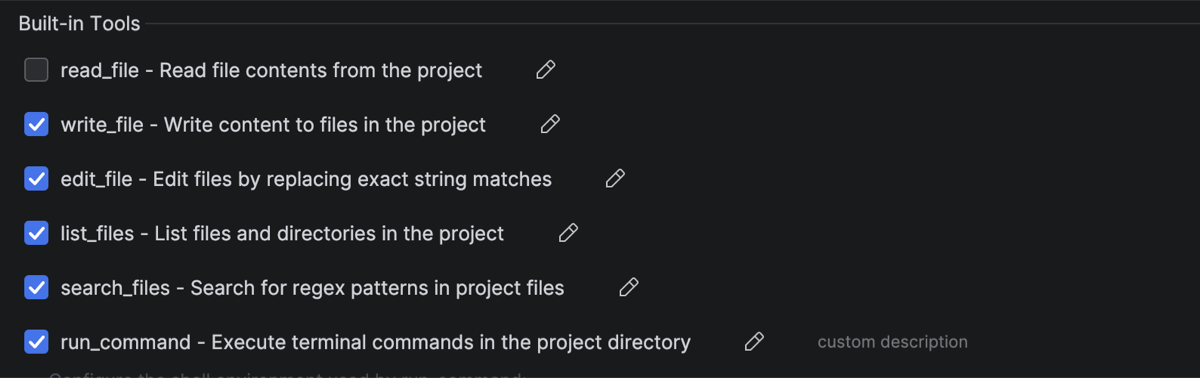
Two things worth noticing in that screenshot. read_file is unchecked — the tool is switched off entirely, which has been possible for a while. And run_command carries a custom description marker, because its description has been rewritten. Hovering any row shows you the exact text currently being sent to the model, which is the part that was previously invisible: the short label next to the checkbox was never what the LLM sees.
Click the pencil and you get the real text, editable:
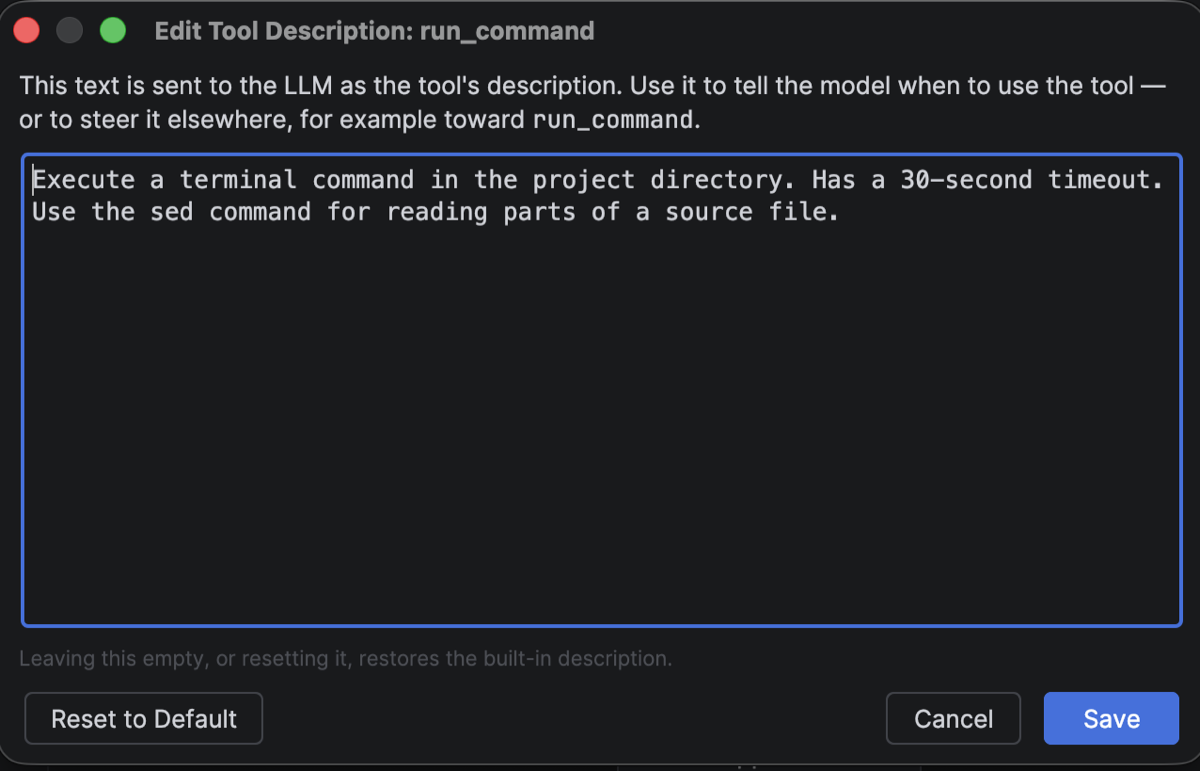
Reset to Default puts the shipped wording back. So does clearing the box — you can't accidentally leave a tool with no description at all.
A real example: reading files without read_file
Here's the change that prompted this feature, tested end to end.
Step 1. Uncheck read_file in Built-in Tools. The agent no longer has a file-reading tool.
Step 2. Click the pencil on run_command and append one sentence to its description:
Use the sed command for reading parts of a source file.
Step 3. Apply, and ask the agent something that requires reading a file.
It reads the file — with sed. No prompt engineering per request, no reminder in the chat. The model simply had one fewer tool and one more instruction about the tool it still had, and it routed around the gap.
That is the whole idea. The tool list and the tool descriptions together are a policy you can write, rather than a fixed set of behaviours you work around.
Other things this is good for
- Pin project conventions. Add "Always use
./gradlew, never a globalgradle" torun_command, or "This project uses pnpm, not npm". It applies to every prompt in every conversation, without occupying space in your system prompt. - Reorder preferences. Tell
search_filesit is a fallback andsemantic_searchis the first stop — or the reverse, if your index is stale. - Narrow a dangerous tool. Keep
run_commandenabled but describe it as read-only-ish: "Use for inspection commands only. Never run build, install or git-write commands." This is guidance, not enforcement — the command blacklist is the mechanism that actually blocks things. - Discourage without disabling. Sometimes you want a tool available for the rare case but rarely chosen. Say so in its description.
Edits apply from your next prompt — no IDE restart. They also reach the read-only tools handed to parallel sub-agents, so a sub-agent sees the same instructions as the main agent.
One consequence to plan for
Redirecting reads through the shell has an approval side effect worth knowing before you copy the example above.
read_file is on DevoxxGenie's read-only list, so it can be auto-approved. run_command is not, and never will be — it can run anything. With "Write tools always require approval" on (the default), every sed read now raises an approval dialog where read_file would have gone through silently.
If that gets noisy you have the Don't ask again checkbox in the dialog, or you can turn write approval off — but the second option also removes the guard from real writes, leaving the command blacklist as your only backstop. Worth a deliberate choice rather than a reflex.
Scope
Descriptions are editable for the built-in tools: the core file and shell tools, the PSI code intelligence tools, run_tests, parallel_explore and web_search.
Tools that come from MCP servers and Skills keep the descriptions their provider publishes — those are the server's contract, not ours to rewrite. Backlog and security-scan tools are out for now too.
A tool you leave alone stores nothing, so it keeps tracking the shipped wording and picks up improvements in future releases automatically. Only the tools you actually edit are frozen at your text.
This lands in the next release. Full details in the Agent Mode guide.