Nativ: A Native macOS Home for Your Local MLX Models, Now a First-Class DevoxxGenie Provider

The local AI story on the Mac has always been a bit of a scavenger hunt. The models live in a Hugging Face cache, the server is a Python process you babysit in a terminal, the performance numbers are whatever flew past in the logs, and the chat UI is a browser tab pointed at localhost. It all works, but nothing about it feels like it belongs on a Mac.
Nativ fixes that with one opinionated move: it puts the whole workflow — chat, model management, serving, monitoring, and even hardware telemetry — inside a single native SwiftUI app. And as of DevoxxGenie 1.10.1, it's a first-class provider in the plugin, sitting right next to Ollama and LM Studio in the LLM Providers list.
What Nativ is
Nativ is a brand new open-source (MIT) macOS app built by Prince Canuma — better known as @Blaizzy, the creator of mlx-vlm, the library much of the Apple Silicon vision-model ecosystem already runs on. Nativ bundles an mlx-vlm server inside a polished SwiftUI shell, so there's no Python environment to set up and no process to babysit: the app owns the server lifecycle, and a menu bar item lets you start it, stop it, or swap the loaded model without breaking focus.
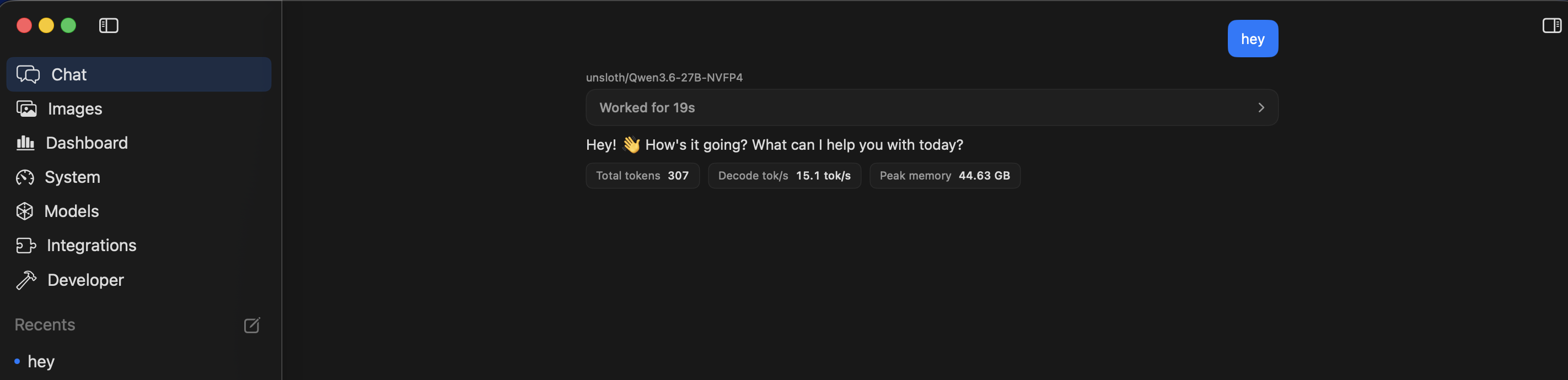
The tagline is "Local AI, native to your Mac," and it earns the native part. Inference runs through Apple's MLX framework, which is built around the unified memory architecture of Apple Silicon — model weights don't get copied between CPU and GPU memory, because there's only one memory. In the chat above, a 4-bit Qwen3.6-27B-NVFP4 answers with its receipts attached: 307 tokens, 15.1 tok/s decode, 44.63 GB peak memory — on a machine that keeps another 80 GB free for IntelliJ.
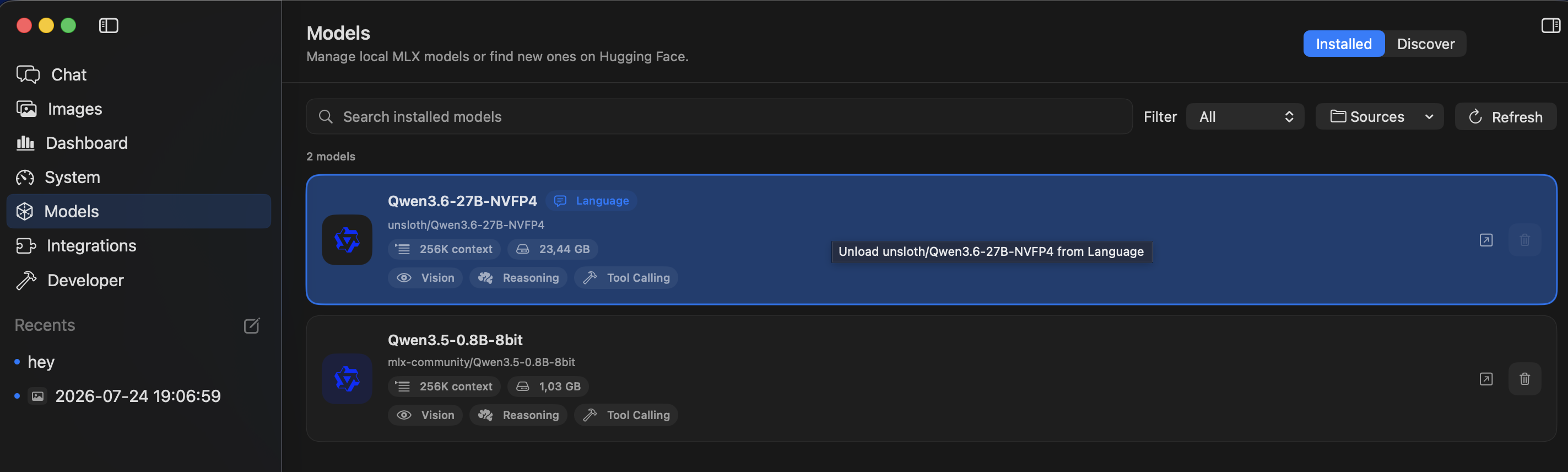
The model library is where you feel the difference from the terminal workflow. Nativ scans your Hugging Face cache (honoring HF_HUB_CACHE and HF_HOME), shows each model's context size, disk footprint, and capability badges — vision, reasoning, tool calling — and can browse and download new MLX models from Hugging Face with memory-fit warnings before you pull 20 GB:
The dashboard your terminal never gave you
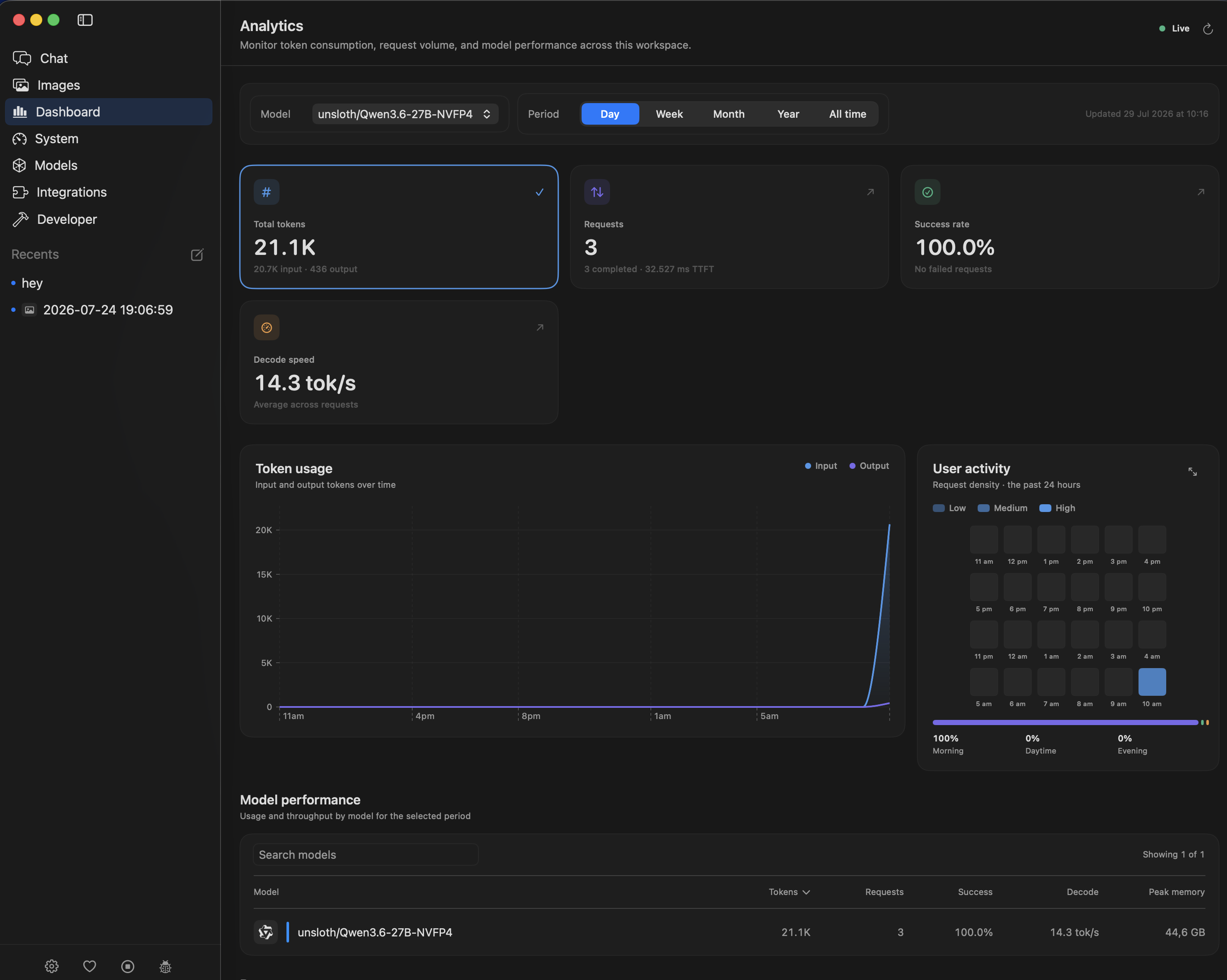
The part that usually vanishes into scrollback — how the server is actually doing — gets its own live Analytics page: token consumption, request volume, success rate, time to first token, decode speed, per-model performance, and a 24-hour activity heatmap, filterable by day, week, month, or all time.
And because local inference is ultimately a hardware story, there's a full System Monitor built in — CPU load per efficiency/performance core, GPU and Neural Engine utilization, memory pressure, and disk — with the interesting bits pinnable to the menu bar:
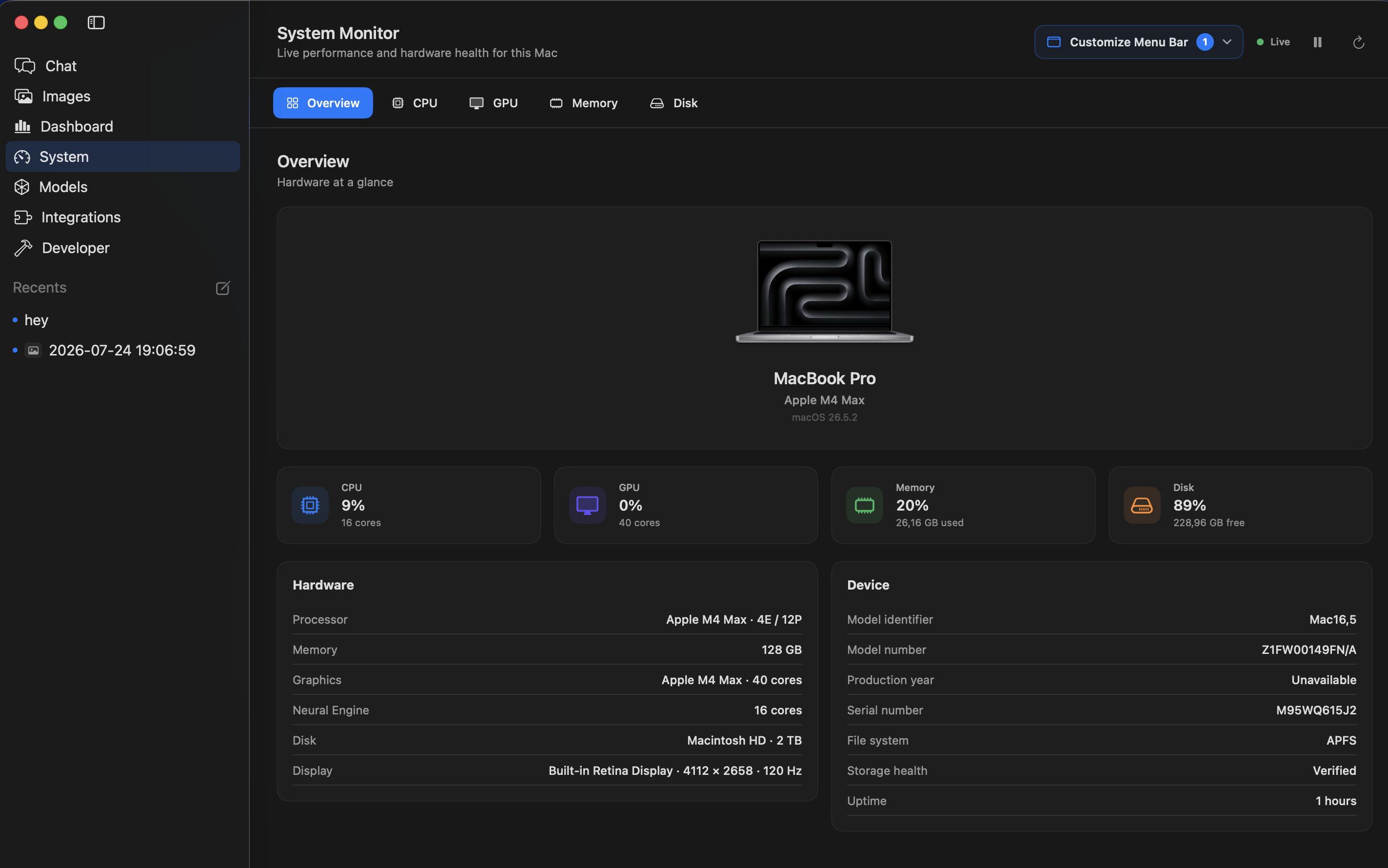
If you've ever tried to answer "which model have I actually been using this month, and is it the GPU or the memory that's the bottleneck?" by grepping server logs and juggling asitop, these two pages are the answer.
A server that speaks OpenAI and Anthropic
Under the shell, Nativ exposes its API on http://127.0.0.1:8080 by default. The Developer page lists every endpoint with copy buttons, lets you change the port, add a Hugging Face token for gated models, protect the server with a Bearer token, and tail the live server logs with filtering:
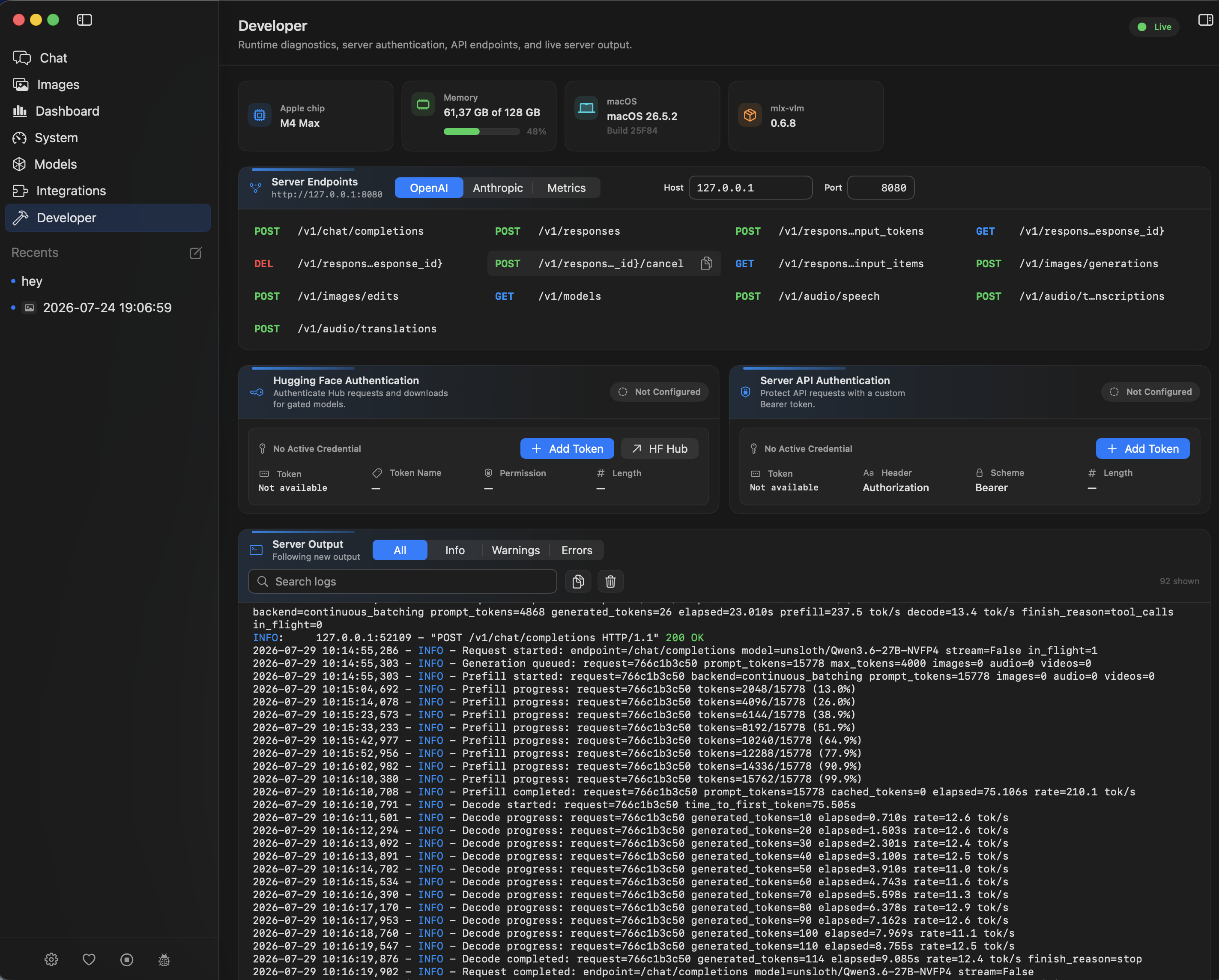
Two things in that screenshot are worth a second look. First, the endpoint tabs: alongside the OpenAI-compatible routes (/v1/chat/completions, /v1/responses, /v1/models, image and audio) there's a full set of Anthropic-compatible /v1/messages endpoints, so tools that speak either dialect can use the same local server. Second, the log lines themselves — finish_reason=tool_calls, prefill progress percentages, per-request decode rates. That's not a synthetic demo; it's DevoxxGenie's agent mode calling tools through the server, which brings us to the point.
Hooking it up to DevoxxGenie
DevoxxGenie doesn't make you go through the generic CustomOpenAI escape hatch. Since v1.10.1 Nativ is a dedicated provider:
- Install Nativ from GitHub Releases (Apple Silicon, macOS 26+) and download a model from its catalog
- In DevoxxGenie, open Settings → LLM Providers → Local and tick the Nativ URL checkbox
- Select Nativ as the provider in the DevoxxGenie panel
That's it. The plugin queries Nativ's /v1/models endpoint and fills the model dropdown with whatever MLX models you have installed. Streaming and agent mode work exactly as with any other provider, and since everything runs on loopback there's no API key and no per-token bill.
Two details worth knowing:
Nativ's default port is 8080 — the same one Llama.cpp uses. That's why the Nativ provider ships disabled in DevoxxGenie: enabling it is one checkbox, but if you run both providers, move one of them off 8080. Nativ's port is configurable on its Developer page, and DevoxxGenie's matching URL field lives right next to the enable checkbox.
Nativ's /v1/models response doesn't report a context length, so DevoxxGenie conservatively assumes 8,000 tokens. The Qwen3.6 in these screenshots has a 256K window, so I enabled the Nativ Fallback Context setting and raised it — otherwise long prompts trigger a false "context exceeded" warning (the request still goes through either way).
Agent mode against a local 27B
Here's DevoxxGenie inside IntelliJ, talking to the Nativ-served Qwen3.6-27B with agent mode on. The model receives the system prompt, decides to call the read_file tool to look at the project's README, and answers with a project-aware greeting:
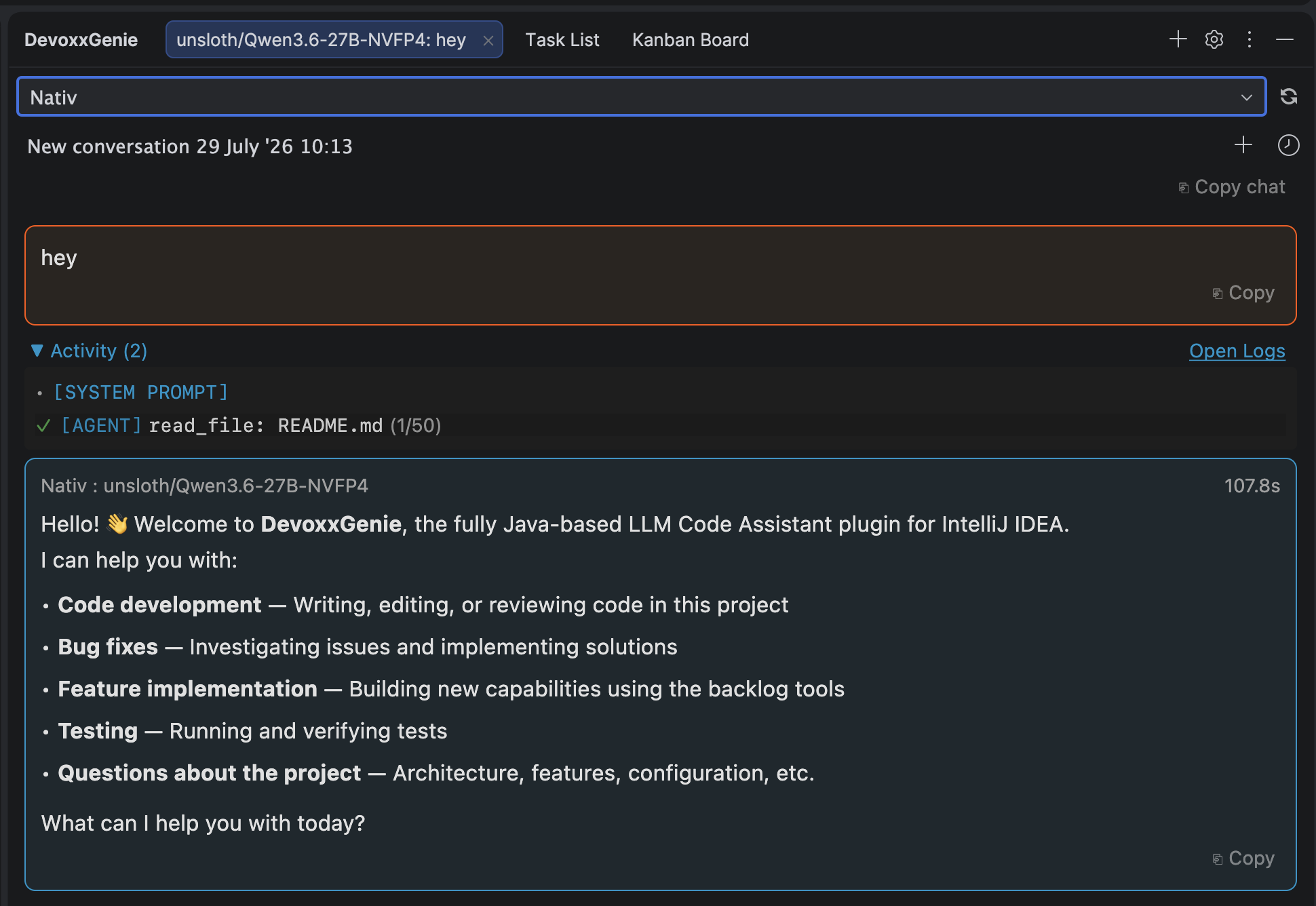
The satisfying part is that you can watch the same request from the other side: the Developer page logs show the 15,778-token agent prompt prefilling at 210 tok/s, then the decode at ~12–15 tok/s, then finish_reason=tool_calls as the model reaches for the tool. Tool calling, streaming, and multi-turn agent loops all come through the OpenAI-compatible path unchanged — to DevoxxGenie, Nativ is just another endpoint that happens to live in your menu bar.
It also sets honest expectations. That turn took 107.8 seconds end to end, most of it prefill: agent mode ships a large system prompt plus project context, and a 27B model on an M4 Max chews through ~16K prompt tokens in about 75 seconds before the first output token appears. Nativ gives you the knobs to attack exactly that — prefix caching (so repeated system prompts aren't re-prefilled), KV-cache quantization, and speculative decoding are all tunable — and for snappier agent turns you can always drop to a smaller model in the same dropdown. That's a choice you get to make per task, not per cloud subscription.
One server, all your tools
DevoxxGenie isn't the only thing that can drink from this well. Nativ's Integrations page configures and launches coding agents — Claude Code, Codex, Pi, Hermes, and OpenCode — against the models it serves. Your Mac becomes a single local inference endpoint: DevoxxGenie inside IntelliJ, a CLI agent in the terminal, and Nativ's own chat window all hitting the same model in the same unified memory, with one dashboard keeping score.
Should you use it?
If you're on Apple Silicon and want your local models managed by something that feels like it belongs on macOS — rather than a constellation of terminal windows — Nativ is an easy recommendation. It's MIT-licensed, it's built by the person behind mlx-vlm so the inference engine underneath is the real thing, and the requirements are simply an Apple Silicon Mac, macOS 26 or newer, and enough unified memory for the model you pick.
Pair it with DevoxxGenie's agent mode and you have a fully local coding assistant with tool calling, streaming, and zero code leaving your laptop.
- Nativ: GitHub · website
- Setup details: DevoxxGenie local models documentation
- DevoxxGenie is open source on GitHub · issues, ideas, and stars all welcome.