RAG Embeddings: Choose Your Provider, Model, Prefixes and Size

Until now, DevoxxGenie's RAG did its embedding one way: nomic-embed-text through Ollama. That was a simple start, but you couldn't try a better model, or use the GPU server you already run with llama.cpp.
Now you can. The RAG settings let you choose the embedding provider and model, set query and document prefixes, and shorten vectors. This post covers what's new, what changes when you upgrade, and what we measured, including where the results aren't all good news.
This work started with issue #523. Thanks for the detailed request!
Use the providers you already have
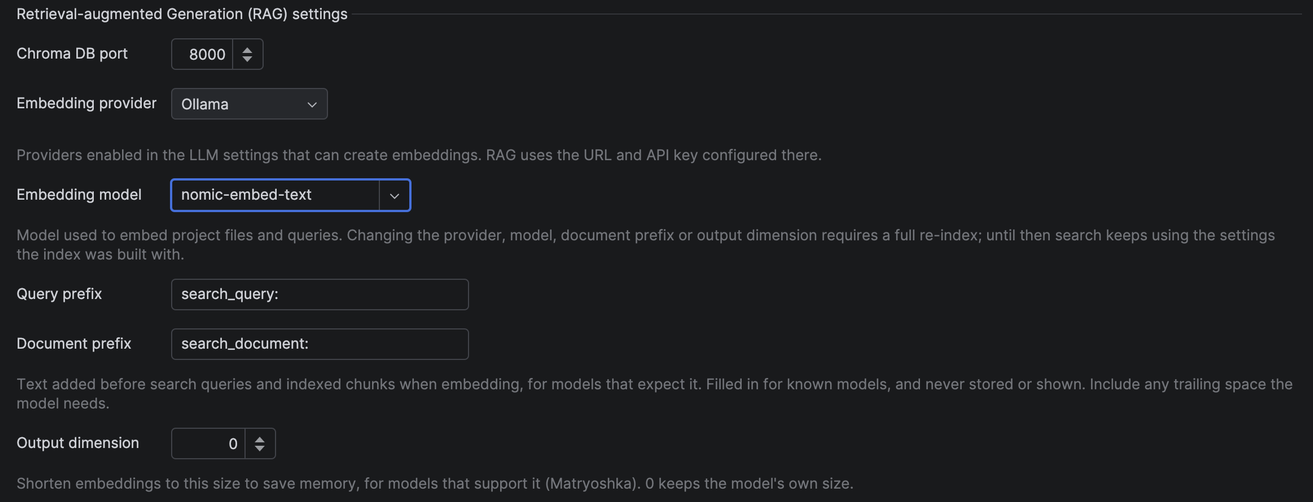
The new Embedding provider dropdown lists the providers that are enabled in your LLM settings and can create embeddings:
- Ollama, still the default
- Custom OpenAI, for any server with an OpenAI-compatible
/embeddingsendpoint - OpenAI
- LM Studio
- llama.cpp
There's no second URL or API key to enter: RAG uses the ones you've already configured. To embed with llama.cpp, start the server with embeddings on, then select it:
llama-server -m your-embedding-model.gguf --embeddings --port 8080
If you pick OpenAI, or any provider whose URL isn't on your own machine, DevoxxGenie warns you that your source code will be sent there. Until now RAG stayed on your machine, so we want that choice to be a clear one.

Any model, and a safer way to switch
The Embedding model field suggests common models and accepts any name. With Ollama, if the model isn't installed, DevoxxGenie asks whether to download it and starts indexing when the download finishes.
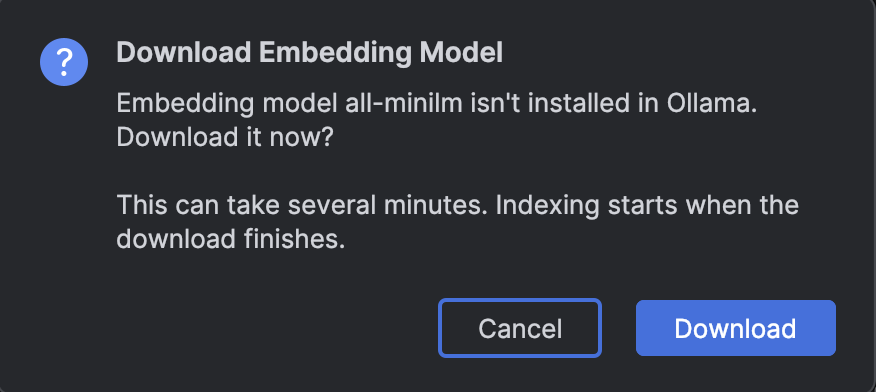
Switching is also safe. Vectors from different models can't be compared, so a new model means a new index, but:
- Nothing re-indexes by surprise. You get a notification with a Re-index now button.
- Search keeps working in the meantime, using the settings your existing index was built with.
- A bad choice can't cost you your index. Before touching anything, DevoxxGenie test-embeds with the new setup. If you picked a chat model, or a server that's down, indexing stops with a message and your old index stays as it was.
We learned that last one the hard way. While testing an early build, selecting a model that wasn't installed wiped a 22,000-segment index, and it still looked like indexing had worked. That's fixed, and failed chunks are no longer counted as indexed.
Prefixes: mostly better, not on every measure
Many embedding models expect a hint about whether a text is a search query or a document. nomic-embed-text asks for search_query: and search_document: , and DevoxxGenie wasn't sending them.
Now you can set both, and they're filled in for nomic-embed-text. Prefixes only go to the model: they're never stored or shown to the LLM.
We measured the change with a benchmark: 28 questions about DevoxxGenie's own code base of 1,458 files, each with a known answer file.
| Setup | Answer ranked first | in top 5 | in top 10 |
|---|---|---|---|
| No prefixes | 14% | 64% | 71% |
| With prefixes (new default) | 25% | 54% | 82% |
The right file comes first far more often and appears in the top 10 more often, but it lands in the top 5 less often. Overall that's why we turned prefixes on by default, but it isn't a clean win, and 28 questions from one code base is a small sample. The benchmark ships with the source, so you can write questions for your own code and measure it yourself.
Shorter vectors
Some models keep working when their vectors are cut short, which is known as Matryoshka truncation. It saves memory and speeds up search. Set Output dimension and DevoxxGenie shortens and re-normalizes the vectors itself, so your server doesn't need to support it.
It isn't free, though:
| Setup | Answer ranked first | in top 5 | in top 10 |
|---|---|---|---|
| 768 dimensions (native) | 25% | 54% | 82% |
| 256 dimensions | 21% | 57% | 61% |
On our questions, cutting nomic-embed-text to 256 dimensions lost a lot in the top 10. Leave Output dimension at 0 unless memory really matters, and measure before you commit.
A better settings panel
While we were in there, we improved the panel itself:
- Required RAG Services now sits above the test search, so you see what's missing first.
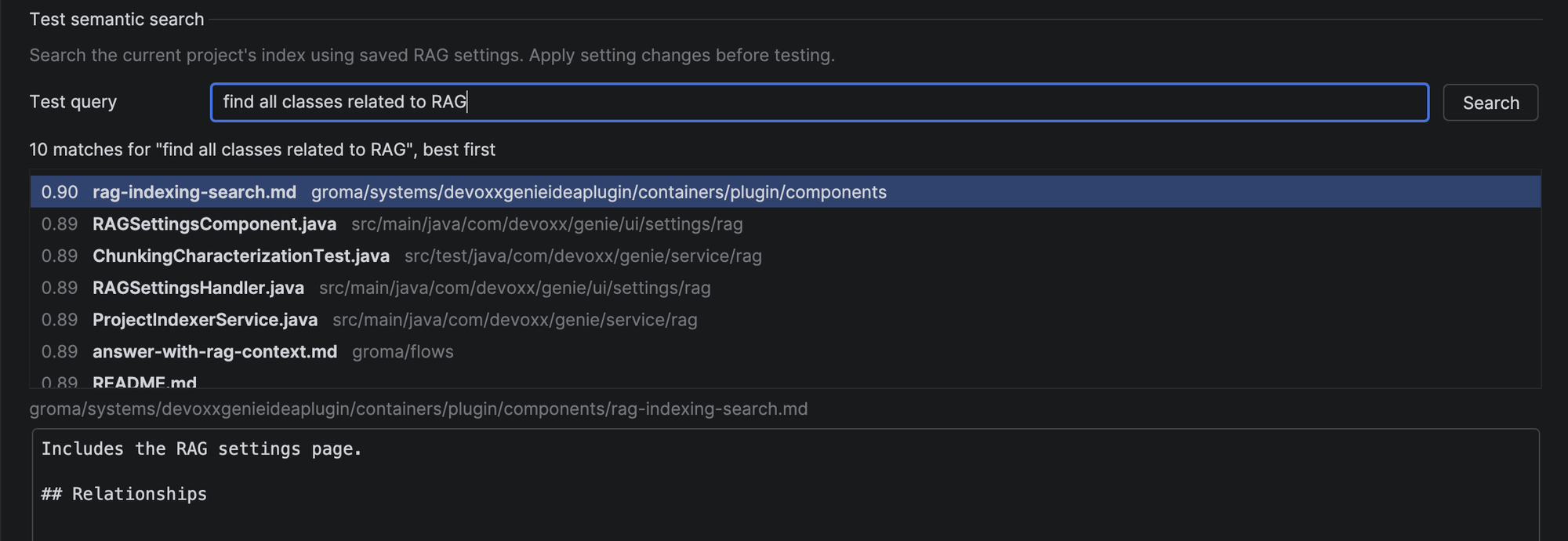
- Test semantic search shows a proper list of matches with a score and file name, and a preview of the selected match, instead of one long block of text.
What happens when you upgrade
If you use RAG with nomic-embed-text, prefixes turn on for you, and your existing index needs one re-index to use them:
- DevoxxGenie tells you once per project, with a Re-index now button.
- Nothing re-indexes until you click it.
- Until then, search keeps working exactly as before.
If you'd rather keep the old behavior, clear both prefix fields.

Try it
Open Settings → Tools → DevoxxGenie → RAG, and see the RAG docs for the full reference. If you find an embedding model that works well on your code, or a provider that doesn't work as it should, tell us in the GitHub issues.