DevoxxGenie 1.19.0: Choose Your Web Search Provider (Keenable, Parallel, Tavily)

DevoxxGenie 1.19.0 is about web search. You now pick one web search provider from a dropdown, and that choice is used everywhere DevoxxGenie searches the web. Two new providers join Tavily: Keenable, which works without an API key and gives you 100K searches a month with a free key, and Parallel. /search answers now show where their information came from. And because Google is shutting down its Custom Search JSON API on January 1, 2027, the Google option is now marked as deprecated.
🔎 One provider, used everywhere
DevoxxGenie searches the web in three places:
- the
/searchcommand in the chat, - the agent's
web_searchtool in Agent Mode, - the Test search in Settings.
Until now each of these had its own copy of the provider logic, and the copies didn't always agree. In 1.19.0 they all go through one provider registry, so they use the same provider and the same "is it set up?" rules.
In Settings → DevoxxGenie → Web search you choose one Provider:
| Provider | API key | Notes |
|---|---|---|
| Keenable | Optional | New. Works without a key on Keenable's free endpoint, which is rate-limited per network. A free API key from keenable.ai gives you 100K searches per month. |
| Parallel | Required | New. Uses Parallel's Search API. |
| Tavily | Required | A search API built for LLMs, with a free tier. |
| Google Custom Search | Required | Deprecated: Google discontinues the API on January 1, 2027. |
If a provider needs a key and you haven't entered one, DevoxxGenie sends no request and tells you which provider is missing its key, instead of failing somewhere down the line.
Thanks to @KGKallasmaa for contributing the Keenable search engine. And thanks to the Keenable and Parallel teams for asking to be added. Their requests (#1428 and #1423) are what prompted the registry.
📚 Sources in /search answers
A web-grounded answer is only as useful as your ability to check it. /search answers now end with a Sources list: numbered links to the search results the answer was based on. It works the same for every provider.
Two smaller changes come with it:
- If the provider finds nothing,
/searchsays so straight away instead of asking the LLM to answer from no results. - Links in chat answers open through IntelliJ's own browser support, and only
http,httpsandmailtolinks open, since the text comes from an LLM.
🧪 A Test search you can actually read
The Test search in Settings is how you check that a provider and key work before you rely on them. It used to print the raw provider output, Markdown and all, into one text box. Now it reads like search results:
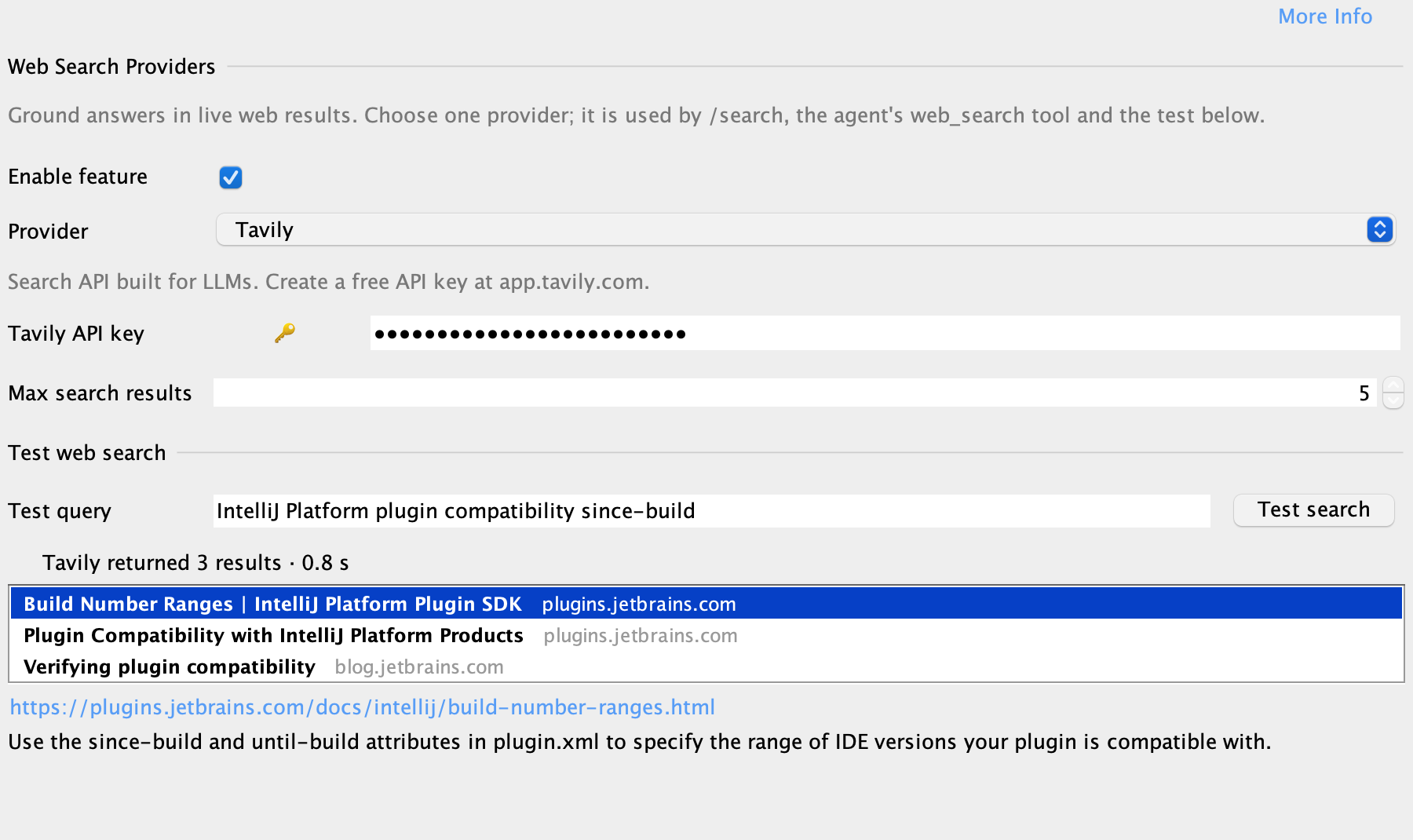
- Each result is one row with its title and site.
- Selecting a row shows the cleaned-up snippet and the full URL as a link. Double-click a row to open the page in your browser.
- A status line tells you which provider answered, how many results came back and how long it took. A rejected key, a missing key or a rate limit shows as a clear error.
- The test uses what's in the form, so you can try a new key before you click Apply.
The RAG settings' Test semantic search now uses the same component. Matches keep their score, file and folder, the selected match shows the exact chunk that was embedded, and double-clicking a match opens the file at that chunk. Settings is a modal dialog, so the file opens in the editor behind it.
⚠️ Google Custom Search is deprecated
Google has closed its Custom Search JSON API to new customers, and existing customers have until January 1, 2027 to move to an alternative. DevoxxGenie keeps the Google option working until then, but:
- The dropdown shows it as Google Custom Search (deprecated), listed last, with a warning and the shutdown date while it's selected.
- If a Google search fails,
/search, the agent'sweb_searchtool and Test search explain that the API is being (or has been) discontinued and suggest another provider, instead of showing a raw error. - New setups start with no provider selected, not Google.
If you use Google today, switch before January 1, 2027. Keenable is the quickest move: it needs no key to get started, and a free key gives you 100K searches a month.
🛠️ For contributors
Adding a web search provider now takes three things: an entry in the WebSearchProvider enum, one definition in WebSearchProviderRegistry, and an engine class. The everyDefinition_isFullyWired test fails if any piece is missing. The settings page, readiness checks, /search, the agent tool and analytics all pick the new provider up from the registry.
Also in 1.19.0
- Run All To Do in the Backlog tasks panel resets chat memory for each task, asks whether to resume In Progress tasks, records why a task stopped when the agent action limit is reached, and no longer hangs when a task is marked Done during the grace period (#1424).
- RAG indexing works for projects whose name has no ASCII letters, such as Cyrillic names (#1421).
The full list is in the changelog.
Get started
Update DevoxxGenie from the JetBrains Marketplace, open Settings → DevoxxGenie → Web search, choose a provider and run a Test search. The web search docs cover each provider's setup.
Found a problem or have an idea? Open an issue.