See What the Agent Changed: Diffs Are Back

Agent Mode is fast. You describe a migration, walk away, and come back to a finished answer and a changed project. The answer tells you what the agent says it did. Until now, DevoxxGenie had nothing to show you what it actually did.
That gap had a name: issue #705. The old Git Diff/Merge feature was removed back in 0.4.x because MCP tooling had made it obsolete — and nothing replaced the part people actually missed. A user put it plainly on the closed issue a few days ago:
Was just desperately searching why this feature is not available. Could someone point me in the right direction how to get a diff/merge view for approving changes suggested by an agent?
Fair question. Here's the answer, shipping in v1.13.0.
Every run tells you what it touched
When an agent run finishes, its answer is followed by a list of the files it changed, each with the familiar +added -removed line counts:
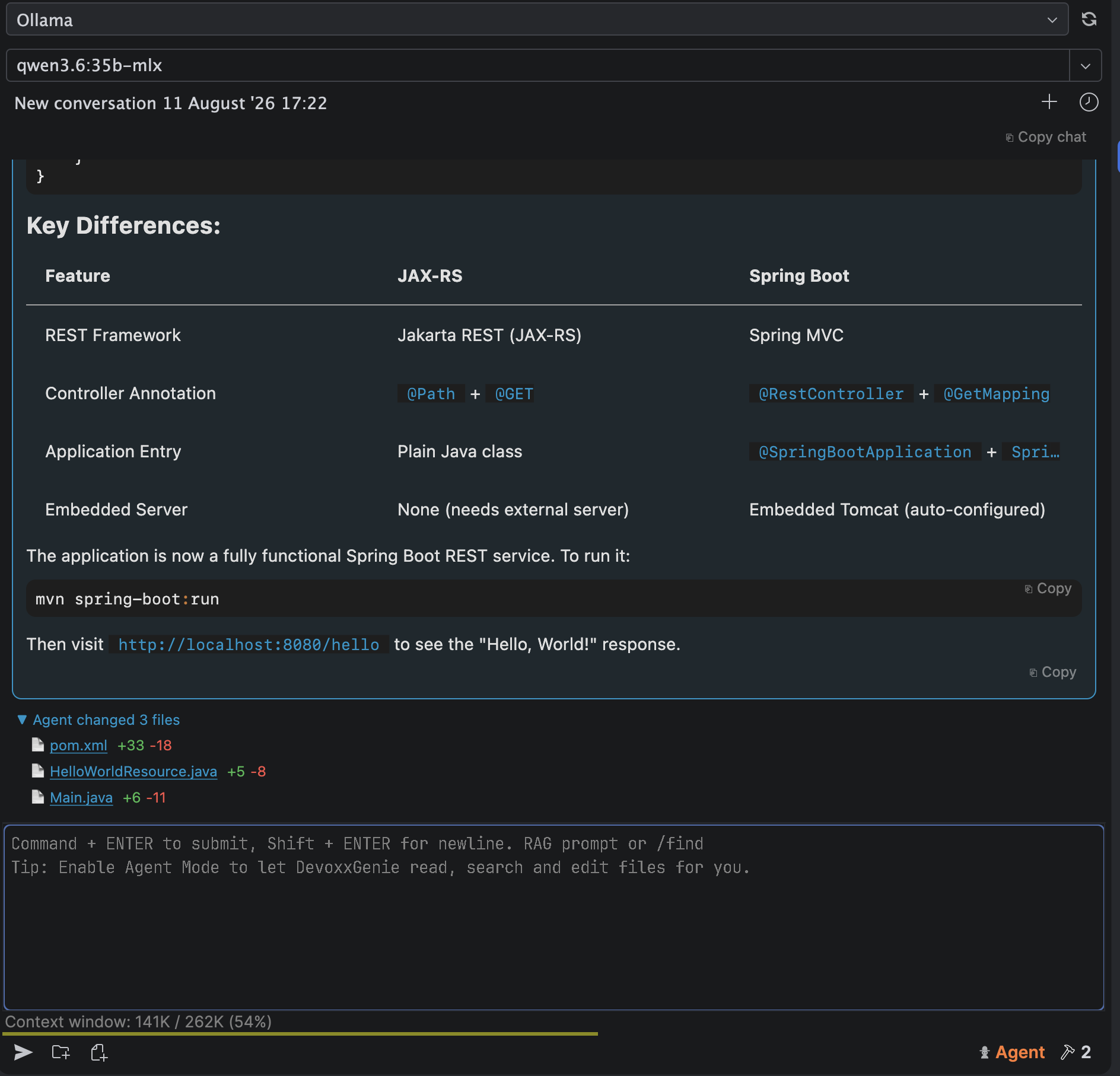
Click any file and the IDE opens a real diff — its content before the run on the left, its current state on the right. Not a rendering of what the model claimed, but the actual bytes, side by side, in the same diff viewer you use for version control.
A few details that matter in practice:
- One row per file, not one per edit. If the agent rewrites the same file five times over a long run, you get a single row and a single cumulative diff. You care about where the file ended up, not about the agent's scratch work along the way.
- New files diff against an empty side, so a freshly created class reads as one clean block of additions.
- The right-hand side is live. Start editing the file while the diff is open and the diff keeps up.
- History stays clickable. Snapshots are retained for the last 20 runs, so you can scroll back through a conversation and still open the diff for something the agent did a while ago.
Turning it on and off
It is on by default. You'll find the switch under Settings → Tools → DevoxxGenie → Agent → Approval:

Untick it and agent answers go back to being just answers.
Review before it happens, not just after
The list above tells you what the agent did. If you'd rather decide before anything touches disk, keep "Write tools always require approval" enabled — and that dialog got the same treatment.
It used to hand you the tool's raw JSON arguments and ask you to decide:
{"path": "src/main/java/Main.java", "old_string": "public class Main {\n public static void main...
Approving a change based on an escaped JSON string is not reviewing it. The dialog now renders a real diff of the file as it is now against what the tool is about to write, with syntax highlighting from the file's type:
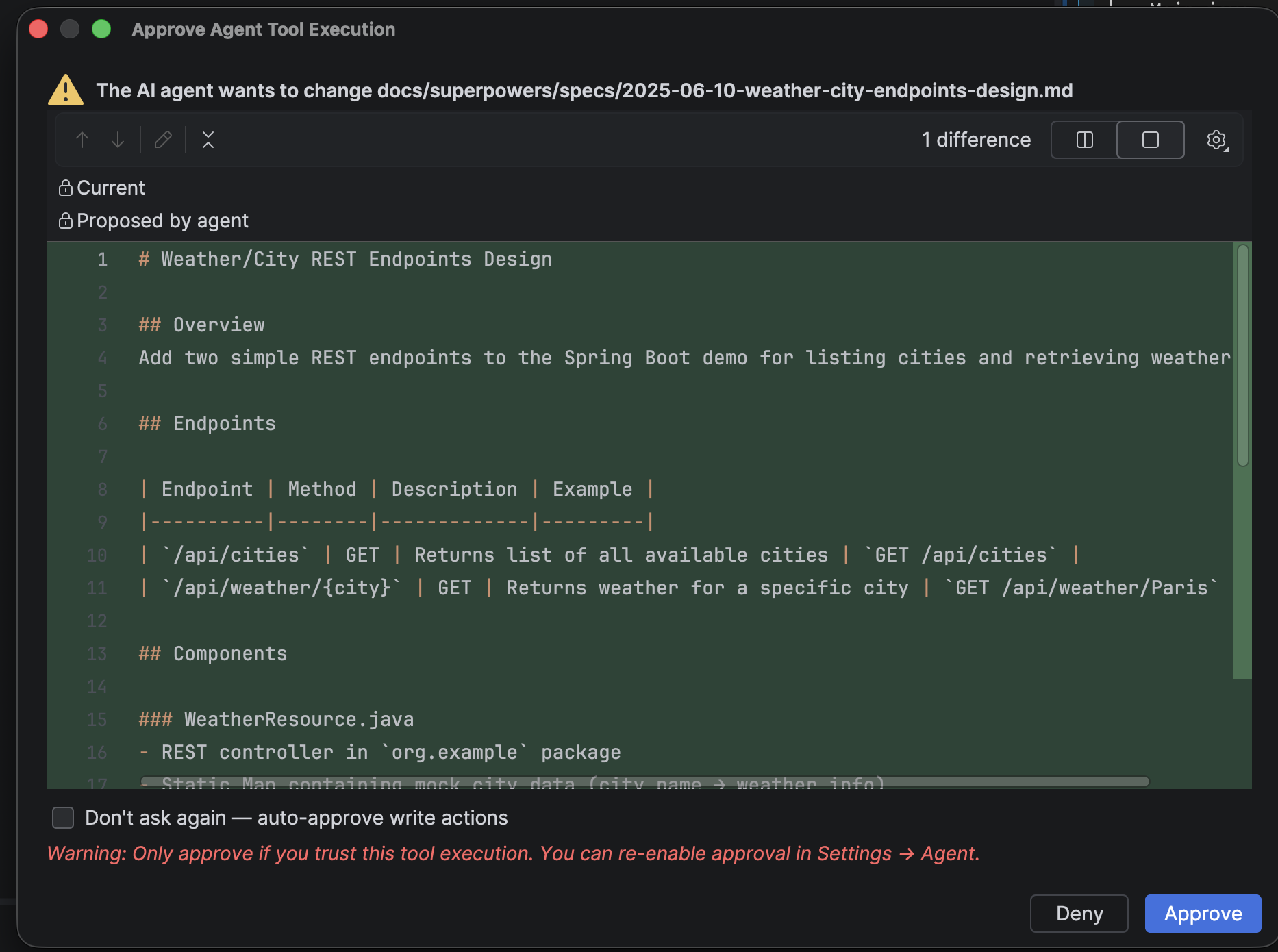
It's IntelliJ's own diff viewer, so everything you'd expect works: toggle between side-by-side and unified, jump between differences, change the whitespace policy. Then Approve or Deny with the change actually in front of you — and a denial stops the write, telling the agent the user refused.
Tools with nothing file-shaped to preview — run_command, MCP tools — keep the arguments view, which is the right thing to show for a shell command.
Which one you'll use
The two are deliberately complementary, and you don't have to choose:
| Write approvals on | Write approvals off (auto-approve) | |
|---|---|---|
| Before the write | Diff in the approval dialog, per file, with Approve/Deny | — |
| After the run | Changed-files list under the answer | Changed-files list under the answer |
Approve-as-you-go is the careful mode: nothing lands without you seeing it. Auto-approve plus the post-run list is the fast mode: the agent works uninterrupted and you review the result as a whole. Either way, there's a diff — which was the entire complaint in #705.
Worth knowing
- A cancelled run doesn't produce a change list. The files it already wrote are still changed; the run just never reaches the point where the list is built. IntelliJ's Local History remains your safety net there.
- CLI and ACP runners aren't covered. Their edits don't go through DevoxxGenie's own
edit_file/write_filetools, so there's nothing for us to snapshot. - Files larger than 1 MB are listed, but not diffable — keeping a snapshot of every large file an agent touches isn't a good trade for your heap.
Try it
Grab v1.13.0 from the JetBrains Marketplace, flip on Agent Mode, and give it something substantial to do. The list under the answer is the part that makes walking away comfortable.
Feedback and bug reports are welcome on GitHub — and thanks to everyone who kept issue #705 alive long after it was closed.