Extending DevoxxGenie: How External Plugins Can Plug Into Your AI Assistant

DevoxxGenie is not a closed system. It exposes a small but powerful API that other IntelliJ plugins can use to interact with it at runtime — no hard compile-time dependency required. Two real-world forks demonstrate the pattern beautifully: a SonarLint fork and a SpotBugs fork that each detect a code-quality finding and send a rich, context-aware prompt to DevoxxGenie with a single click.
Whether you maintain an IntelliJ plugin yourself or just want to understand how these integrations work under the hood, this post walks through the full picture: the integration API first, then the two concrete implementations with screenshots.
The Integration API
Detecting DevoxxGenie at Runtime
The first thing any integration needs to do is check whether DevoxxGenie is actually installed in the IDE. You don't want your plugin to blow up or show broken UI when DevoxxGenie isn't present. The check is a two-liner using PluginManagerCore:
import com.intellij.ide.plugins.PluginManagerCore;
import com.intellij.openapi.extensions.PluginId;

public static boolean isDevoxxGenieAvailable() {
    var plugin = PluginManagerCore.getPlugin(PluginId.getId("com.devoxx.genie"));
    return plugin != null && plugin.isEnabled();
}
Always guard your integration code with this check. If DevoxxGenie is absent, your plugin should degrade gracefully — hide the action, skip the menu item, or silently no-op.
Sending a Prompt via Reflection
DevoxxGenie exposes ExternalPromptService as the entry point for receiving prompt text from other plugins. Rather than requiring a hard compile-time dependency on DevoxxGenie's JAR, you access it via reflection. This means your plugin can be distributed independently and will simply not call the API if DevoxxGenie isn't present:
public static void sendPrompt(Project project, String promptText) {
    if (!isDevoxxGenieAvailable()) return;

    try {
        Class<?> serviceClass = Class.forName(
            "com.devoxx.genie.service.ExternalPromptService"
        );
        Object instance = serviceClass
            .getMethod("getInstance", Project.class)
            .invoke(null, project);

        serviceClass
            .getMethod("setPromptText", String.class)
            .invoke(instance, promptText);

    } catch (Exception e) {
        // DevoxxGenie not available or API changed — fail silently
    }
}
setPromptText(String) populates the DevoxxGenie prompt input and submits it immediately, triggering a full LLM query with the current conversation context. The response appears in the DevoxxGenie chat panel — no polling, no callbacks needed on your side.
Backlog Task File Integration
Not every finding warrants an immediate AI fix. Sometimes you want to defer resolution to a later session or hand it off to the Spec-Driven Development workflow. For this, integrations can write TASK-*.md files directly into backlog/tasks/ inside the project root:
---
id: TASK-7
title: Fix SonarLint java:S2259 in UserService.java:87
status: todo
priority: high
created: 2026-02-18
source: sonarlint
rule: java:S2259
file: src/main/java/com/example/UserService.java
line: 87
---

## Description

SonarQube rule **java:S2259** (Null pointers should not be dereferenced) triggered at
`UserService.java:87`.

## Acceptance Criteria

- [ ] Resolve the SonarLint finding without introducing regressions
- [ ] All existing tests pass
DevoxxGenie picks these up automatically — they appear in the Spec Browser's task list and Kanban board, ready for an agent to implement.
Task ID Synchronisation
To avoid ID collisions across sessions, scan the three task storage locations before allocating a new ID:
| Location | Content |
|---|---|
backlog/tasks/ | Active tasks |
backlog/completed/ | Completed tasks |
backlog/archive/tasks/ | Archived tasks |
Find the highest existing id: TASK-N value across all three, then increment by one. The full Java implementation is in the API reference.
Creating Tasks Programmatically
For a simpler path that handles ID allocation and backlog initialisation automatically,
use ExternalTaskService:
Class<?> svc = Class.forName("com.devoxx.genie.service.ExternalTaskService");
Object instance = svc.getMethod("getInstance", Project.class).invoke(null, project);
String taskId = (String) svc
    .getMethod("createBacklogTask", String.class, String.class, String.class, List.class)
    .invoke(instance, title, description, "high", List.of("sonarlint"));
This returns the created task ID (e.g. "TASK-5") and requires no manual ID scanning or
directory setup. The trade-off: it supports only title, description, priority, and labels.
For richer metadata (source, rule, file, line), write the file directly as shown above.
Full details in the API reference.
SonarQube / SonarLint Integration
The SonarLint DevoxxGenie plugin is a fork of SonarLint for IntelliJ (v11.13) that adds a DevoxxGenie AI layer on top of standard SonarQube analysis.

- DevoxxGenie v0.9.12 or later
- IntelliJ IDEA 2024.2 or later
- Both plugins installed and enabled in the same IDE instance
The fork surfaces three entry points for acting on a SonarLint finding with AI.
Entry Point 1: Intention Action (Alt+Enter)
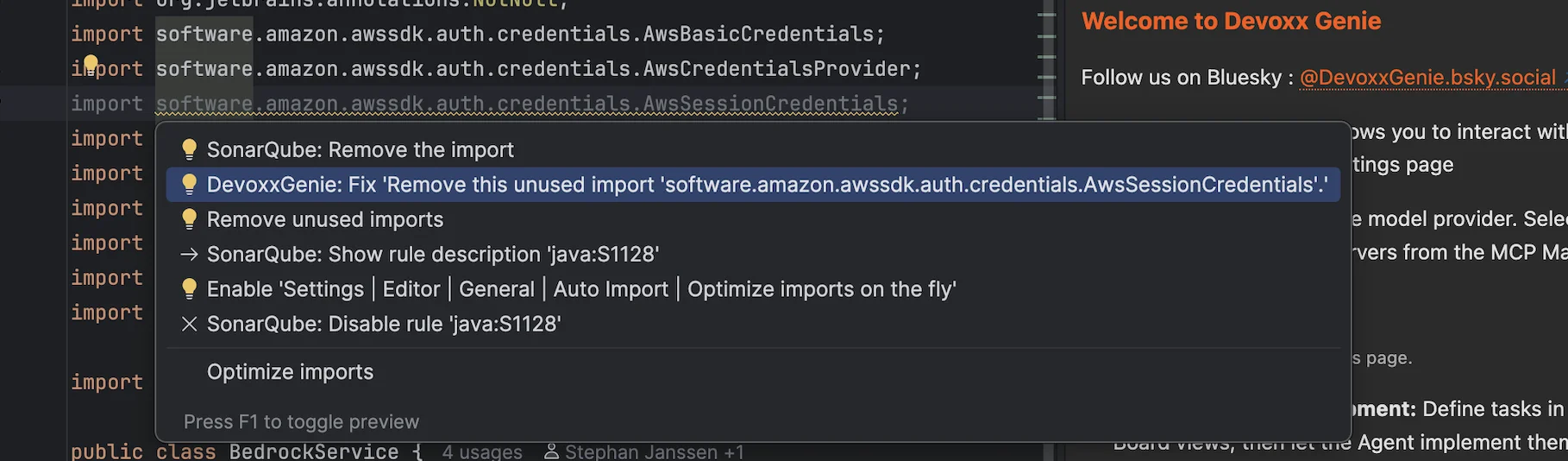
Press Alt+Enter on any SonarLint-highlighted code and you'll see a "Fix with DevoxxGenie" intention action in the lightbulb menu. Select it and the prompt is assembled and submitted automatically — rule ID, rule description, severity, and ±10 lines of context all included.
Entry Point 2: Rule Panel Button
Open the SonarLint tool window, select an issue, and look at the rule detail panel. A "Fix with DevoxxGenie" button appears in the header. Clicking it sends the same rich context to DevoxxGenie and focuses the chat panel so you can review the response.

Entry Point 3: Create DevoxxGenie Task(s)
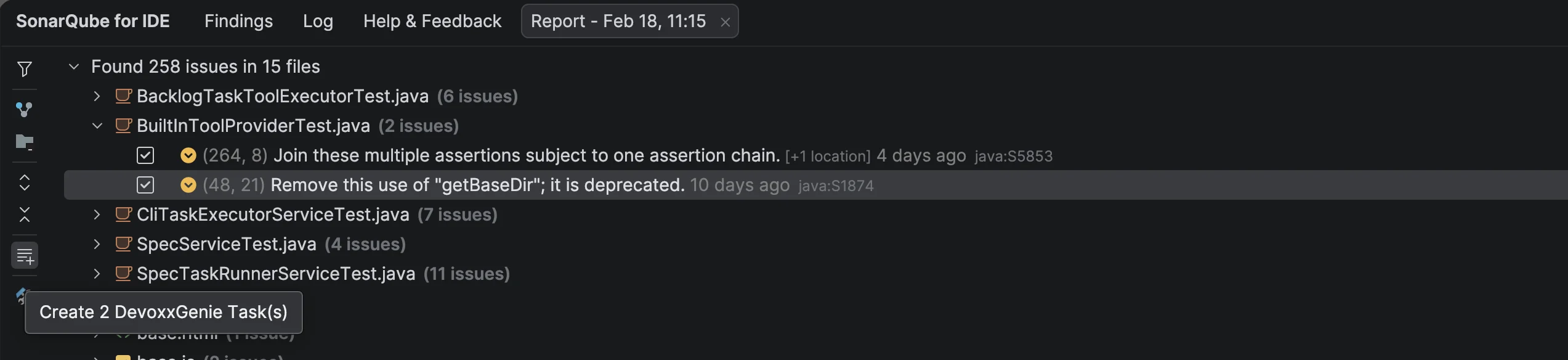
The SonarLint toolbar has a "Create DevoxxGenie Task(s)" action that does something different: instead of invoking the LLM immediately, it writes one or more TASK-*.md files into backlog/tasks/. This is the SDD integration path — defer the fix, let an agent handle it later.
What Context Gets Sent
All three entry points build the same prompt from the same fields:
| Field | Source |
|---|---|
| Rule ID | SonarLint finding metadata |
| Rule name & description | SonarLint rule database |
| Severity / type | SonarLint finding metadata |
| File path & line number | Editor selection |
| Violating code snippet | ±10 lines around the finding |
| Project language | IntelliJ project model |
GitHub: github.com/stephanj/sonarlint-devoxxgenie-intellij Full docs: /docs/integrations/sonarlint
SpotBugs Integration
The SpotBugs DevoxxGenie plugin is a fork of the JetBrains SpotBugs plugin that adds a DevoxxGenie AI layer for fixing static analysis findings. When SpotBugs detects a potential bug, you send it to DevoxxGenie for an AI-assisted fix — no manual copy-pasting required.

- IntelliJ IDEA 2023.3 or later
- JDK 17 or later
- DevoxxGenie installed and configured in the same IDE instance
Three Entry Points
-
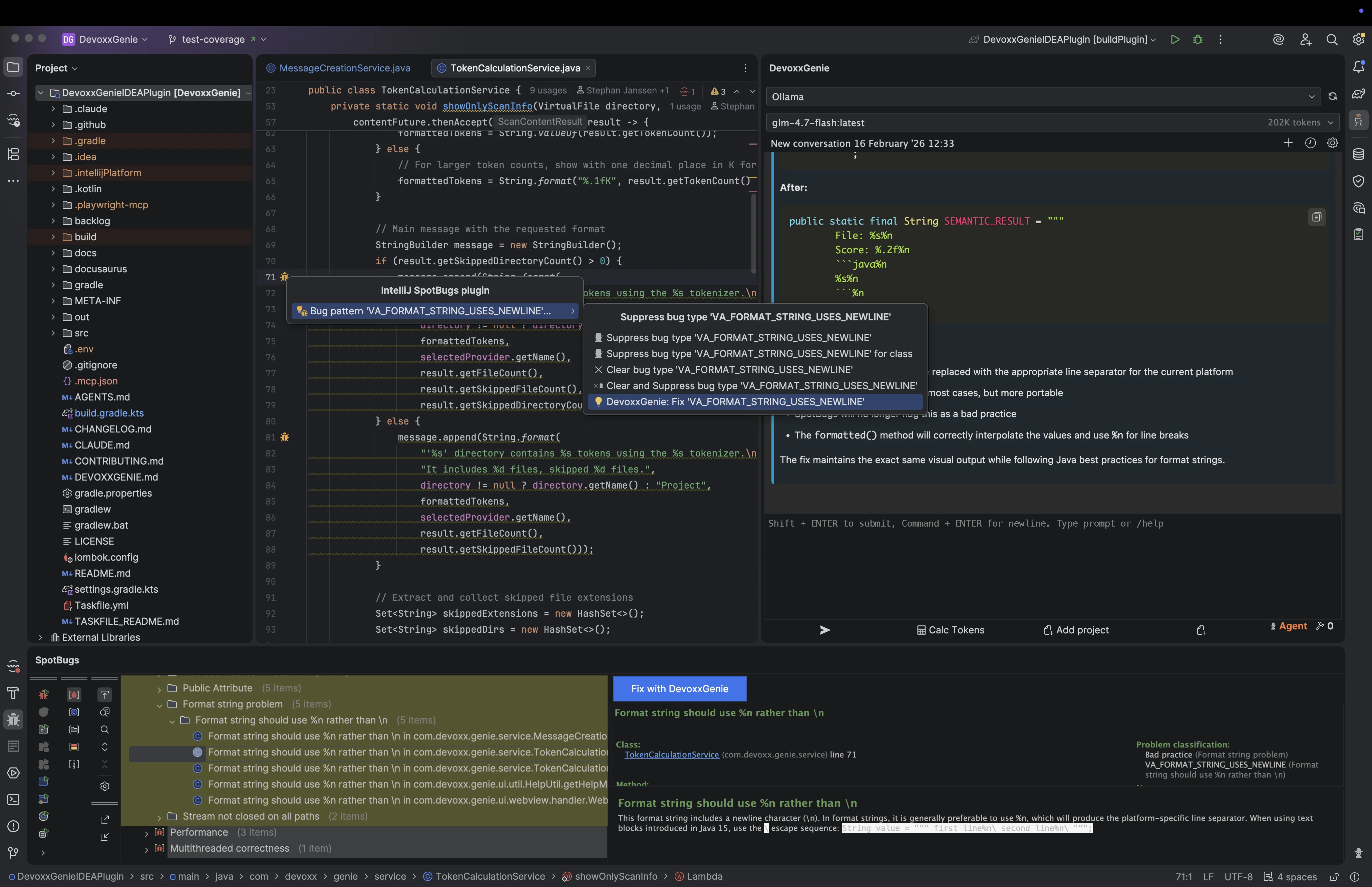
Intention action — press Alt+Enter on SpotBugs-highlighted code. You'll see a
"DevoxxGenie: Fix '[BugPattern]'"entry, e.g.DevoxxGenie: Fix 'NP_NULL_ON_SOME_PATH'. Selecting it assembles and submits the prompt immediately. -
Gutter icon right-click — SpotBugs annotates flagged lines with a gutter icon. Right-clicking opens a context menu with a "Fix with DevoxxGenie" item alongside the standard SpotBugs actions. Useful when you want to stay in the editor without switching tool windows.
-
Bug details panel button — in the SpotBugs tool window, selecting a finding shows a details panel. The "Fix with DevoxxGenie" button there sends the full finding to DevoxxGenie with a single click.
Smart Context
Regardless of which entry point you use, the prompt includes:
| Field | Description |
|---|---|
| Bug pattern ID | e.g. NP_NULL_ON_SOME_PATH |
| Bug category | e.g. CORRECTNESS, PERFORMANCE, SECURITY |
| Priority | High, Medium, or Low |
| File path | Relative path within the project |
| Line number | Exact line where the bug was detected |
| Code snippet | ±10 lines of source code around the finding |
| Bug description | SpotBugs rule description from the detector |
Scope Note
SpotBugs DevoxxGenie is a prompt-sending integration only. It does not create backlog task files — it sends the finding directly to the active DevoxxGenie conversation for an immediate AI response. If you need deferred task-based resolution with SDD workflow integration, use the SonarLint fork above.
GitHub: github.com/stephanj/spotbugs-devoxxgenie-plugin Full docs: /docs/integrations/spotbugs
Build Your Own Integration
The pattern is deliberately small. Here's what a minimal integration looks like end-to-end:
- Check if DevoxxGenie is installed (
PluginManagerCore.getPlugin("com.devoxx.genie")) - Build a rich prompt string from whatever context your plugin has (rule, file, code snippet, description)
- Choose your delivery mechanism:
- Immediate AI response → call
ExternalPromptService.setPromptText()via reflection - Deferred SDD resolution (simple) → call
ExternalTaskService.createBacklogTask()via reflection - Deferred SDD resolution (rich metadata) → write a
TASK-*.mdfile tobacklog/tasks/directly
- Immediate AI response → call
That's it. No SDK to pull in, no compile-time coupling, no registration required. If DevoxxGenie isn't installed, your code path silently does nothing.
The full API reference — including the TaskIdAllocator implementation, filename conventions, and frontmatter field definitions — is at /docs/integrations/overview.
If you build an integration, open an issue or PR on the DevoxxGenie GitHub repository — I'd love to list it in the docs.
Enjoy!
Links: