SpotBugs with DevoxxGenie
The SpotBugs DevoxxGenie plugin is a fork of the JetBrains SpotBugs plugin that adds a DevoxxGenie AI layer for fixing bug findings. When SpotBugs detects a potential bug in your Java code, you can send it to DevoxxGenie for an AI-assisted fix with a single action — no manual copy-pasting required.

- IntelliJ IDEA 2023.3 or later
- JDK 17 or later
- DevoxxGenie installed and configured in the same IDE instance
Overview
SpotBugs DevoxxGenie surfaces three ways to invoke AI assistance on a finding:
- Intention action — Alt+Enter on the highlighted code
- Gutter icon right-click menu — right-click the SpotBugs gutter marker
- Bug details panel button — "Fix with DevoxxGenie" button in the SpotBugs tool window
All three entry points send the same rich context to DevoxxGenie: the bug pattern, category, priority, file path, line number, and the surrounding code.
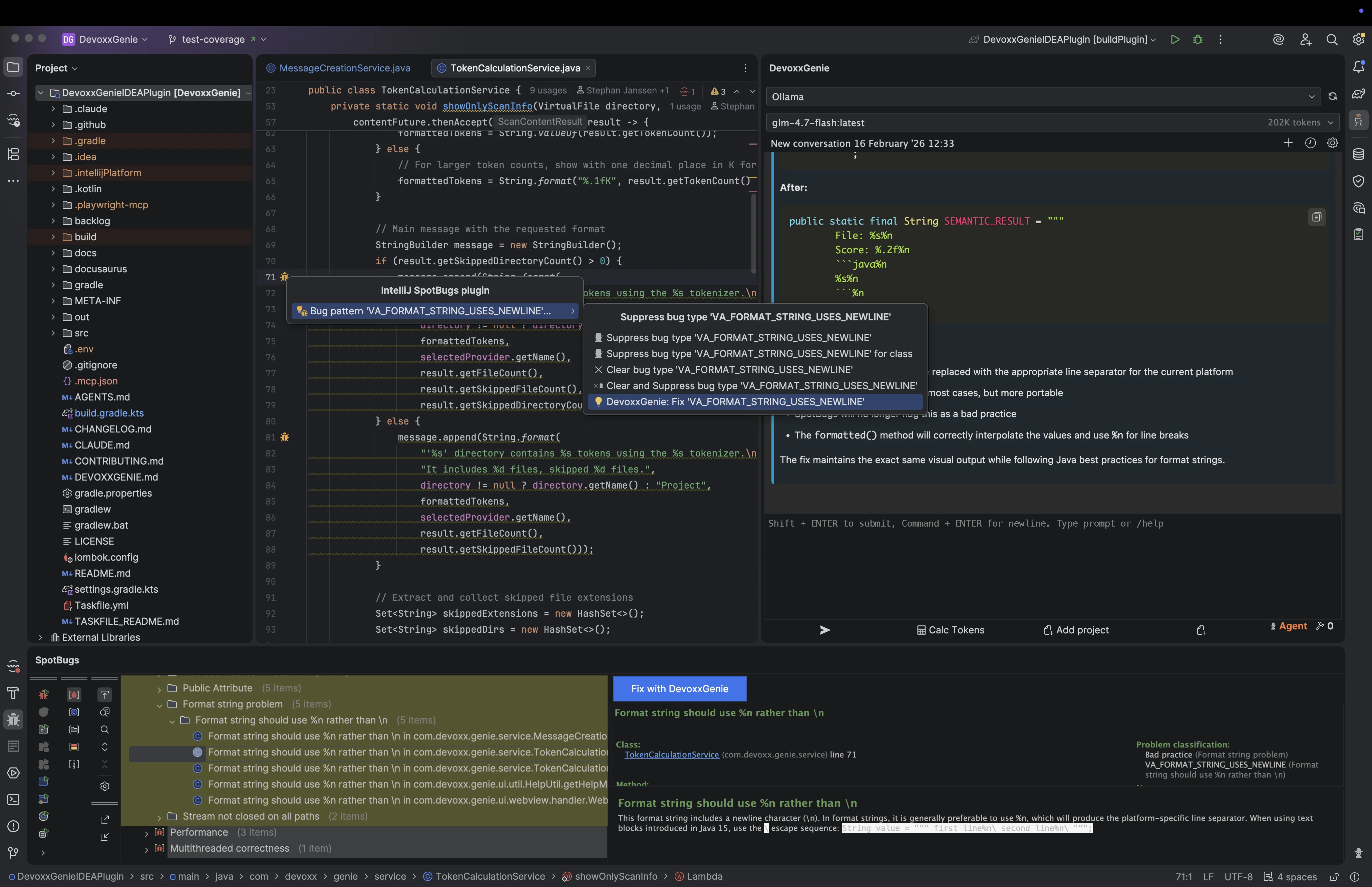
Entry Point 1: Intention Action
Press Alt+Enter on any code flagged by SpotBugs to see a "DevoxxGenie: Fix '[BugPattern]'" entry in the intention action list. For example:
DevoxxGenie: Fix 'NP_NULL_ON_SOME_PATH'
Selecting the action assembles a prompt and submits it to DevoxxGenie immediately. The DevoxxGenie tool window is focused so you can review the AI's suggested fix.
Entry Point 2: Gutter Icon Right-Click
SpotBugs annotates lines with a gutter icon when a bug is detected. Right-clicking the gutter icon opens a context menu that includes a "Fix with DevoxxGenie" item alongside the standard SpotBugs actions.
This is useful when you want to keep focus in the editor without switching to the SpotBugs tool window.
Entry Point 3: Bug Details Panel
In the SpotBugs tool window, selecting a bug in the findings tree shows a details panel at the bottom. The panel includes a "Fix with DevoxxGenie" button that sends the current finding to DevoxxGenie with full context.
Smart Context
Regardless of which entry point you use, the prompt sent to DevoxxGenie includes:
| Field | Description |
|---|---|
| Bug pattern ID | e.g. NP_NULL_ON_SOME_PATH |
| Bug category | e.g. CORRECTNESS, PERFORMANCE, SECURITY |
| Priority | High, Medium, or Low |
| File path | Relative path within the project |
| Line number | Exact line where the bug was detected |
| Code snippet | ±10 lines of source code around the finding |
| Bug description | SpotBugs rule description from the detector |
This gives DevoxxGenie enough context to propose a targeted fix without requiring you to explain the issue manually.
Example Prompt
For a NP_NULL_ON_SOME_PATH finding at OrderProcessor.java:124, the plugin generates a prompt similar to:
SpotBugs detected a potential bug in your Java code:

Bug Pattern: NP_NULL_ON_SOME_PATH
Category: CORRECTNESS
Priority: High
File: src/main/java/com/example/OrderProcessor.java
Line: 124

Code context:
120:     public Order processOrder(String orderId) {
121:         Order order = orderRepository.findById(orderId);
122:         List<Item> items = order.getItems();  // potential NPE
123:         for (Item item : items) {
124:             inventory.reserve(item);
125:         }
126:         return order;
127:     }

Description: Null pointer dereference. The return value of a method is dereferenced
without a null check.

Please provide a fix for this SpotBugs finding.
Scope of Integration
SpotBugs DevoxxGenie is a prompt-sending integration only. It does not create backlog task files — it sends the finding directly to the active DevoxxGenie conversation for an immediate AI response.
If you need deferred task-based resolution with backlog integration, see the SonarLint DevoxxGenie plugin.
Installation
- Download the plugin JAR from GitHub Releases
- In IntelliJ: Settings → Plugins → Install Plugin from Disk…
- Select the downloaded JAR and restart the IDE
This plugin replaces the standard JetBrains SpotBugs plugin. Uninstall the official SpotBugs plugin before installing this fork to avoid conflicts.