SonarQube with DevoxxGenie
The SonarLint DevoxxGenie plugin is a fork of SonarLint for IntelliJ (v11.13) that adds a DevoxxGenie AI layer on top of the standard SonarQube analysis. It lets you fix SonarLint findings with a single click and optionally create structured backlog task specs for later resolution.

- DevoxxGenie v0.9.12 or later
- IntelliJ IDEA 2024.2 or later
- Both plugins installed and enabled in the same IDE instance
Overview
When SonarLint detects a code quality issue, the SonarLint DevoxxGenie plugin surfaces three ways to act on it with AI:
- Intention action (lightbulb / Alt+Enter) — fastest path for a single violation
- Rule panel button — from the SonarLint tool window while reviewing a rule
- Batch task creation — create
TASK-*.mdfiles inbacklog/tasks/for later AI-assisted resolution
Entry Point 1: Intention Action
Press Alt+Enter (or click the lightbulb) on any SonarLint-highlighted code to see a "Fix with DevoxxGenie" intention action. Selecting it sends an AI-crafted fix prompt to DevoxxGenie with full context: the rule ID, rule description, affected code, and surrounding lines.
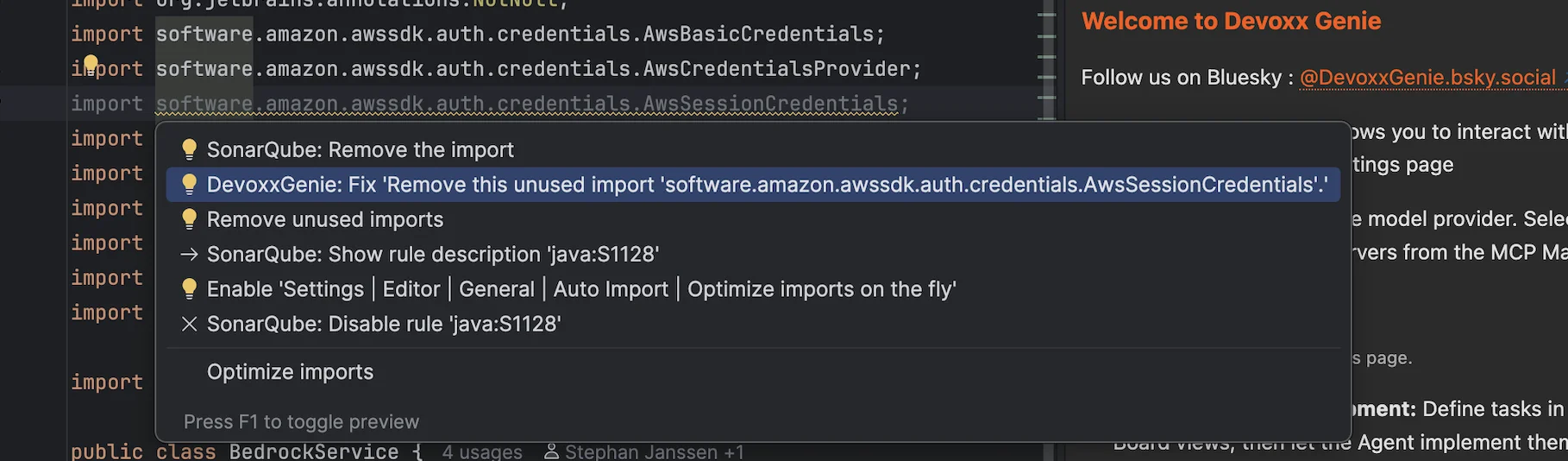
The prompt is submitted automatically — DevoxxGenie will respond with a suggested fix in the chat panel.
Entry Point 2: Rule Panel Button
When you open the SonarLint tool window and select an issue, the rule detail panel includes a "Fix with DevoxxGenie" button in the header area.

Clicking this button:
- Assembles a prompt with the rule name, severity, description, and the violating code snippet
- Sends it to the active DevoxxGenie conversation
- Focuses the DevoxxGenie tool window so you can review the response
Entry Point 3: Create DevoxxGenie Task(s)
The SonarLint toolbar includes a "Create DevoxxGenie Task(s)" action. This does not immediately invoke the LLM — instead, it writes one or more TASK-*.md files into backlog/tasks/ for deferred AI-assisted resolution via the Spec-Driven Development workflow.
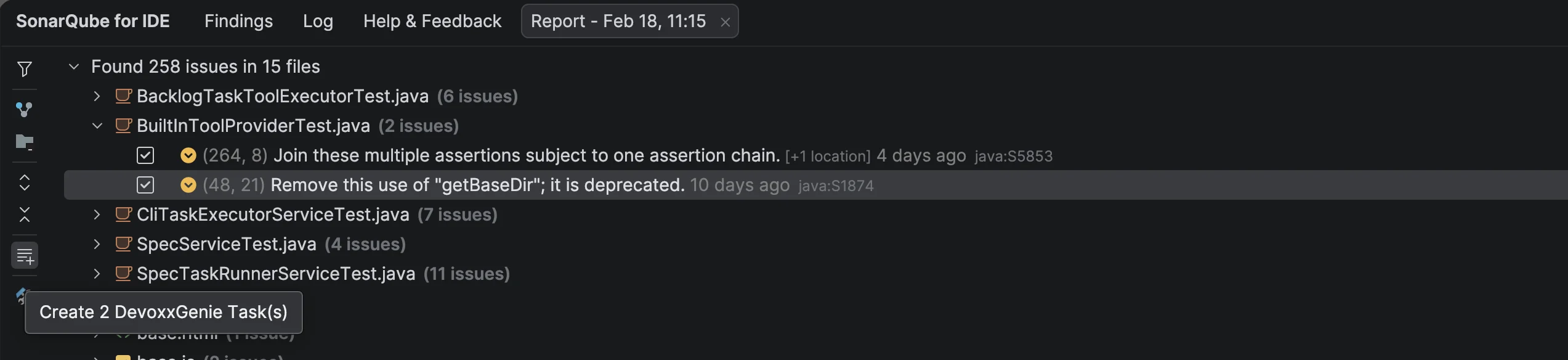
What gets written
Each task file follows the standard backlog format:
---
id: TASK-7
title: Fix SonarLint java:S2259 in UserService.java:87
status: todo
priority: high
created: 2026-02-18
source: sonarlint
rule: java:S2259
file: src/main/java/com/example/UserService.java
line: 87
---

## Description

SonarQube rule **java:S2259** (Null pointers should not be dereferenced) triggered at
`UserService.java:87`.

## Acceptance Criteria

- [ ] Resolve the SonarLint finding without introducing regressions
- [ ] All existing tests pass
Task IDs are allocated by scanning all existing files in backlog/tasks/, backlog/completed/, and backlog/archive/tasks/ to find the current highest id: value, then incrementing by one. See the Task ID Synchronisation section for details.
Prompt Context
All three entry points build the prompt from the same set of contextual fields:
| Field | Source |
|---|---|
| Rule ID | SonarLint finding metadata |
| Rule name & description | SonarLint rule database |
| Severity / type | SonarLint finding metadata |
| File path & line number | Editor selection |
| Violating code snippet | ±10 lines around the finding |
| Project language | IntelliJ project model |
Installation
- Download the plugin JAR from GitHub Releases
- In IntelliJ: Settings → Plugins → Install Plugin from Disk…
- Select the downloaded JAR and restart the IDE
- Ensure DevoxxGenie v0.9.12+ is also installed
This plugin replaces the standard SonarLint plugin. Uninstall the official SonarLint before installing this fork to avoid conflicts.