100+ Frontier LLMs for $0: NVIDIA Support Lands in DevoxxGenie

Here's a quietly wild fact: NVIDIA is casually giving you access to a whole catalogue of frontier AI models - including five of the strongest Chinese frontier models - for free. 😳
No credit card. No subscriptions. Just one API key that unlocks everything.
Starting with DevoxxGenie 1.8.11, the plugin ships NVIDIA as a first-class cloud provider. Drop in your nvapi-... key, and the entire NVIDIA build catalogue shows up in the model dropdown - over 100 models, all reachable through a single OpenAI-compatible endpoint.
What you get for $0
A single free key unlocks a deep bench of frontier models. The headliners:
- DeepSeek V4 Flash - ultra-fast inference for quick iterations
- MiniMax M3 - a drop-in coding companion for your daily work
- Qwen3.5-397B - heavyweight reasoning for the hard problems
- Kimi K2.6 - agentic workflows and long tool chains
- GLM 5.1 - a reliable, do-everything everyday model
And that's just the top of the list. The provider fetches the full live catalogue straight from NVIDIA, so you get Llama, Nemotron, Mistral, GPT-OSS, embeddings, and more - 100+ models in total, without us hardcoding a stale list.
Why this is a big deal
- No juggling subscriptions for different models - one key covers them all
- No workflow changes - everything is OpenAI-compatible, so it just plugs in
- No vendor lock-in - swap models freely inside the same DevoxxGenie session
Around 40 requests per minute is plenty for most developers and personal projects, and five of these models genuinely compete with GPT- and Claude-class output - for a grand total of zero dollars.
Getting started takes under 2 minutes
- Go to build.nvidia.com
- Sign up and verify your account
- Generate your
nvapikey - In DevoxxGenie, open Settings → LLM Providers, pick NVIDIA, and paste your key
- Choose any model in the dropdown and start building

That's it. Under the hood, DevoxxGenie points at NVIDIA's OpenAI-compatible base URL - https://integrate.api.nvidia.com/v1 - and reuses the same battle-tested client path as our other cloud providers. If you'd rather wire it up manually, the base URL and your nvapi key are all you need.
Type-to-filter, because 100+ models is a lot
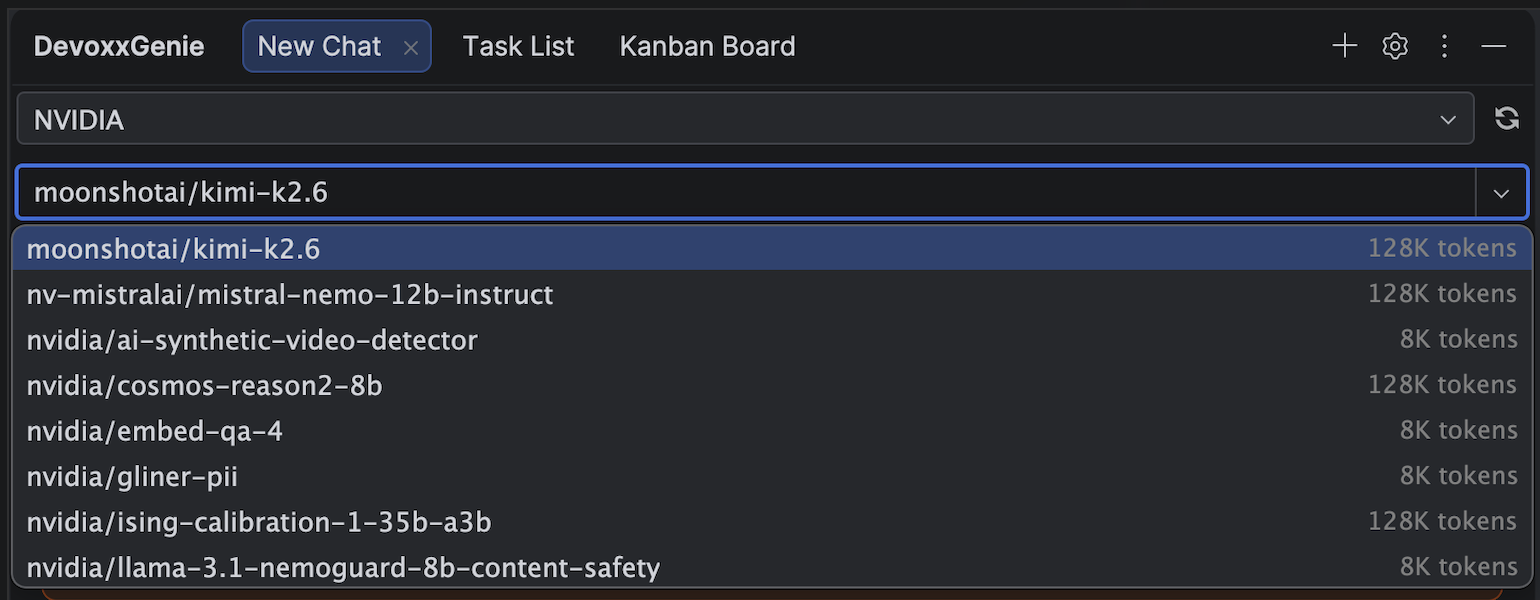
A catalogue this big would drown a normal dropdown. So the NVIDIA model picker is type-to-filter: start typing kimi, deepseek, or qwen and the list narrows instantly to matching models. There's also a Refresh button that re-probes NVIDIA's catalogue on demand, so newly-released models show up without a plugin update.
Because NVIDIA's /v1/models endpoint only reports model IDs (no context length), DevoxxGenie applies a best-effort context-window heuristic per model family - 128K for most instruct models, larger for Llama 4, smaller for embeddings and safety guards. That value only drives the token-usage bar and the "add project to context" budget; it never truncates your conversation. And if the endpoint is ever unreachable, the provider degrades gracefully to a curated fallback list so you're never left without models.
A quick field guide
A pragmatic way to split the work across the free tier:
- DeepSeek V4 Flash when you want speed
- Qwen3.5-397B when the reasoning is genuinely hard
- Kimi K2.6 for agent mode and long tool chains
- MiniMax M3 as your everyday coding companion
- GLM 5.1 as the reliable default
Claim it before the limits change
Five frontier models that go toe-to-toe with GPT and Claude, plus a hundred more - all behind one free key, all inside your IntelliJ IDE. Grab your key at build.nvidia.com, select NVIDIA in DevoxxGenie, and start coding. 👀
DevoxxGenie is open source on GitHub - issues, ideas, and stars all welcome.