From Slash Commands to LLM-Activated Skills

DevoxxGenie has long had a way to bottle up reusable prompts as Commands: the /test, /explain, /review style slash commands that expand a template before sending it to the model. With the latest release we are adding a second, complementary mechanism called Skills: portable SKILL.md files on disk that the LLM itself decides to activate while it is thinking.
The big difference: Commands are typed by you, Skills are picked by the model. And because Skills live in the same directories that Claude Code, Codex and Gemini's .agents-aware tools already use, the same file can teach all four assistants the same playbook.
Commands: the slash-command you already know
Commands are a pre-LLM text substitution macro. You type /explain, DevoxxGenie expands the stored template (optionally substituting $ARGUMENT), and the resulting prompt is sent to the model. The model never sees the /explain; it just sees the expanded text.
That makes Commands ideal for things you trigger consciously and repeatedly:
| Command | What it sends |
|---|---|
/test | "Generate unit tests for the selected code…" |
/explain | "Explain the selected code…" |
/review | "Review the selected code and suggest improvements…" |
/find | RAG-backed semantic search across your project |
/init | Generate a DEVOXXGENIE.md project description file |
You add your own in Settings → Tools → DevoxxGenie → Commands. Everything happens locally, with no tool call and no agent loop required.
See the full reference in the Commands docs.
Skills: capabilities the LLM activates itself
Skills flip the workflow around. Instead of you typing a slash, you drop a SKILL.md file into one of the well-known skill directories. DevoxxGenie scans those directories, hands a one-line index to the LLM in the system prompt, and the model decides, based on what you're asking, whether to call activate_skill("…") to pull in the full body of the skill mid-conversation.
A minimal skill looks like this:
~/.claude/skills/refactor-helper/SKILL.md
---
name: refactor-helper
description: Guides a safe, step-by-step refactoring workflow with tests
---

# Refactor Helper

When the user asks for a refactor:

1. Read the target file and its references.
2. Sketch the refactor as a diff before applying it.
3. Run the project's tests after each step.
4. Stop and report if any test fails.
The model sees only the name/description pair until it decides the skill is relevant. Then it calls activate_skill("refactor-helper"), gets the full Markdown body streamed back as a tool result, and continues the conversation with those instructions in context.
One file, four assistants: Claude, Codex, Gemini, DevoxxGenie
The real win is portability. DevoxxGenie scans six directories for skills, in increasing priority order:
| Priority | Directory | Shared with |
|---|---|---|
| 1 (lowest) | ~/.agents/skills/<name>/ | Codex, Gemini, other .agents-aware tools |
| 2 | ~/.claude/skills/<name>/ | Claude Code |
| 3 | ~/.devoxxgenie/skills/<name>/ | DevoxxGenie only |
| 4 | <project>/.agents/skills/<name>/ | Codex, Gemini, other .agents-aware tools |
| 5 | <project>/.claude/skills/<name>/ | Claude Code |
| 6 (highest) | <project>/.devoxxgenie/skills/<name>/ | DevoxxGenie only |
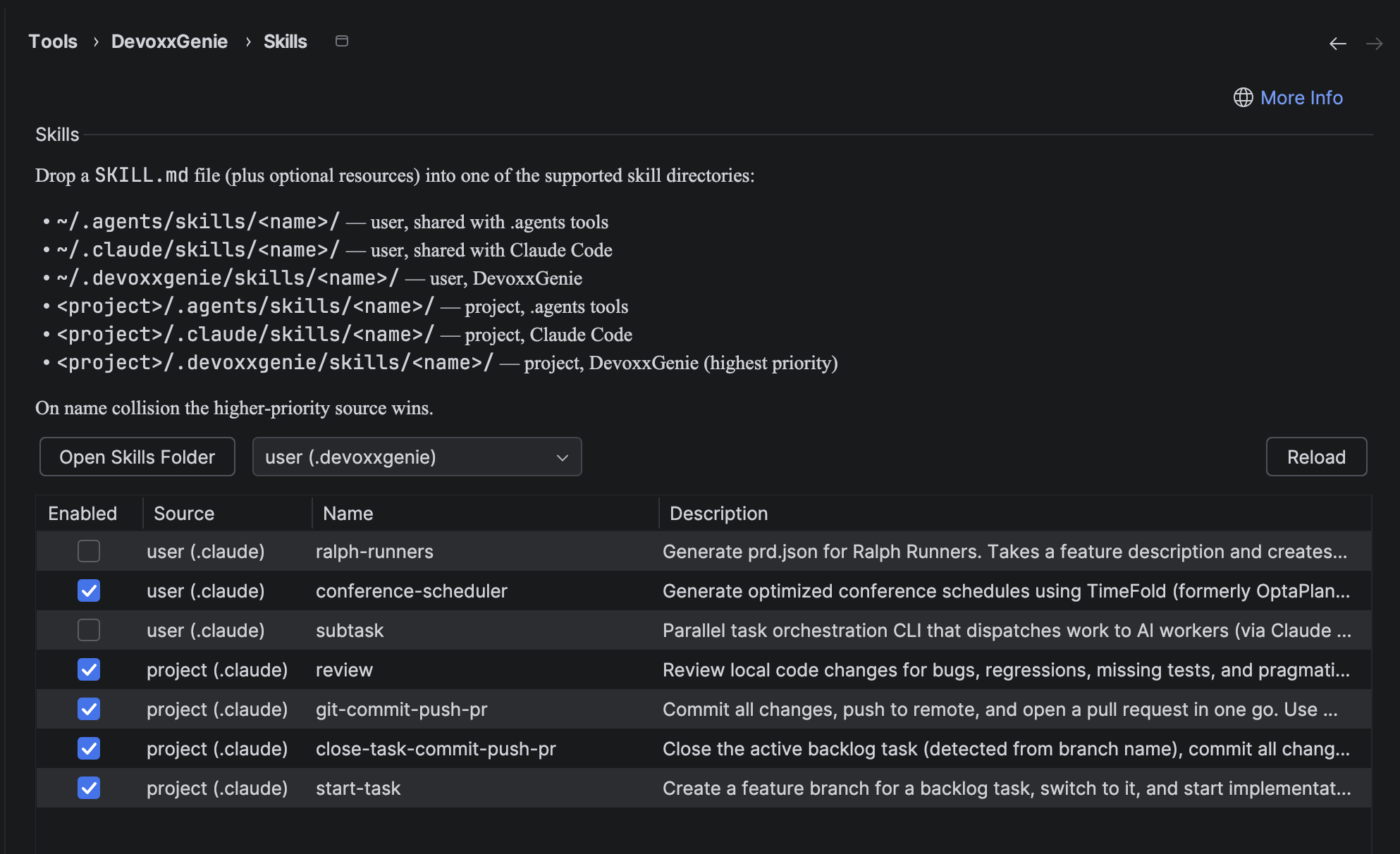
Two rules govern collisions: project beats user, and within the same scope .devoxxgenie beats .claude beats .agents. The screenshot above shows the Settings panel listing exactly that mix: subtask, ralph-runners, conference-scheduler, review, start-task, git-commit-push-pr, all loaded from ~/.claude/skills/ and <project>/.claude/skills/, instantly visible to DevoxxGenie too.
This is the whole point: keep a curated library of skills in ~/.claude/skills/, get them everywhere. Override one per-project in <project>/.devoxxgenie/skills/ when you need a team-specific variant.
Under the hood: Langchain4j's Skills API
Skills support in DevoxxGenie is a thin layer on top of the langchain4j-skills module, the same Java framework that already powers the plugin's chat, agent and MCP integrations.
// build.gradle.kts
implementation("dev.langchain4j:langchain4j-skills:1.14.0-beta24")
The whole pipeline is three building blocks:
1. Load SKILL.md files from disk
import dev.langchain4j.skills.FileSystemSkill;
import dev.langchain4j.skills.FileSystemSkillLoader;

List<FileSystemSkill> skills = FileSystemSkillLoader.loadSkills(dir);
DevoxxGenie does this for each of the six directories above, merging the results into a single map and letting higher-priority sources overwrite lower ones (with a warning logged on collision).
2. Wrap them in a Skills instance
import dev.langchain4j.skills.Skill;
import dev.langchain4j.skills.Skills;

Skills skills = Skills.from(activeSkills);

// One-line index for the system prompt (the LLM sees only this)
String fragment = skills.formatAvailableSkills();
The fragment is appended to the system prompt under a heading like "You have access to the following skills", so the model knows what's on the menu before the first user message.
3. Expose the activation tool to the agent loop
import dev.langchain4j.service.tool.ToolProvider;

// AgentToolProviderFactory.java
Skills skills = SkillRegistry.getInstance(project).buildSkills();
if (skills != null) {
    providers.add(skills.toolProvider());     // adds activate_skill tool
    log.info("Skills tool provider included in agent tool chain");
}
skills.toolProvider() returns a Langchain4j ToolProvider exposing the activate_skill tool (plus an optional read_skill_resource helper). It is added alongside DevoxxGenie's built-in agent tools (read_file, write_file, run_command, parallel_explore and so on) and any MCP tool providers, then composed and wrapped with the existing approval and loop-tracking layers.
That's the full integration. The rest is wiring: a project-scoped SkillRegistry, a settings panel to enable/disable individual skills, and the small system-prompt augmentation that tells the model "these exist, here's how to activate them".
When to reach for which
| Commands | Skills | |
|---|---|---|
| Invoked by | You typing /name args | The LLM calling activate_skill(name) |
| Timing | Pre-LLM, before the request is sent | Mid-conversation, LLM-driven |
| Requires Agent mode | No | Yes (tool-capable model needed) |
| Storage | IDE settings (XML) | SKILL.md files on disk |
| Portable | DevoxxGenie only | Shared with Claude Code, Codex, Gemini |
| Best for | Quick repeatable prompt templates | Reusable agent workflows and playbooks |
Use Commands for the things you trigger consciously, every day: "explain this", "write tests for this". Use Skills for repeatable agent behaviours that the model should reach for on its own: code-review checklists, framework-specific recipes, deployment runbooks, your team's commit-message conventions.
Try it out
- Drop a
SKILL.mdinto~/.claude/skills/<name>/(or any of the other five locations). - In DevoxxGenie open Settings → Tools → DevoxxGenie → Skills, hit Reload, and confirm the skill shows up in the table.
- Enable Agent Mode, pick a tool-capable model, and ask a question that matches the skill's description. The model will activate it on its own.
Full reference: Skills docs · Commands docs · Agent Mode.
Install: JetBrains Marketplace · GitHub