Stop Prompting, Start Specifying: Introducing Spec-driven Development in DevoxxGenie

We've all been there. You open your AI coding assistant, type a prompt, get a result, realise it missed half the requirements, rephrase, try again. Rephrase and repeat. It works (kind of) but it doesn't scale and we lose history.
What if instead of ad-hoc prompting, you could define exactly what needs to be built as a structured spec, and then let the AI agent implement it autonomously — checking off acceptance criteria as it goes?
That's the idea behind Spec-driven Development (SDD), the latest feature in DevoxxGenie v0.9.7.
The Problem with Ad-Hoc Prompting
Most AI-assisted coding today is conversational. You describe what you want in natural language, hope the LLM understands the full picture, and manually verify the result. This approach has real limitations:
- Requirements get lost in chat history
- There's no structured way to track what's been done vs. what's pending
- You can't easily hand off work between sessions, developers, or agents
- Verification is manual and inconsistent
A More Disciplined Approach
SDD flips the workflow. Instead of writing code instructions in chat, you write task specifications — structured markdown files with a title, description, acceptance criteria, priority, labels, dependencies, and milestones. These specs live in a backlog/ directory alongside your code, version-controlled like everything else.
I've intentionally aligned with the Backlog.md directory structure and workflow, so you can use their board or browser view side-by-side with the new IDEA SDD views that DevoxxGenie introduces.
The workflow is straightforward:
1. Create tasks from natural language
Type something like "Create a task for adding JWT authentication to the REST API with acceptance criteria for login, token generation, and password hashing" in the DevoxxGenie chat. The agent creates a properly structured spec file automatically using one of the 17 built-in backlog tools.
2. Browse and organize in the Spec Browser
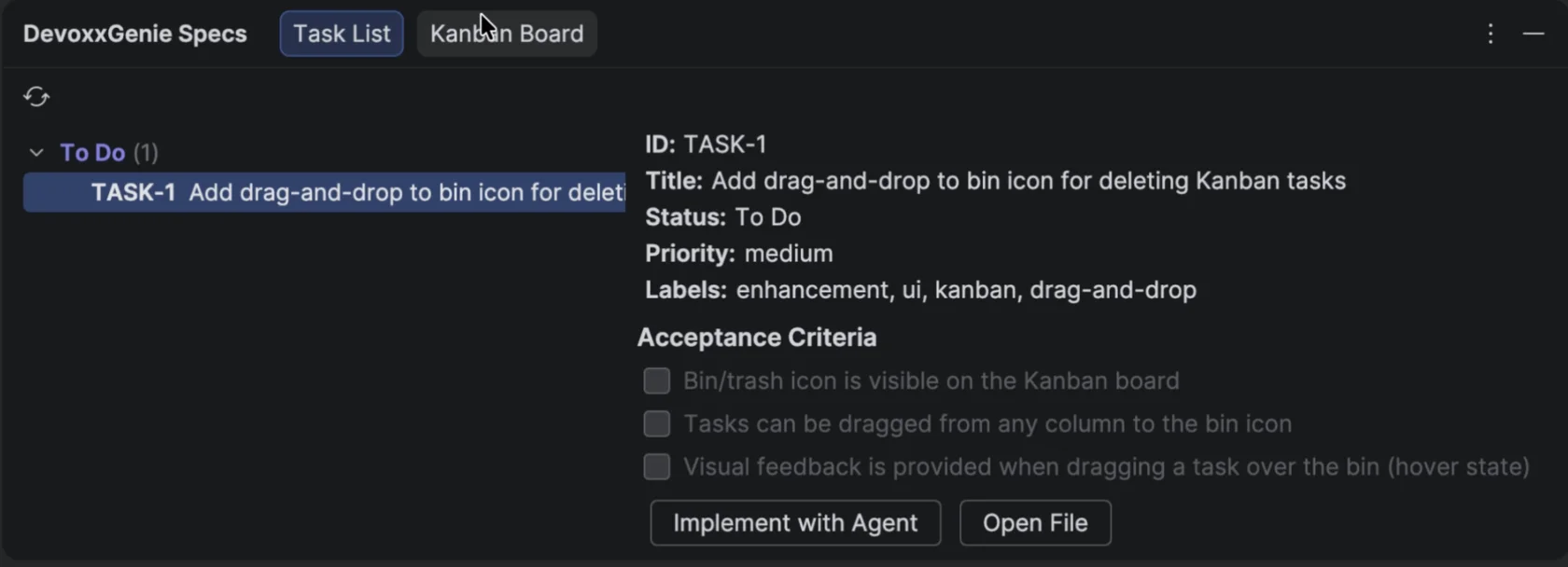
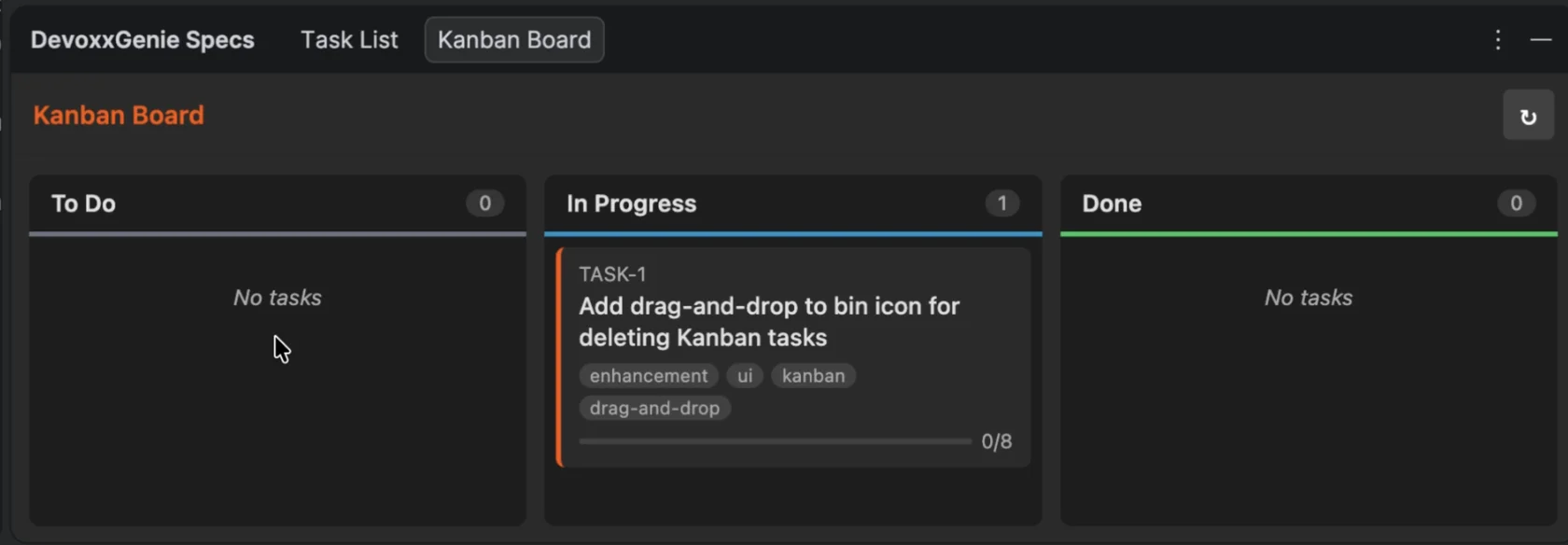
A dedicated tool window in your IDE gives you two views:
A Task List grouped by status (To Do, In Progress, Done) with a detail preview panel:
A Kanban Board with drag-and-drop for visual task management:
3. Click "Implement with Agent"
Select a task, click the button, and the agent takes over. It reads the full spec, explores your codebase, makes edits, checks off acceptance criteria one by one, records implementation notes, and marks the task complete when it's done.
Why This Matters
SDD brings something that's been missing from AI-assisted development: traceability and structure.
- Specs are reproducible. They're plain markdown files. Commit them. Review them in PRs. Share them with your team.
- Progress is visible. Acceptance criteria get checked off as the agent works, so you can see exactly where things stand.
- Work is composable. Break a feature into multiple tasks with dependencies. Assign milestones. The agent respects the structure.
- Review is built in. Every completed task has implementation notes and a final summary documenting what was changed and why.
17 Tools, Full Lifecycle
The agent doesn't just implement code — it manages the entire backlog programmatically:
- 7 task tools: create, list, search, view, edit, complete, archive
- 5 document tools: for supporting docs, design notes, API specs
- 5 milestone tools: for release planning and grouping
All accessible to the LLM in Agent mode.
Getting Started
- Update DevoxxGenie to v0.9.7
- Go to Settings > DevoxxGenie > Spec Driven Dev and enable the Spec Browser
- Click "Init Backlog" to create the directory structure
- Start creating tasks from the chat prompt
- Open the Spec Browser, pick a task, and let the agent do its thing
No external CLI tools needed. No npm packages. Everything runs inside your IDE.
The Proof is in the Pudding
In the video above, I demonstrate how I built an SDD feature that adds a Trash icon to the Kanban view, allowing users to drag and drop a specific task to delete it. In less than a minute the spec was created, and in five minutes the spec was fully implemented and ready to ship — using Claude Sonnet 4.5 (not even Opus 4.6).
I could also have used a local model like GLM-4.7-Flash via Ollama, which works great, but that would have taken a bit longer to demo.
The Bigger Picture
DevoxxGenie started as a simple LLM chat plugin. With Agent Mode, MCP support, and now Spec-driven Development, it's evolving into something more — an AI-augmented development environment where structured specifications replace ad-hoc prompts, and autonomous agents replace copy-paste workflows.
We're not just chatting with AI anymore. We're collaborating with it.
Try it out and let me know what you think. The plugin is free and open source.
Enjoy!
Links: