A Seatbelt for run_command: The Command Blacklist

Agent Mode is at its best when you stop babysitting it. Turn on "auto-approve read-only tools", let it explore, let it run your tests, and go get coffee.
The moment that stops being comfortable is run_command. Ninety-nine commands out of a hundred are ./gradlew test or git status. The hundredth is git reset --hard — and the agent runs it with the same cheerful confidence.
DevoxxGenie now lets you name that hundredth command in advance.
What it does
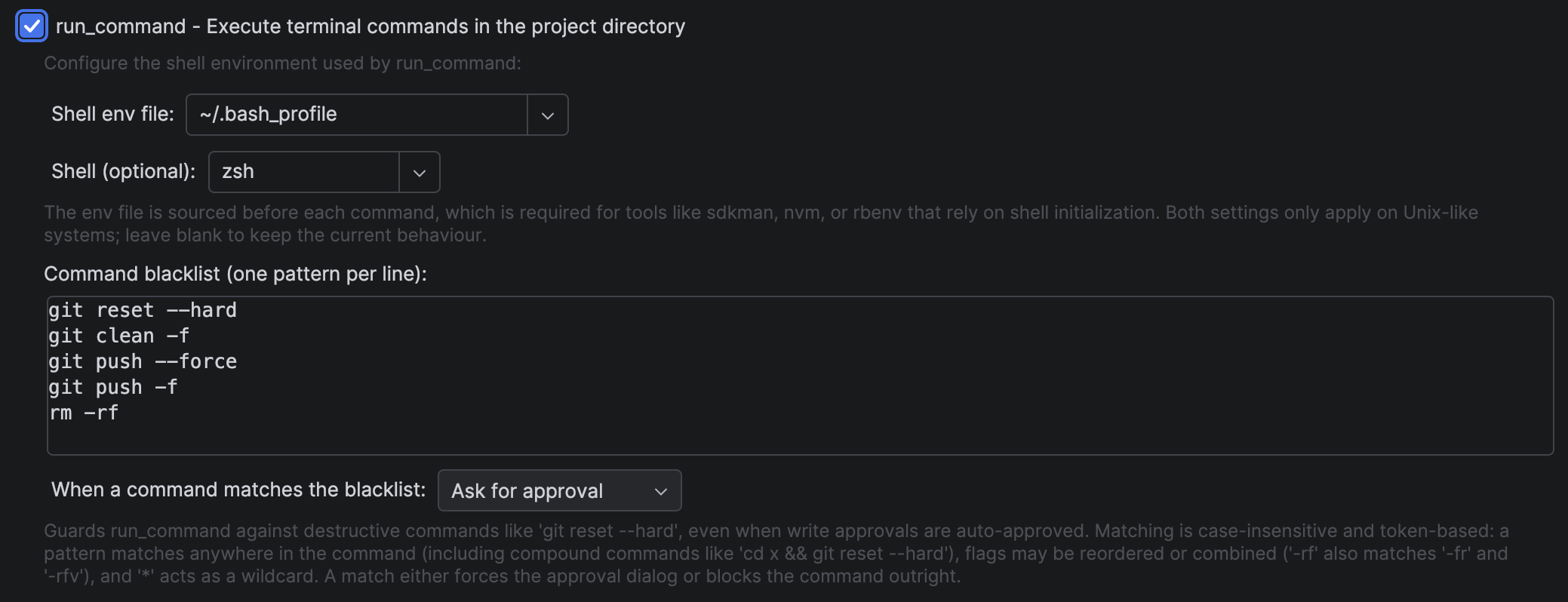
Under Settings → Tools → DevoxxGenie → Agent → Built-in Tools, the run_command tool now has a command blacklist: one pattern per line, plus a choice of what should happen when a command matches.
- Ask for approval — the approval dialog is forced open, showing which pattern matched. This happens even if you've disabled write approvals or clicked "Don't ask again". A blacklist match always wins.
- Block — the command never reaches your shell. The agent gets an error explaining that the command is blocked by user policy, and is explicitly told not to retry it or dress it up in a variation.
Out of the box the list is deliberately short and uncontroversial:
git reset --hard
git clean -f
git push --force
git push -f
rm -rf
Everything else is yours to add: docker system prune, kubectl delete, terraform apply, npm publish, DROP TABLE wrappers — whatever would ruin your afternoon.
Matching that isn't trivially fooled
A naive command.startsWith(pattern) check would be security theatre. The agent doesn't emit clean, canonical commands — it emits whatever the model felt like typing. So matching is token-based, case-insensitive, and considers every starting position in the command.
It matches inside compound commands. The pattern git reset --hard catches:
cd modules/core && git reset --hard HEAD~3
It tolerates extra flags between pattern tokens. git reset --hard still matches:
git reset -q --hard
It understands short-flag clusters. The pattern rm -rf also matches rm -fr, rm -rfv, and rm -rvf — because flag letters get reordered and combined, and a blacklist that only knows one spelling protects nothing.
It supports wildcards. A * inside a pattern token globs, so git push --force* covers --force-with-lease too.
And it's deliberately not greedy about skipping. Between two matched pattern tokens, only flag-like tokens may be skipped — so rm build && grep -rf x does not match rm -rf. False positives train you to click "approve" without reading, which is exactly the habit this feature exists to prevent.
Where it lives
The blacklist sits directly under the run_command checkbox, next to the shell environment settings that also shape how that tool behaves — everything that governs command execution in one place, rather than scattered between the tool list and the approval section.
Guardrails, not a sandbox
Worth being precise about what this is: a guardrail against accidents, not a security boundary. It protects you from an agent that misunderstood your intent, took a shortcut, or hallucinated a cleanup step. A model actively trying to evade a pattern list — base64-encoding a command, writing a shell script and executing it — is a different threat model, and no pattern list solves that one.
For that reason the blacklist composes with, rather than replaces, the existing controls:
- Approval dialogs for write tools
- Per-tool enable/disable (you can switch
run_commandoff entirely) - The global max-tool-calls limit
- The agent log panel, where every tool call and its arguments are recorded
Try it
Open Settings → Tools → DevoxxGenie → Agent, scroll to Built-in Tools, and look under run_command. Add the commands you'd never want to discover after the fact, pick Ask for approval or Block, and let the agent get back to work.
The defaults are a starting point, not a recommendation. The commands that can ruin your project are the ones worth typing in.