Engram: Persistent Memory for AI Coding Agents

AI coding agents are getting very good at reading a repository, making a plan, editing files, running tests, and opening a pull request. But most of them still have one surprisingly human problem: they forget.
Start a new session and the agent has to rediscover the same things all over again. Why did we choose this architecture? Which fix already failed? What naming convention did the team settle on? Which test is flaky? What did the user explicitly prefer last time?
That is where Engram fits in. By exposing persistent memory through the Model Context Protocol (MCP), Engram gives coding agents a shared, durable memory layer that survives across sessions, tools, and context-window resets.
The stateless-agent problem
Modern coding agents can inspect your project, run commands, call tools, and even coordinate sub-agents. During a single session, they often feel impressively contextual. The problem starts when the session ends.
The next agent run may still have access to your repository, but it does not automatically know:
- The design decisions made in earlier conversations
- The root cause of a bug that was already investigated
- The failed approaches that should not be repeated
- The conventions a maintainer asked the agent to follow
- The subtle setup steps that are not obvious from the code
- The difference between a temporary workaround and an intentional architecture choice
Repositories contain code, but they do not contain all of the reasoning behind the code. Pull requests capture some of it. Issues capture some of it. Chat transcripts capture too much of it. What agents need is something more focused: small, typed, retrievable memories.
Engram as an MCP memory server
MCP is a natural fit for this. Instead of baking memory into one IDE, one CLI, or one model provider, Engram runs as an MCP server. Any MCP-capable agent can connect to it and use the same memory tools.
A minimal setup looks like this:
{
  "mcpServers": {
    "Engram": {
      "command": "/opt/homebrew/bin/engram",
      "args": [
        "mcp",
        "--tools=agent"
      ]
    }
  }
}
That configuration starts Engram in MCP mode and exposes the agent-oriented toolset. The exact place where you paste it depends on the client: Claude Code, Codex, Gemini CLI, DevoxxGenie MCP settings, or any other MCP-aware environment. In DevoxxGenie, it shows up as a regular STDIO MCP server with the available Engram tools detected automatically.
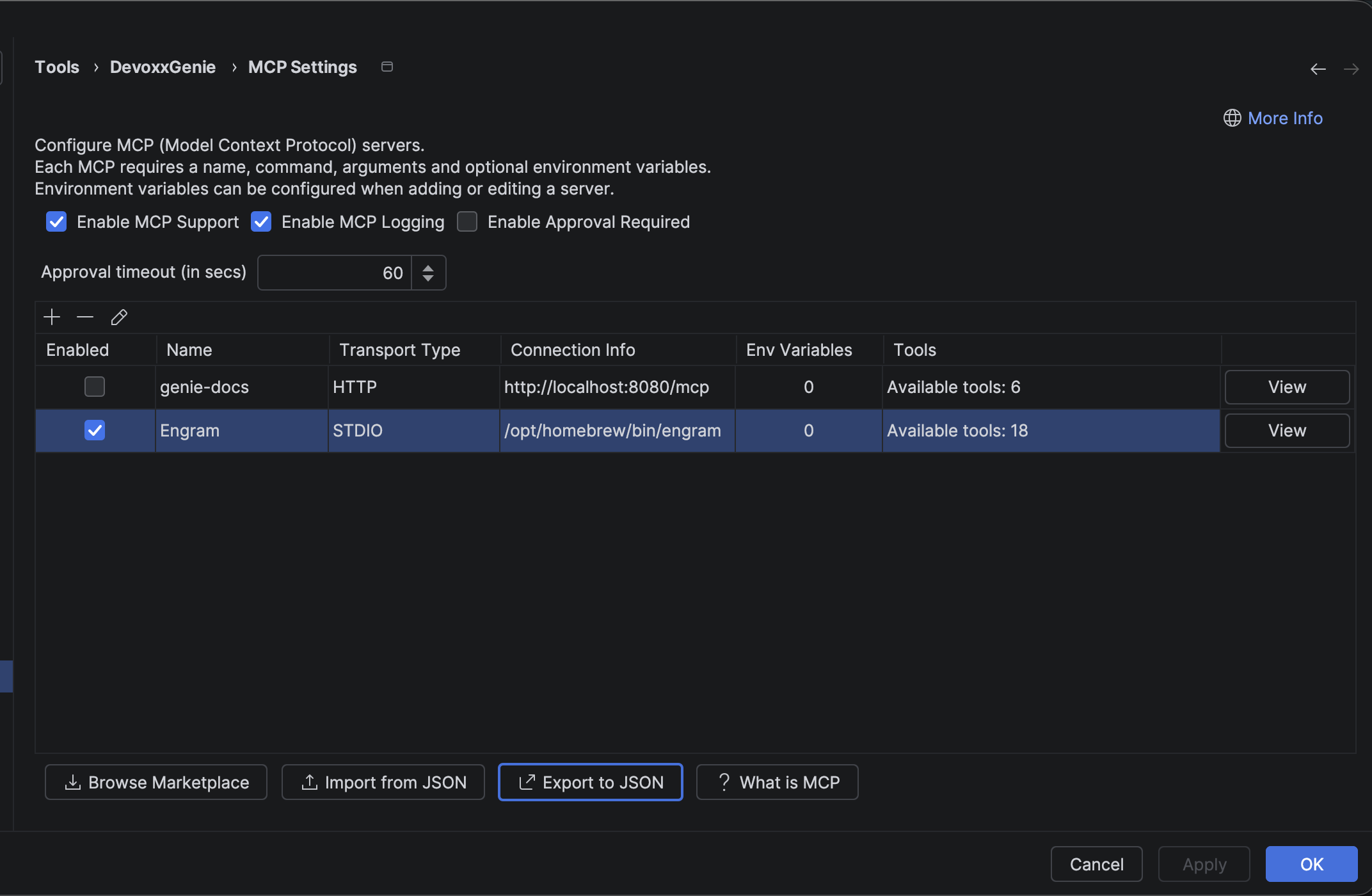
The important part is the boundary: the coding agent does not need to know how Engram stores memory internally. It just sees tools for saving, searching, retrieving, and summarising useful development knowledge.
What should agents remember?
Persistent memory is only useful if it stays selective. You do not want to dump every token of every chat into a database and call it context. That creates a second context-window problem: too much irrelevant history.
A good agent memory is compact, typed, and actionable. For coding work, the most useful categories are:
| Memory type | Example |
|---|---|
| Decision | "We chose ChromaDB for local vector storage because it already matches the RAG pipeline." |
| Architecture | "Agent tools are registered through a provider chain so built-in tools, MCP tools, and skills can be composed." |
| Bug fix | "Fixed streaming cancellation by checking the stop flag before appending each token." |
| Discovery | "The integration test fails only when Docker is not running; the service itself handles the error correctly." |
| Pattern | "Settings panels use the SomethingSettingsComponent naming convention." |
| Preference | "The maintainer prefers short, practical blog posts with setup snippets and architecture context." |
The point is not to remember everything. The point is to preserve the facts that would otherwise have to be rediscovered.
A better coding-agent loop
With Engram connected, an agent can start each session differently:
- Identify the project
- Retrieve recent or relevant memories
- Use those memories while planning
- Save new decisions, fixes, discoveries, and preferences as they happen
- Write a session summary before stopping
That turns memory into part of the development workflow rather than a passive archive.
For example, before changing a provider integration, the agent can search for previous work on that provider. If it finds a memory saying a specific API endpoint was deprecated, it avoids repeating the same mistake. If it fixes a new edge case, it saves that as a bug-fix memory for the next session.
In practice, the agent activity log makes this visible: the model calls Engram tools such as mem_context, mem_search, and mem_review, then folds the retrieved memories into its response.
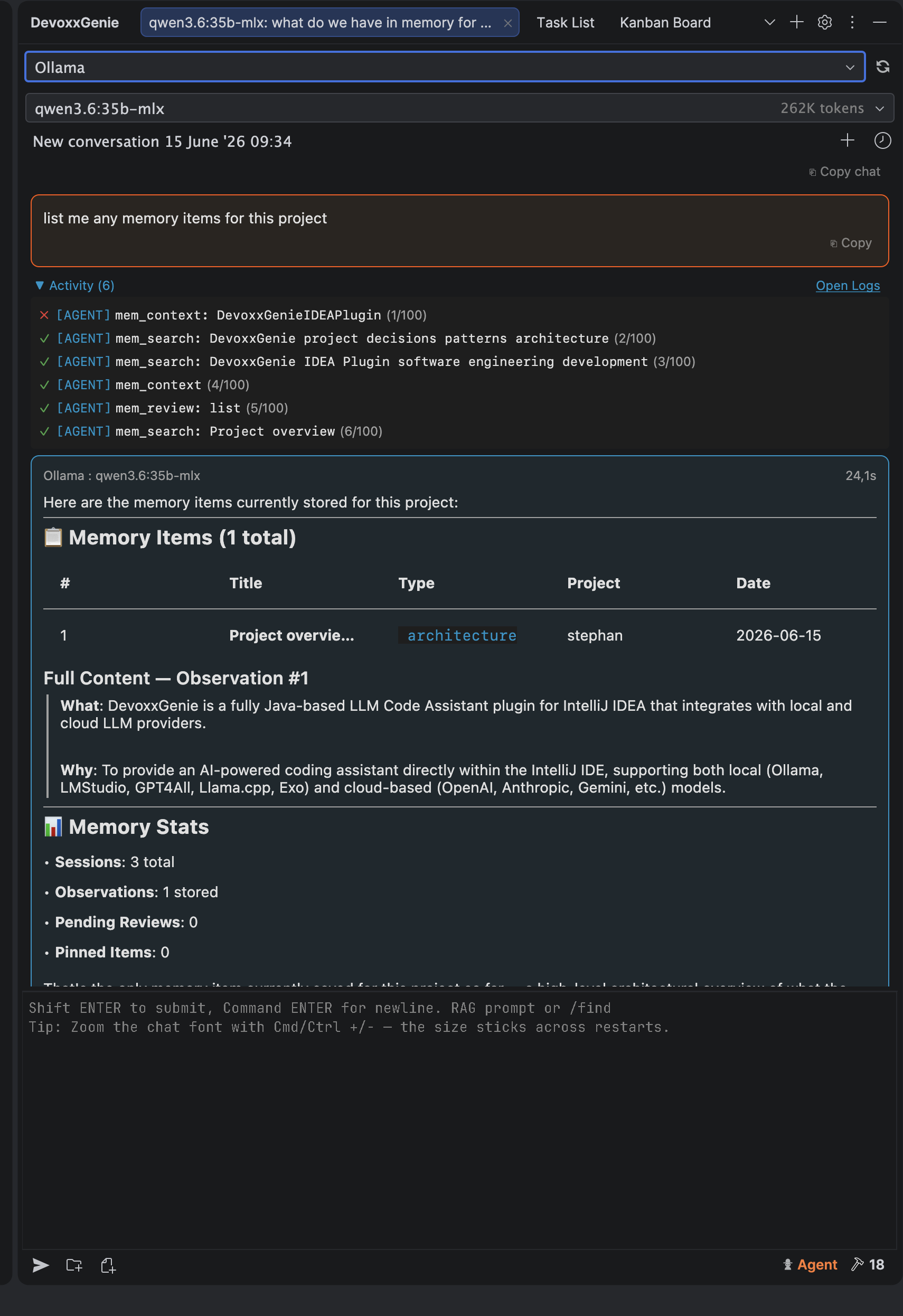
This is especially useful for long-running projects where work happens in bursts. You might come back to a feature days or weeks later, with a different model or a different tool, and still recover the important context quickly.
Why MCP matters
Without MCP, every coding assistant would need its own private memory plugin. That fragments the knowledge base. Claude Code might remember one thing, Codex another, and your IDE assistant nothing at all.
With MCP, memory becomes a shared capability:
Claude Code ─┐
Codex      ──┼── MCP ── Engram persistent memory
Gemini CLI ──┤
DevoxxGenie ─┘
The agent changes, but the project memory remains. This is the same reason MCP works well for filesystem access, backlog management, browser automation, and database tools: the capability lives behind a protocol, not inside a single model integration.
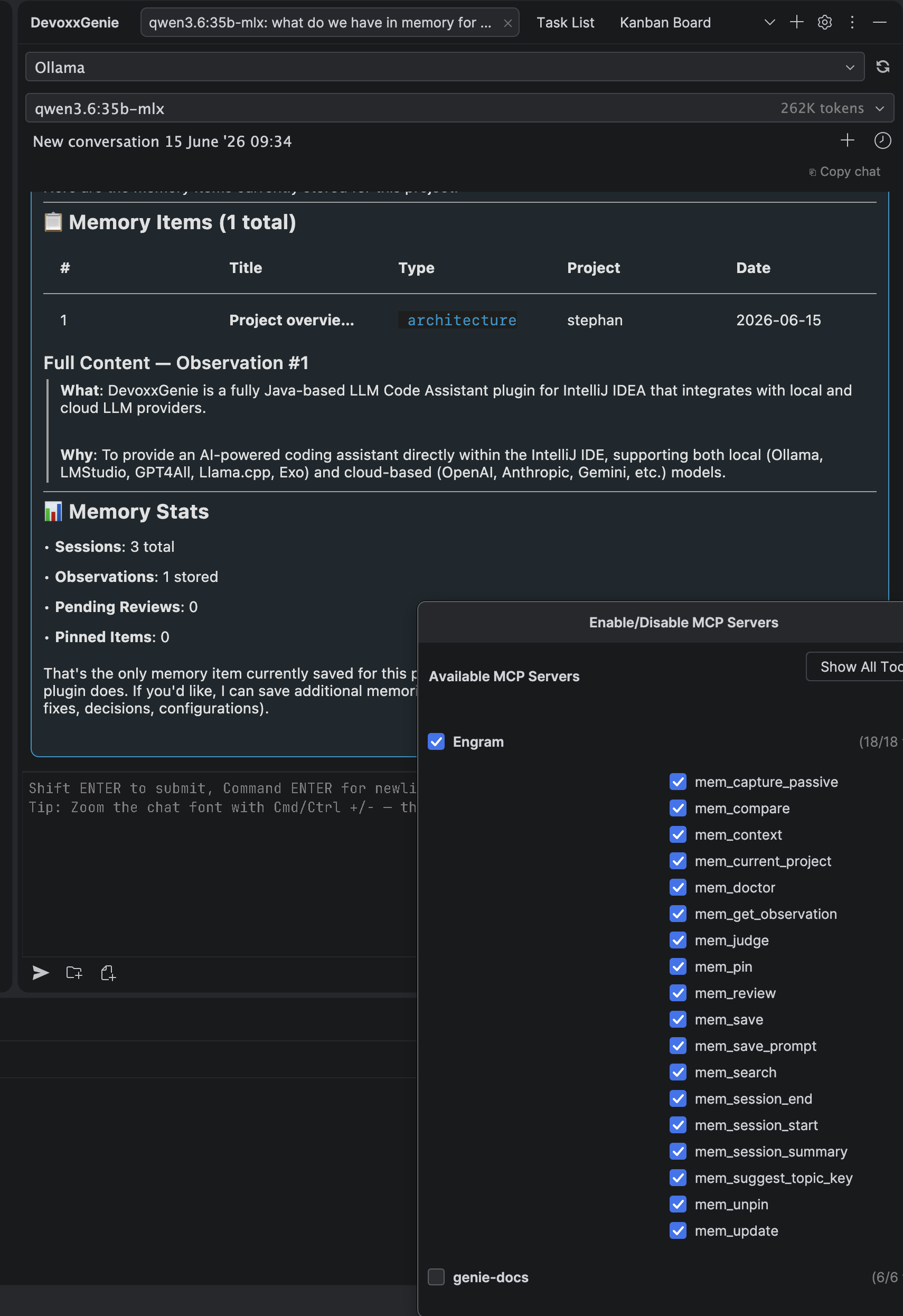
For DevoxxGenie users, this also fits naturally beside the existing MCP support. Engram is just another MCP server you can add to your agent toolbox. You can enable or disable the individual memory tools the same way you manage any other MCP tool.
Recommended agent instructions
The MCP server provides the tools, but the agent still needs a habit: it should know when to use memory.
A practical instruction block looks like this:
Use Engram persistent memory during coding work.

At the start of a task:
- Search memory for relevant prior decisions, bugs, patterns, and preferences.
- Use retrieved memories as context, but verify against the current codebase.

During the task:
- Save important decisions immediately.
- Save completed bug fixes with the root cause and files changed.
- Save non-obvious discoveries that would help a future session.
- Save user preferences or project conventions when they are learned.

At the end of a task:
- Save a concise session summary with the goal, what changed, what was learned, and next steps.
That last sentence matters. Memory systems are only as good as the discipline around them. If the agent waits until the end of a long session to reconstruct what happened, it will forget details just like humans do. Saving memories at the moment of discovery produces better future context.
Memory is not a replacement for source control
Engram should not become a shadow Git history. Source control still owns the code. Issues still own planned work. Pull requests still own review discussion. Documentation still owns stable public knowledge.
Engram is best for the layer between those systems:
- Why an implementation went a certain way
- What the agent should avoid repeating
- Which local convention is not obvious yet
- What the maintainer told the agent in conversation
- What was learned while debugging
A good rule of thumb: if the fact would help the next agent avoid wasting time, it probably belongs in memory. If it is required public documentation, put it in the repository too.
Guardrails for persistent memory
Long-lived memory introduces a new responsibility: stale memories can mislead agents. Treat memory as evidence, not truth.
Good agent behaviour looks like this:
- Retrieve first, verify second — memories should guide exploration, not replace reading the code.
- Prefer specific memories — "Fixed X in file Y because Z" is better than "The auth system is weird".
- Record scope — distinguish personal preferences from project-wide conventions.
- Update or supersede old decisions — do not let outdated architecture notes linger unchallenged.
- Avoid secrets — API keys, tokens, credentials, and customer data do not belong in agent memory.
The goal is not an agent that blindly obeys memory. The goal is an agent that starts with better context and still checks reality.
A small example
Imagine an agent is asked to improve MCP logging. In a stateless workflow, it reads the code, makes assumptions, and maybe repeats a previous mistake.
With persistent memory, the session can begin with something like:
Relevant memory found:
- MCP request/response logging is intentionally routed through MCPCallbackLogger.
- The settings UI already has a toggle for MCP logging.
- Previous attempt to log raw payloads was rejected because it exposed secrets.
That changes the plan immediately. The agent now knows to extend the existing logger, respect the UI toggle, and redact sensitive values before writing logs. It still reads the code, but it starts closer to the right answer.
After the fix, it can save a new memory:
What: Added redaction for Authorization and API-key-like headers in MCP logs.
Why: MCP logging is useful for debugging, but raw payloads may contain secrets.
Where: MCPCallbackLogger and related tests.
Learned: Keep logging controlled by the existing MCP logging setting; do not add a second toggle.
The next agent gets that context for free.
Setup checklist
-
Install the
engramCLI. -
Add the MCP server configuration:
{"mcpServers": {"Engram": {"command": "/opt/homebrew/bin/engram","args": ["mcp","--tools=agent"]}}} -
Restart or reload your MCP-capable client.
-
Confirm that the Engram tools appear in the agent's tool list.
-
Add agent instructions that define when to search, save, and summarise memory.
-
Start small: decisions, bug fixes, discoveries, patterns, and preferences.
Why this matters
The next wave of coding-agent productivity will not come only from bigger context windows or stronger models. It will also come from better continuity.
A senior developer is effective partly because they remember the project: the decisions, the scars, the conventions, the dead ends. Persistent memory gives AI coding agents a lightweight version of that continuity.
Engram plus MCP is a practical way to get there: local, tool-based, model-agnostic, and reusable across agent clients. The agent still has to read the code. It still has to run the tests. But it no longer has to begin every session as if the project has no past.
Install DevoxxGenie: JetBrains Marketplace · GitHub