LLM Routers
Routers are OpenAI-compatible gateways that reach models from many vendors through one API key. Your prompts pass through the router on their way to another provider. They're configured on the Routers tab of the DevoxxGenie settings (Settings > Tools > DevoxxGenie).
Anything you send, including project files added to context, may pass through the router and whichever provider it selects. Each has its own logging, retention and training policies, and a provider may be in another country. DevoxxGenie doesn't verify these services or their privacy claims, and listing one here isn't an endorsement. Check the router's terms before enabling it, and avoid sending confidential code or secrets unless your organisation allows it.
Supported routers:
How the Routers tab works
Each router is disabled until you tick its checkbox and enter an API key.
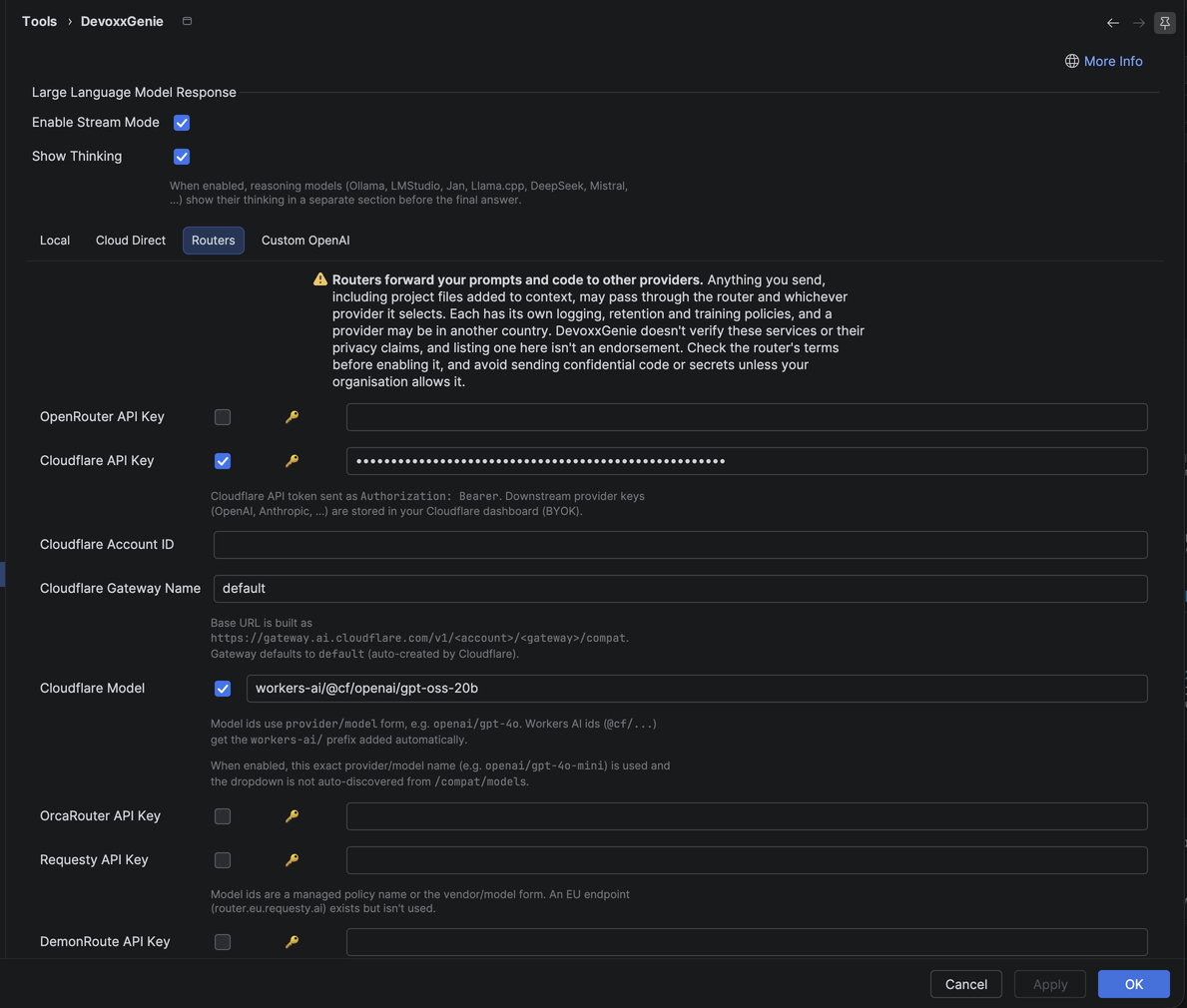
Each router row works the same way:
- Checkbox: decides whether the router appears in the chat's provider list. New routers are off by default.
- API Key: the key button next to the field opens the router's API key page. A key is only saved on Apply when you changed it.
- URL: the base URL for the model catalog and chat requests, pre-filled with the router's default. Change it to use an alternative endpoint, such as Requesty's EU router. Leave it blank to go back to the default. Only a changed URL is stored, so a router left on the default follows later changes to it. Changing the URL refreshes that router's model list.
A disabled router, or one without a key, sends no requests. If fetching a router's model catalog fails, DevoxxGenie waits 60 seconds before trying again. DevoxxGenie sends no affiliate, referral or attribution data to any router.
Cloudflare AI Gateway has its own fields (API token, account ID and gateway name) instead of a URL; see Cloudflare AI Gateway.
OpenRouter
OpenRouter is a unified API that provides access to many different models from various providers.
Setup
- Create an account at OpenRouter
- Generate an API key
- In DevoxxGenie settings, open the Routers tab, enable "OpenRouter" and paste your API key
- Select your preferred model from the extensive list
Configuration
- API Key: Your OpenRouter API key
- Model: Select from available models (OpenAI, Anthropic, Meta, Mistral, and many more)
- Parameters: Temperature, Top P
Advantages
- Single API for many different models
- Fallback options if a provider is unavailable
- Easy model comparisons
- Pay-as-you-go pricing
Check OpenRouter's pricing page for current rates.
OrcaRouter
OrcaRouter is an OpenAI-compatible router that offers models from several vendors through one API key.
DevoxxGenie talks to https://api.orcarouter.ai/v1 and builds the model list from its /models endpoint, keeping chat models and OrcaRouter's routing aliases such as orcarouter/auto. Image, video, embedding and text-to-speech models are left out. Context window and prices come from that catalog. A model that doesn't list a context window is assumed to have 128K, and one without prices shows no price.
Setup
- Create an account at OrcaRouter
- Generate an API key on the API Keys page of the console. Keys start with
sk-orca- - In DevoxxGenie settings, open the Routers tab, enable "OrcaRouter" and paste your API key
- Select a model from the list
Configuration
- API Key: Your OrcaRouter API key
- Model: Model ids use the
vendor/modelform, such asanthropic/claude-fable-5, or a routing alias such asorcarouter/auto - Parameters: Temperature, Top P, and the max output tokens from your chat model settings
OrcaRouter support was added for request #1291. The model list was checked against the live catalog, but chat requests haven't been tested against the live service.
Check the OrcaRouter model list for current rates.
UberLLM
UberLLM is an OpenAI-compatible router that offers models from several vendors through one API key.
DevoxxGenie talks to https://api.uberllm.dev/v1 and builds the model list from its /models endpoint, keeping models that return text. Context window and prices come from that catalog. A model that doesn't list a context window is assumed to have 128K.
Setup
- Create an account and an API key at uberllm.dev/signup. Credit is prepaid, with no monthly fee
- In DevoxxGenie settings, open the Routers tab, enable "UberLLM" and paste your API key
- Select a model from the list
Configuration
- API Key: Your UberLLM API key
- Model: Model ids use the
vendor/modelform, such asdeepseek/deepseek-v3.2oranthropic/claude-sonnet-4.5 - Parameters: Temperature, Top P, and the max output tokens from your chat model settings
Check the UberLLM model list for current rates.
Requesty
Requesty is an OpenAI-compatible router that offers models from several vendors through one API key.
DevoxxGenie talks to https://router.requesty.ai/v1 and builds the model list from the Requesty catalog (/v1/models/managed and /v1/models), keeping chat models only. Context window and prices come from that catalog.
Setup
- Create an account at Requesty
- Generate an API key at app.requesty.ai/api-keys
- In DevoxxGenie settings, open the Routers tab, enable "Requesty" and paste your API key
- Select a model from the list
Configuration
- API Key: Your Requesty API key
- Model: Model ids are either a Requesty managed policy such as
claude-sonnet-4-5, or thevendor/modelform such asopenai/gpt-4o-minioranthropic/claude-sonnet-4-5 - Parameters: Temperature, Top P
DevoxxGenie uses the global endpoint by default. To route through Requesty's EU endpoint, set the Requesty URL on the Routers tab to https://router.eu.requesty.ai/v1. See the Requesty docs for region details.
Requesty support was contributed by Thibault Jaigu (#1303). It hasn't been tested against the live service by the maintainers.
Check the Requesty model list for current rates.
DemonRoute
DemonRoute is an OpenAI-compatible router. DevoxxGenie talks to https://api.demonroute.com/v1 and reads the model list from its /models endpoint.
Setup
- Create an account and an API key at demonroute.com
- In DevoxxGenie settings, open the Routers tab, enable "DemonRoute" and paste your API key
- Select a model from the list
Configuration
- API Key: Your DemonRoute API key
- Model: Select from the models the endpoint reports
- Parameters: Temperature, Top P, and the max output tokens from your chat model settings
The /models endpoint is assumed to return the usual OpenAI-style list without prices or context windows, so DevoxxGenie assumes a 128K context window and treats the input cost as $0. The model dropdown therefore shows no price, and the project scan cost estimate reports $0.00000.
DemonRoute support was added for requests #1340 and #1378. It hasn't been tested against the live service.
Cloudflare AI Gateway
Cloudflare AI Gateway is not a model provider itself — it sits in front of your existing providers (OpenAI, Anthropic, Google, Workers AI, and dozens more) and gives you a single endpoint with caching, rate limiting, spend controls, and per-request analytics.
DevoxxGenie talks to the gateway's OpenAI-compatible /compat endpoint, so every model you've wired up behind the gateway becomes available in the plugin.
Setup
- Create (or reuse) a gateway in the Cloudflare AI Gateway dashboard. A gateway named
defaultis created automatically on first authenticated request. - Store the provider API keys you want to use in the Cloudflare dashboard (BYOK — Bring Your Own Keys).
- Generate a Cloudflare API token at dash.cloudflare.com/profile/api-tokens.
- In DevoxxGenie settings, open the Routers tab and enable "Cloudflare".
- Enter your API Key, Account ID, and Gateway Name.
- Select your preferred model from the auto-populated list.
Configuration
- Cloudflare API Key: Your Cloudflare API token, sent as
Authorization: Bearer - Cloudflare Account ID: Your account identifier
- Cloudflare Gateway Name:
default, or the name of a gateway you created - Model: Select from the auto-populated list, or enable the model name override to type a model id directly
- Parameters: Temperature, Top P, Maximum tokens
The base URL is assembled for you from the account id and gateway name — you never type it:
https://gateway.ai.cloudflare.com/v1/<account-id>/<gateway>/compat
This provider uses Cloudflare's single-token (BYOK) model. You give DevoxxGenie only your Cloudflare API token; the downstream provider keys (OpenAI, Anthropic, ...) live in your Cloudflare dashboard, where the gateway injects them. You never paste an OpenAI or Anthropic key into DevoxxGenie for this provider.
Model discovery uses a fast best-effort probe of the gateway's /models endpoint. If your gateway doesn't expose that endpoint, or you already know the exact model id you want, enable the model name override and type it in — this skips discovery entirely.
Model naming
The /compat endpoint addresses models as provider/model — the provider prefix tells the gateway where to route the request:
openai/gpt-4o
anthropic/claude-4-5-sonnet
workers-ai/@cf/meta/llama-3.3-70b-instruct-fp8-fast
A bare model id (e.g. kimi-k2.6) cannot be routed and fails with 400 AiGatewayError code 2005/2008. Workers AI ids copied from the Cloudflare dashboard start with @cf/ — DevoxxGenie adds the missing workers-ai/ prefix for those automatically, so @cf/openai/gpt-oss-20b is sent as workers-ai/@cf/openai/gpt-oss-20b. For every other provider, include the prefix yourself when using the model name override.
Advantages
- One key, every provider — no per-provider setup inside the plugin
- Caching of identical requests, so repeated prompts don't cost you twice
- Rate limiting and spend controls you own, rather than the provider's
- Analytics and logs for every request (latency, tokens, cost) in the Cloudflare dashboard
- Centralized key management — provider keys live in Cloudflare, not scattered across tools
Cloudflare's /compat/models endpoint doesn't report context length or pricing, so DevoxxGenie assumes a 128K context window and shows no cost estimate for gateway models. Use the Cloudflare dashboard for authoritative per-request cost data.