<?xml version="1.0" encoding="utf-8"?>
<feed xmlns="http://www.w3.org/2005/Atom">
    <id>https://genie.devoxx.com/blog</id>
    <title>DevoxxGenie Blog</title>
    <updated>2026-06-04T00:00:00.000Z</updated>
    <generator>https://github.com/jpmonette/feed</generator>
    <link rel="alternate" href="https://genie.devoxx.com/blog"/>
    <subtitle>Stay up to date with the latest DevoxxGenie news and features</subtitle>
    <icon>https://genie.devoxx.com/img/favicon.ico</icon>
    <rights>Copyright © 2026 Devoxx</rights>
    <entry>
        <title type="html"><![CDATA[Why We Turned RAG Into a Tool]]></title>
        <id>https://genie.devoxx.com/blog/rag-semantic-search-tool</id>
        <link href="https://genie.devoxx.com/blog/rag-semantic-search-tool"/>
        <updated>2026-06-04T00:00:00.000Z</updated>
        <summary type="html"><![CDATA[When agent-mode LLMs started ignoring our carefully injected semantic context, we stopped wallpapering prompts and exposed RAG as a proper tool. Here's how we built semantic_search, web_search, and why agentic retrieval needs to be orchestrated, not injected.]]></summary>
        <content type="html"><![CDATA[<p>For months, DevoxxGenie's RAG pipeline worked beautifully — as long as you stayed in chat mode. Index your project into ChromaDB, ask a question, and the most relevant code chunks would automatically appear in the prompt as a <code>&lt;SemanticContext&gt;</code> block. It was invisible, automatic, and effective.</p>
<p>Then we shipped Agent Mode, and RAG fell off a cliff.</p>
<p>Users would ask conceptual questions like <em>"which slides discuss MCP?"</em> or <em>"where do we explain the indexing pipeline?"</em> and the agent would ignore the rich semantic context we had just injected. Instead, it reached for <code>search_files</code> — a regex grep — and returned nonsense. The semantic context had become wallpaper: present, but unseen.</p>
<p><img decoding="async" loading="lazy" alt="RAG Feature Overview" src="data:image/png;base64,iVBORw0KGgoAAAANSUhEUgAAAAEAAAABCAQAAAC1HAwCAAAAC0lEQVR42mNkYAAAAAYAAjCB0C8AAAAASUVORK5CYII=" width="1" height="1" class="img_ev3q"></p>
<h2 class="anchor anchorTargetStickyNavbar_Vzrq" id="the-tool-bias-problem">The tool bias problem<a href="https://genie.devoxx.com/blog/rag-semantic-search-tool#the-tool-bias-problem" class="hash-link" aria-label="Direct link to The tool bias problem" title="Direct link to The tool bias problem" translate="no">​</a></h2>
<p>Agent-mode LLMs are trained to prefer tools over passive context. When both a <code>&lt;SemanticContext&gt;</code> block and a <code>search_files</code> tool are available, the model almost always chooses the tool. It's not being lazy; it's doing exactly what the agent loop incentivises. The problem is that regex grep is terrible for conceptual queries. <em>"Authentication flow"</em> doesn't match <code>auth.*flow</code> in any file — but it embeds close to the actual auth code.</p>
<p>We tried making the tool descriptions more persuasive. We tried bigger models. Smaller models still defaulted to grep. The only reliable fix was to stop fighting the bias and <strong>lean into it</strong>: if the model wants a tool, give it a tool.</p>
<h2 class="anchor anchorTargetStickyNavbar_Vzrq" id="from-injection-to-orchestration">From injection to orchestration<a href="https://genie.devoxx.com/blog/rag-semantic-search-tool#from-injection-to-orchestration" class="hash-link" aria-label="Direct link to From injection to orchestration" title="Direct link to From injection to orchestration" translate="no">​</a></h2>
<p>The <code>semantic_search</code> tool (task-221, refined in task-222) does exactly what the passive injection did — embed the query, search ChromaDB, return the top-K chunks — but exposes it through the agent tool loop instead of prepending it to the prompt.</p>
<p>The key design decision was <strong>mutual exclusion</strong>: when Agent mode is on, passive injection is completely suppressed. The LLM sees the index only through the tool. This avoids three problems at once:</p>
<ol>
<li class=""><strong>Token waste</strong> — no duplicate context in the prompt</li>
<li class=""><strong>Contradictory sources</strong> — the LLM can't get confused by injected chunks that differ from tool-retrieved ones</li>
<li class=""><strong>Tool bias</strong> — the model has no choice but to use the tool if it wants semantic retrieval</li>
</ol>
<p>Of course, the agent still has <code>search_files</code> for exact-string lookups, <code>list_files</code> for browsing, and the PSI tools for symbol navigation. The point isn't to replace those. It's to give the agent an <em>orchestration layer</em>: semantic search for meaning, grep for literals, PSI for symbols.</p>
<h2 class="anchor anchorTargetStickyNavbar_Vzrq" id="query-expansion-and-the-meta-query-trap">Query expansion and the meta-query trap<a href="https://genie.devoxx.com/blog/rag-semantic-search-tool#query-expansion-and-the-meta-query-trap" class="hash-link" aria-label="Direct link to Query expansion and the meta-query trap" title="Direct link to Query expansion and the meta-query trap" translate="no">​</a></h2>
<p>Conceptual queries have a second problem: they embed like conversational boilerplate. Ask <em>"where do we discuss authentication?"</em> and the embedding lands near chit-chat, not near <code>AuthenticationService.java</code>.</p>
<p>Our answer was optional <strong>query expansion</strong> via <code>ExpandingQueryTransformer</code>. The query is paraphrased into multiple variants, each searched independently, and the results fused with <strong>Reciprocal Rank Fusion</strong> (RRF, k=60). A single meta-query becomes a small retrieval ensemble. It's overkill for "find the User class" and essential for "where do we explain the indexing pipeline?"</p>
<h2 class="anchor anchorTargetStickyNavbar_Vzrq" id="the-nudge-that-smaller-models-need">The nudge that smaller models need<a href="https://genie.devoxx.com/blog/rag-semantic-search-tool#the-nudge-that-smaller-models-need" class="hash-link" aria-label="Direct link to The nudge that smaller models need" title="Direct link to The nudge that smaller models need" translate="no">​</a></h2>
<p>Even with the tool registered, we noticed smaller models still sometimes defaulted to <code>search_files</code> for conceptual queries. Tool descriptions alone weren't enough. So when Agent mode + RAG are both enabled, DevoxxGenie now injects a dedicated <code>&lt;RAG_INSTRUCTION&gt;</code> system-prompt fragment:</p>
<blockquote>
<p>Prefer <code>semantic_search</code> for conceptual queries (e.g. "which slides discuss X", "where do we explain Y").</p>
</blockquote>
<p>This lives outside the tool schema, in the system prompt itself, where smaller models are more likely to honour it. It's a small patch, but it meaningfully improved tool selection on models like Qwen 2.5 and Gemma.</p>
<h2 class="anchor anchorTargetStickyNavbar_Vzrq" id="error-handling-as-a-first-class-concern">Error handling as a first-class concern<a href="https://genie.devoxx.com/blog/rag-semantic-search-tool#error-handling-as-a-first-class-concern" class="hash-link" aria-label="Direct link to Error handling as a first-class concern" title="Direct link to Error handling as a first-class concern" translate="no">​</a></h2>
<p>One subtle requirement: the tool must fail gracefully. If ChromaDB is unreachable, throwing an exception breaks the agent loop. Instead, <code>SemanticSearchToolExecutor</code> returns a descriptive error string:</p>
<div class="language-text codeBlockContainer_Ckt0 theme-code-block" style="--prism-color:#F8F8F2;--prism-background-color:#282A36"><div class="codeBlockContent_QJqH"><pre tabindex="0" class="prism-code language-text codeBlock_bY9V thin-scrollbar" style="color:#F8F8F2;background-color:#282A36"><code class="codeBlockLines_e6Vv"><div class="token-line" style="color:#F8F8F2"><span class="token plain">Error: ChromaDB is not available. Docker container may not be running.</span><br></div></code></pre></div></div>
<p>The agent reads this, understands the index is down, and falls back to <code>search_files</code> or PSI tools. No modal dialogs, no stack traces in the chat window. Because <code>semantic_search</code> is classified as a <strong>read-only tool</strong>, it's also auto-approved — no approval friction on every call.</p>
<h2 class="anchor anchorTargetStickyNavbar_Vzrq" id="the-user-control-layer">The user-control layer<a href="https://genie.devoxx.com/blog/rag-semantic-search-tool#the-user-control-layer" class="hash-link" aria-label="Direct link to The user-control layer" title="Direct link to The user-control layer" translate="no">​</a></h2>
<p>Not everyone wants the agent to have semantic search. We kept the control granular: <code>semantic_search</code> appears in <strong>Settings → Agent Mode → Built-in Tools</strong> as an individual checkbox, independent of the master RAG switch. You can keep passive injection active for chat mode while excluding the tool from the agent's toolbox, or vice versa.</p>
<h2 class="anchor anchorTargetStickyNavbar_Vzrq" id="architecture-in-three-layers">Architecture in three layers<a href="https://genie.devoxx.com/blog/rag-semantic-search-tool#architecture-in-three-layers" class="hash-link" aria-label="Direct link to Architecture in three layers" title="Direct link to Architecture in three layers" translate="no">​</a></h2>
<p>The implementation is thin by design — it reuses the existing RAG stack rather than building a parallel one:</p>
<table><thead><tr><th>Layer</th><th>Component</th><th>Role</th></tr></thead><tbody><tr><td><strong>Storage</strong></td><td><code>ProjectIndexerService</code> + ChromaDB</td><td>Language-aware chunking, content-hash manifest, batched embeddings</td></tr><tr><td><strong>Retrieval</strong></td><td><code>SemanticSearchService</code></td><td>Embedding, optional query expansion, RRF fusion, score filtering</td></tr><tr><td><strong>Agent glue</strong></td><td><code>SemanticSearchToolExecutor</code></td><td>Formats results for LLM consumption, truncates snippets, returns safe errors</td></tr></tbody></table>
<p>Registration happens in <code>BuiltInToolProvider</code>: the tool is added only when <code>ragEnabled</code> is true. Suppression of passive injection lives in <code>MessageCreationService.shouldInjectPassiveRagContext()</code>. The <code>&lt;RAG_INSTRUCTION&gt;</code> fragment is injected by <code>ChatMemoryManager</code>. Each concern is separated, so the feature can be disabled or extended without touching the core RAG pipeline.</p>
<h2 class="anchor anchorTargetStickyNavbar_Vzrq" id="a-third-retrieval-tier-web_search">A third retrieval tier: web_search<a href="https://genie.devoxx.com/blog/rag-semantic-search-tool#a-third-retrieval-tier-web_search" class="hash-link" aria-label="Direct link to A third retrieval tier: web_search" title="Direct link to A third retrieval tier: web_search" translate="no">​</a></h2>
<p><code>semantic_search</code> covers your local codebase. <code>search_files</code> covers exact strings. But sometimes the right answer isn't in the project at all — it's in a library changelog, a Stack Overflow thread, or a vendor API reference. That's the gap the new <strong><code>web_search</code> tool</strong> fills (task-223).</p>
<p>When <code>web_search</code> is enabled in <strong>Settings → Agent Mode → Built-in Tools</strong>, the agent gains access to live web search backed by whichever provider you've already configured in <strong>Settings → Web Search</strong>: <a href="https://tavily.com/" target="_blank" rel="noopener noreferrer" class="">Tavily</a> or <a href="https://programmablesearchengine.google.com/" target="_blank" rel="noopener noreferrer" class="">Google Custom Search</a>. No new API key management — it reuses the keys you've already set up for the <code>/search</code> slash command.</p>
<p>The tool returns raw structured results — title, URL, and snippet — so the agent can reason over the sources directly:</p>
<div class="language-text codeBlockContainer_Ckt0 theme-code-block" style="--prism-color:#F8F8F2;--prism-background-color:#282A36"><div class="codeBlockContent_QJqH"><pre tabindex="0" class="prism-code language-text codeBlock_bY9V thin-scrollbar" style="color:#F8F8F2;background-color:#282A36"><code class="codeBlockLines_e6Vv"><div class="token-line" style="color:#F8F8F2"><span class="token plain">Found 3 results for "langchain4j ChromaDB 0.6 migration":</span><br></div><div class="token-line" style="color:#F8F8F2"><span class="token plain" style="display:inline-block"></span><br></div><div class="token-line" style="color:#F8F8F2"><span class="token plain">1. LangChain4j 0.37 release notes</span><br></div><div class="token-line" style="color:#F8F8F2"><span class="token plain">   URL: https://github.com/langchain4j/langchain4j/releases/tag/0.37.0</span><br></div><div class="token-line" style="color:#F8F8F2"><span class="token plain">   ChromaDB store updated to API v2 (0.6.x). Collection creation now uses ...</span><br></div><div class="token-line" style="color:#F8F8F2"><span class="token plain" style="display:inline-block"></span><br></div><div class="token-line" style="color:#F8F8F2"><span class="token plain">2. ...</span><br></div></code></pre></div></div>
<p>The tool picks the provider automatically: Tavily is tried first if its key is present; Google Custom Search is used as the fallback. If neither is configured, the tool returns a descriptive error string — the agent degrades gracefully, just like <code>semantic_search</code> does when ChromaDB is unreachable.</p>
<p>When a result looks worth reading in full, the agent can follow up with <code>fetch_page</code>, which fetches the complete content of a webpage given a URL — making <code>web_search</code> → <code>fetch_page</code> a natural two-step pattern for retrieving and reading external documentation.</p>
<p>Like its sibling tools, <code>web_search</code> is classified as <strong>read-only</strong> and is therefore auto-approved — no per-call confirmation dialog when auto-approve read-only is on.</p>
<h3 class="anchor anchorTargetStickyNavbar_Vzrq" id="the-three-tier-retrieval-stack">The three-tier retrieval stack<a href="https://genie.devoxx.com/blog/rag-semantic-search-tool#the-three-tier-retrieval-stack" class="hash-link" aria-label="Direct link to The three-tier retrieval stack" title="Direct link to The three-tier retrieval stack" translate="no">​</a></h3>
<p>With all three tools enabled, the agent now has a complete retrieval stack:</p>
<table><thead><tr><th>Tool</th><th>Best for</th></tr></thead><tbody><tr><td><code>semantic_search</code></td><td>Conceptual queries over your indexed codebase</td></tr><tr><td><code>search_files</code></td><td>Exact-string or regex lookups in project files</td></tr><tr><td><code>web_search</code></td><td>Documentation, release notes, external references</td></tr></tbody></table>
<p>The LLM decides which tier to invoke based on the query. Conceptual questions about your own code go to <code>semantic_search</code>. Grep-style lookups go to <code>search_files</code>. Anything that requires up-to-date external knowledge goes to <code>web_search</code>.</p>
<h2 class="anchor anchorTargetStickyNavbar_Vzrq" id="what-changed-what-didnt">What changed, what didn't<a href="https://genie.devoxx.com/blog/rag-semantic-search-tool#what-changed-what-didnt" class="hash-link" aria-label="Direct link to What changed, what didn't" title="Direct link to What changed, what didn't" translate="no">​</a></h2>
<p>The RAG pipeline itself is unchanged. It still indexes via Ollama's <code>nomic-embed-text</code>, still stores vectors in ChromaDB v0.6.2, still filters low-content chunks at index time, still debounces re-indexing on save. What changed is the <strong>interface surface</strong>: from prompt injection to tool contract — and now, a third tool tier that reaches beyond the local project entirely.</p>
<p>If you're already using RAG in chat mode, nothing breaks. If you turn on Agent mode, the same index becomes queryable on demand. And if you want the gory setup details — Docker, Ollama, indexing, configuration — the <a class="" href="https://genie.devoxx.com/docs/features/rag">RAG docs</a> have you covered.</p>
<p><strong>Install:</strong> <a href="https://plugins.jetbrains.com/plugin/24169-devoxxgenie" target="_blank" rel="noopener noreferrer" class="">JetBrains Marketplace</a> · <a href="https://github.com/devoxx/DevoxxGenieIDEAPlugin" target="_blank" rel="noopener noreferrer" class="">GitHub</a></p>]]></content>
        <author>
            <name>Stephan Janssen</name>
            <uri>https://github.com/stephanj</uri>
        </author>
        <category label="rag" term="rag"/>
        <category label="semantic search" term="semantic search"/>
        <category label="web search" term="web search"/>
        <category label="agent mode" term="agent mode"/>
        <category label="chromadb" term="chromadb"/>
        <category label="ollama" term="ollama"/>
        <category label="tavily" term="tavily"/>
        <category label="intellij idea" term="intellij idea"/>
        <category label="open source" term="open source"/>
    </entry>
    <entry>
        <title type="html"><![CDATA[From Slash Commands to LLM-Activated Skills]]></title>
        <id>https://genie.devoxx.com/blog/commands-and-skills</id>
        <link href="https://genie.devoxx.com/blog/commands-and-skills"/>
        <updated>2026-05-18T00:00:00.000Z</updated>
        <summary type="html"><![CDATA[DevoxxGenie now supports portable SKILL.md files shared with Claude Code, Codex and Gemini. They are discovered automatically and activated by the LLM mid-conversation. Here's how it works under the hood with Langchain4j.]]></summary>
        <content type="html"><![CDATA[<p>DevoxxGenie has long had a way to bottle up reusable prompts as <strong>Commands</strong>: the <code>/test</code>, <code>/explain</code>, <code>/review</code> style slash commands that expand a template before sending it to the model. With the latest release we are adding a second, complementary mechanism called <strong>Skills</strong>: portable <code>SKILL.md</code> files on disk that the <em>LLM itself</em> decides to activate while it is thinking.</p>
<p>The big difference: <strong>Commands are typed by you, Skills are picked by the model</strong>. And because Skills live in the same directories that Claude Code, Codex and Gemini's <code>.agents</code>-aware tools already use, the same file can teach all four assistants the same playbook.</p>
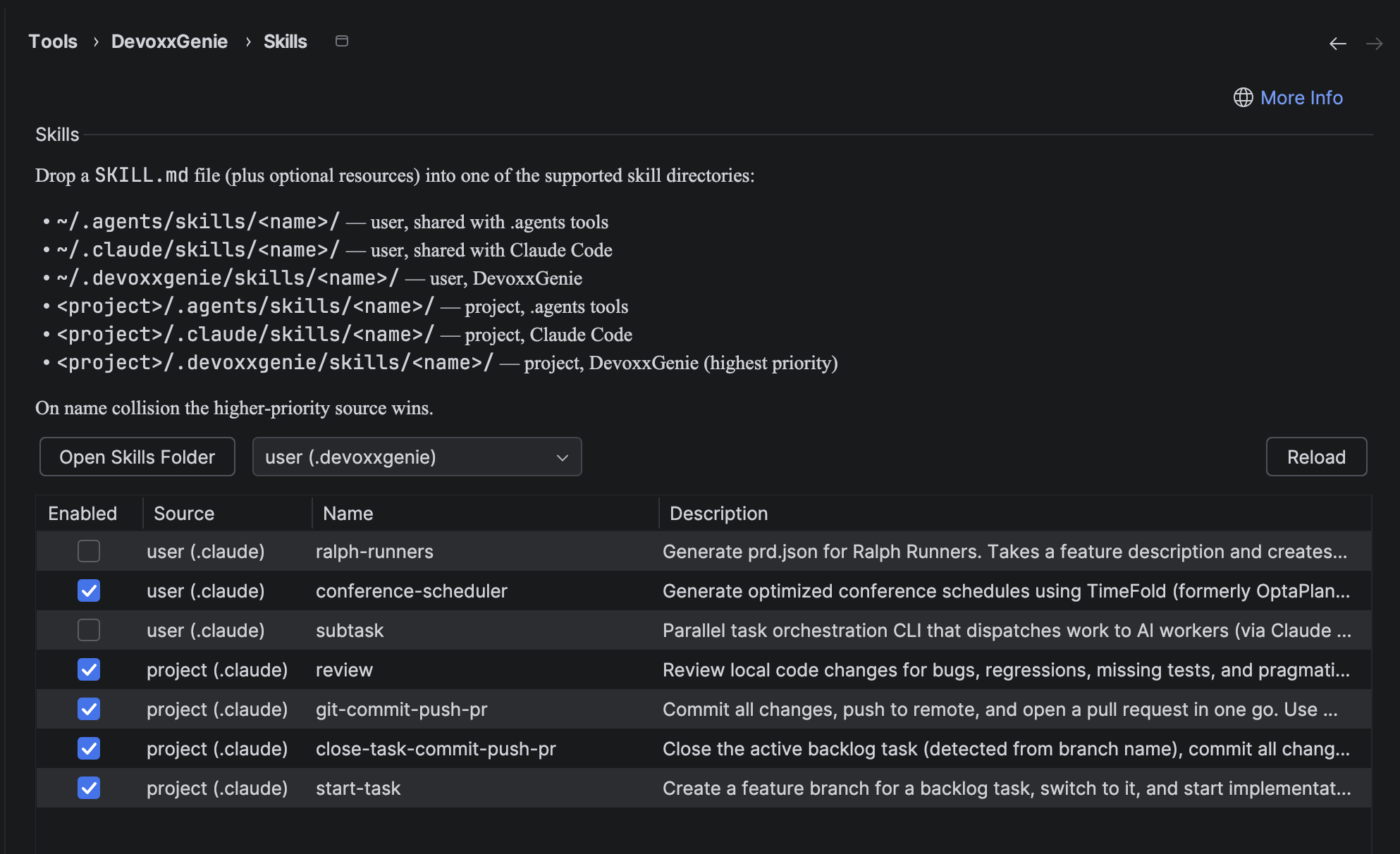
<p><img decoding="async" loading="lazy" alt="DevoxxGenie Skills settings panel" src="https://genie.devoxx.com/assets/images/Skills-e8df6a8168b4eda13999e9cc81cee9aa.png" width="1986" height="1212" class="img_ev3q"></p>
<h2 class="anchor anchorTargetStickyNavbar_Vzrq" id="commands-the-slash-command-you-already-know">Commands: the slash-command you already know<a href="https://genie.devoxx.com/blog/commands-and-skills#commands-the-slash-command-you-already-know" class="hash-link" aria-label="Direct link to Commands: the slash-command you already know" title="Direct link to Commands: the slash-command you already know" translate="no">​</a></h2>
<p>Commands are a pre-LLM text substitution macro. You type <code>/explain</code>, DevoxxGenie expands the stored template (optionally substituting <code>$ARGUMENT</code>), and the resulting prompt is sent to the model. The model never sees the <code>/explain</code>; it just sees the expanded text.</p>
<p>That makes Commands ideal for things you trigger consciously and repeatedly:</p>
<table><thead><tr><th>Command</th><th>What it sends</th></tr></thead><tbody><tr><td><code>/test</code></td><td>"Generate unit tests for the selected code…"</td></tr><tr><td><code>/explain</code></td><td>"Explain the selected code…"</td></tr><tr><td><code>/review</code></td><td>"Review the selected code and suggest improvements…"</td></tr><tr><td><code>/find</code></td><td>RAG-backed semantic search across your project</td></tr><tr><td><code>/init</code></td><td>Generate a <code>DEVOXXGENIE.md</code> project description file</td></tr></tbody></table>
<p>You add your own in <strong>Settings → Tools → DevoxxGenie → Commands</strong>. Everything happens locally, with no tool call and no agent loop required.</p>
<p>See the full reference in the <a class="" href="https://genie.devoxx.com/docs/features/commands">Commands docs</a>.</p>
<h2 class="anchor anchorTargetStickyNavbar_Vzrq" id="skills-capabilities-the-llm-activates-itself">Skills: capabilities the LLM activates itself<a href="https://genie.devoxx.com/blog/commands-and-skills#skills-capabilities-the-llm-activates-itself" class="hash-link" aria-label="Direct link to Skills: capabilities the LLM activates itself" title="Direct link to Skills: capabilities the LLM activates itself" translate="no">​</a></h2>
<p>Skills flip the workflow around. Instead of you typing a slash, you drop a <code>SKILL.md</code> file into one of the well-known skill directories. DevoxxGenie scans those directories, hands a one-line index to the LLM in the system prompt, and the model decides, based on what you're asking, whether to call <code>activate_skill("…")</code> to pull in the full body of the skill mid-conversation.</p>
<p>A minimal skill looks like this:</p>
<div class="language-text codeBlockContainer_Ckt0 theme-code-block" style="--prism-color:#F8F8F2;--prism-background-color:#282A36"><div class="codeBlockContent_QJqH"><pre tabindex="0" class="prism-code language-text codeBlock_bY9V thin-scrollbar" style="color:#F8F8F2;background-color:#282A36"><code class="codeBlockLines_e6Vv"><div class="token-line" style="color:#F8F8F2"><span class="token plain">~/.claude/skills/refactor-helper/SKILL.md</span><br></div></code></pre></div></div>
<div class="language-markdown codeBlockContainer_Ckt0 theme-code-block" style="--prism-color:#F8F8F2;--prism-background-color:#282A36"><div class="codeBlockContent_QJqH"><pre tabindex="0" class="prism-code language-markdown codeBlock_bY9V thin-scrollbar" style="color:#F8F8F2;background-color:#282A36"><code class="codeBlockLines_e6Vv"><div class="token-line" style="color:#F8F8F2"><span class="token front-matter-block punctuation" style="color:rgb(248, 248, 242)">---</span><span class="token front-matter-block"></span><br></div><div class="token-line" style="color:#F8F8F2"><span class="token front-matter-block"></span><span class="token front-matter-block front-matter yaml language-yaml key atrule">name</span><span class="token front-matter-block front-matter yaml language-yaml punctuation" style="color:rgb(248, 248, 242)">:</span><span class="token front-matter-block front-matter yaml language-yaml"> refactor</span><span class="token front-matter-block front-matter yaml language-yaml punctuation" style="color:rgb(248, 248, 242)">-</span><span class="token front-matter-block front-matter yaml language-yaml">helper</span><br></div><div class="token-line" style="color:#F8F8F2"><span class="token front-matter-block front-matter yaml language-yaml"></span><span class="token front-matter-block front-matter yaml language-yaml key atrule">description</span><span class="token front-matter-block front-matter yaml language-yaml punctuation" style="color:rgb(248, 248, 242)">:</span><span class="token front-matter-block front-matter yaml language-yaml"> Guides a safe</span><span class="token front-matter-block front-matter yaml language-yaml punctuation" style="color:rgb(248, 248, 242)">,</span><span class="token front-matter-block front-matter yaml language-yaml"> step</span><span class="token front-matter-block front-matter yaml language-yaml punctuation" style="color:rgb(248, 248, 242)">-</span><span class="token front-matter-block front-matter yaml language-yaml">by</span><span class="token front-matter-block front-matter yaml language-yaml punctuation" style="color:rgb(248, 248, 242)">-</span><span class="token front-matter-block front-matter yaml language-yaml">step refactoring workflow with tests</span><span class="token front-matter-block"></span><br></div><div class="token-line" style="color:#F8F8F2"><span class="token front-matter-block"></span><span class="token front-matter-block punctuation" style="color:rgb(248, 248, 242)">---</span><span class="token plain"></span><br></div><div class="token-line" style="color:#F8F8F2"><span class="token plain" style="display:inline-block"></span><br></div><div class="token-line" style="color:#F8F8F2"><span class="token plain"></span><span class="token title important punctuation" style="color:rgb(248, 248, 242)">#</span><span class="token title important"> Refactor Helper</span><span class="token plain"></span><br></div><div class="token-line" style="color:#F8F8F2"><span class="token plain" style="display:inline-block"></span><br></div><div class="token-line" style="color:#F8F8F2"><span class="token plain">When the user asks for a refactor:</span><br></div><div class="token-line" style="color:#F8F8F2"><span class="token plain" style="display:inline-block"></span><br></div><div class="token-line" style="color:#F8F8F2"><span class="token plain"></span><span class="token list punctuation" style="color:rgb(248, 248, 242)">1.</span><span class="token plain"> Read the target file and its references.</span><br></div><div class="token-line" style="color:#F8F8F2"><span class="token plain"></span><span class="token list punctuation" style="color:rgb(248, 248, 242)">2.</span><span class="token plain"> Sketch the refactor as a diff before applying it.</span><br></div><div class="token-line" style="color:#F8F8F2"><span class="token plain"></span><span class="token list punctuation" style="color:rgb(248, 248, 242)">3.</span><span class="token plain"> Run the project's tests after each step.</span><br></div><div class="token-line" style="color:#F8F8F2"><span class="token plain"></span><span class="token list punctuation" style="color:rgb(248, 248, 242)">4.</span><span class="token plain"> Stop and report if any test fails.</span><br></div></code></pre></div></div>
<p>The model sees only the <code>name</code>/<code>description</code> pair until it decides the skill is relevant. Then it calls <code>activate_skill("refactor-helper")</code>, gets the full Markdown body streamed back as a tool result, and continues the conversation with those instructions in context.</p>
<h2 class="anchor anchorTargetStickyNavbar_Vzrq" id="one-file-four-assistants-claude-codex-gemini-devoxxgenie">One file, four assistants: Claude, Codex, Gemini, DevoxxGenie<a href="https://genie.devoxx.com/blog/commands-and-skills#one-file-four-assistants-claude-codex-gemini-devoxxgenie" class="hash-link" aria-label="Direct link to One file, four assistants: Claude, Codex, Gemini, DevoxxGenie" title="Direct link to One file, four assistants: Claude, Codex, Gemini, DevoxxGenie" translate="no">​</a></h2>
<p>The real win is portability. DevoxxGenie scans <strong>six</strong> directories for skills, in increasing priority order:</p>
<table><thead><tr><th>Priority</th><th>Directory</th><th>Shared with</th></tr></thead><tbody><tr><td>1 <em>(lowest)</em></td><td><code>~/.agents/skills/&lt;name&gt;/</code></td><td>Codex, Gemini, other <code>.agents</code>-aware tools</td></tr><tr><td>2</td><td><code>~/.claude/skills/&lt;name&gt;/</code></td><td>Claude Code</td></tr><tr><td>3</td><td><code>~/.devoxxgenie/skills/&lt;name&gt;/</code></td><td>DevoxxGenie only</td></tr><tr><td>4</td><td><code>&lt;project&gt;/.agents/skills/&lt;name&gt;/</code></td><td>Codex, Gemini, other <code>.agents</code>-aware tools</td></tr><tr><td>5</td><td><code>&lt;project&gt;/.claude/skills/&lt;name&gt;/</code></td><td>Claude Code</td></tr><tr><td>6 <em>(highest)</em></td><td><code>&lt;project&gt;/.devoxxgenie/skills/&lt;name&gt;/</code></td><td>DevoxxGenie only</td></tr></tbody></table>
<p>Two rules govern collisions: <strong>project beats user</strong>, and within the same scope <strong><code>.devoxxgenie</code> beats <code>.claude</code> beats <code>.agents</code></strong>. The screenshot above shows the Settings panel listing exactly that mix: <code>subtask</code>, <code>ralph-runners</code>, <code>conference-scheduler</code>, <code>review</code>, <code>start-task</code>, <code>git-commit-push-pr</code>, all loaded from <code>~/.claude/skills/</code> and <code>&lt;project&gt;/.claude/skills/</code>, instantly visible to DevoxxGenie too.</p>
<p>This is the whole point: keep a curated library of skills in <code>~/.claude/skills/</code>, get them everywhere. Override one per-project in <code>&lt;project&gt;/.devoxxgenie/skills/</code> when you need a team-specific variant.</p>
<h2 class="anchor anchorTargetStickyNavbar_Vzrq" id="under-the-hood-langchain4js-skills-api">Under the hood: Langchain4j's <code>Skills</code> API<a href="https://genie.devoxx.com/blog/commands-and-skills#under-the-hood-langchain4js-skills-api" class="hash-link" aria-label="Direct link to under-the-hood-langchain4js-skills-api" title="Direct link to under-the-hood-langchain4js-skills-api" translate="no">​</a></h2>
<p>Skills support in DevoxxGenie is a thin layer on top of the <strong><code>langchain4j-skills</code></strong> module, the same Java framework that already powers the plugin's chat, agent and MCP integrations.</p>
<div class="language-kotlin codeBlockContainer_Ckt0 theme-code-block" style="--prism-color:#F8F8F2;--prism-background-color:#282A36"><div class="codeBlockContent_QJqH"><pre tabindex="0" class="prism-code language-kotlin codeBlock_bY9V thin-scrollbar" style="color:#F8F8F2;background-color:#282A36"><code class="codeBlockLines_e6Vv"><div class="token-line" style="color:#F8F8F2"><span class="token comment" style="color:rgb(98, 114, 164)">// build.gradle.kts</span><span class="token plain"></span><br></div><div class="token-line" style="color:#F8F8F2"><span class="token plain"></span><span class="token function" style="color:rgb(80, 250, 123)">implementation</span><span class="token punctuation" style="color:rgb(248, 248, 242)">(</span><span class="token string-literal singleline string" style="color:rgb(255, 121, 198)">"dev.langchain4j:langchain4j-skills:1.14.0-beta24"</span><span class="token punctuation" style="color:rgb(248, 248, 242)">)</span><br></div></code></pre></div></div>
<p>The whole pipeline is three building blocks:</p>
<h3 class="anchor anchorTargetStickyNavbar_Vzrq" id="1-load-skillmd-files-from-disk">1. Load <code>SKILL.md</code> files from disk<a href="https://genie.devoxx.com/blog/commands-and-skills#1-load-skillmd-files-from-disk" class="hash-link" aria-label="Direct link to 1-load-skillmd-files-from-disk" title="Direct link to 1-load-skillmd-files-from-disk" translate="no">​</a></h3>
<div class="language-java codeBlockContainer_Ckt0 theme-code-block" style="--prism-color:#F8F8F2;--prism-background-color:#282A36"><div class="codeBlockContent_QJqH"><pre tabindex="0" class="prism-code language-java codeBlock_bY9V thin-scrollbar" style="color:#F8F8F2;background-color:#282A36"><code class="codeBlockLines_e6Vv"><div class="token-line" style="color:#F8F8F2"><span class="token keyword" style="color:rgb(189, 147, 249);font-style:italic">import</span><span class="token plain"> </span><span class="token import namespace">dev</span><span class="token import namespace punctuation" style="color:rgb(248, 248, 242)">.</span><span class="token import namespace">langchain4j</span><span class="token import namespace punctuation" style="color:rgb(248, 248, 242)">.</span><span class="token import namespace">skills</span><span class="token import namespace punctuation" style="color:rgb(248, 248, 242)">.</span><span class="token import class-name">FileSystemSkill</span><span class="token punctuation" style="color:rgb(248, 248, 242)">;</span><span class="token plain"></span><br></div><div class="token-line" style="color:#F8F8F2"><span class="token plain"></span><span class="token keyword" style="color:rgb(189, 147, 249);font-style:italic">import</span><span class="token plain"> </span><span class="token import namespace">dev</span><span class="token import namespace punctuation" style="color:rgb(248, 248, 242)">.</span><span class="token import namespace">langchain4j</span><span class="token import namespace punctuation" style="color:rgb(248, 248, 242)">.</span><span class="token import namespace">skills</span><span class="token import namespace punctuation" style="color:rgb(248, 248, 242)">.</span><span class="token import class-name">FileSystemSkillLoader</span><span class="token punctuation" style="color:rgb(248, 248, 242)">;</span><span class="token plain"></span><br></div><div class="token-line" style="color:#F8F8F2"><span class="token plain" style="display:inline-block"></span><br></div><div class="token-line" style="color:#F8F8F2"><span class="token plain"></span><span class="token class-name">List</span><span class="token generics punctuation" style="color:rgb(248, 248, 242)">&lt;</span><span class="token generics class-name">FileSystemSkill</span><span class="token generics punctuation" style="color:rgb(248, 248, 242)">&gt;</span><span class="token plain"> skills </span><span class="token operator">=</span><span class="token plain"> </span><span class="token class-name">FileSystemSkillLoader</span><span class="token punctuation" style="color:rgb(248, 248, 242)">.</span><span class="token function" style="color:rgb(80, 250, 123)">loadSkills</span><span class="token punctuation" style="color:rgb(248, 248, 242)">(</span><span class="token plain">dir</span><span class="token punctuation" style="color:rgb(248, 248, 242)">)</span><span class="token punctuation" style="color:rgb(248, 248, 242)">;</span><br></div></code></pre></div></div>
<p>DevoxxGenie does this for each of the six directories above, merging the results into a single map and letting higher-priority sources overwrite lower ones (with a warning logged on collision).</p>
<h3 class="anchor anchorTargetStickyNavbar_Vzrq" id="2-wrap-them-in-a-skills-instance">2. Wrap them in a <code>Skills</code> instance<a href="https://genie.devoxx.com/blog/commands-and-skills#2-wrap-them-in-a-skills-instance" class="hash-link" aria-label="Direct link to 2-wrap-them-in-a-skills-instance" title="Direct link to 2-wrap-them-in-a-skills-instance" translate="no">​</a></h3>
<div class="language-java codeBlockContainer_Ckt0 theme-code-block" style="--prism-color:#F8F8F2;--prism-background-color:#282A36"><div class="codeBlockContent_QJqH"><pre tabindex="0" class="prism-code language-java codeBlock_bY9V thin-scrollbar" style="color:#F8F8F2;background-color:#282A36"><code class="codeBlockLines_e6Vv"><div class="token-line" style="color:#F8F8F2"><span class="token keyword" style="color:rgb(189, 147, 249);font-style:italic">import</span><span class="token plain"> </span><span class="token import namespace">dev</span><span class="token import namespace punctuation" style="color:rgb(248, 248, 242)">.</span><span class="token import namespace">langchain4j</span><span class="token import namespace punctuation" style="color:rgb(248, 248, 242)">.</span><span class="token import namespace">skills</span><span class="token import namespace punctuation" style="color:rgb(248, 248, 242)">.</span><span class="token import class-name">Skill</span><span class="token punctuation" style="color:rgb(248, 248, 242)">;</span><span class="token plain"></span><br></div><div class="token-line" style="color:#F8F8F2"><span class="token plain"></span><span class="token keyword" style="color:rgb(189, 147, 249);font-style:italic">import</span><span class="token plain"> </span><span class="token import namespace">dev</span><span class="token import namespace punctuation" style="color:rgb(248, 248, 242)">.</span><span class="token import namespace">langchain4j</span><span class="token import namespace punctuation" style="color:rgb(248, 248, 242)">.</span><span class="token import namespace">skills</span><span class="token import namespace punctuation" style="color:rgb(248, 248, 242)">.</span><span class="token import class-name">Skills</span><span class="token punctuation" style="color:rgb(248, 248, 242)">;</span><span class="token plain"></span><br></div><div class="token-line" style="color:#F8F8F2"><span class="token plain" style="display:inline-block"></span><br></div><div class="token-line" style="color:#F8F8F2"><span class="token plain"></span><span class="token class-name">Skills</span><span class="token plain"> skills </span><span class="token operator">=</span><span class="token plain"> </span><span class="token class-name">Skills</span><span class="token punctuation" style="color:rgb(248, 248, 242)">.</span><span class="token function" style="color:rgb(80, 250, 123)">from</span><span class="token punctuation" style="color:rgb(248, 248, 242)">(</span><span class="token plain">activeSkills</span><span class="token punctuation" style="color:rgb(248, 248, 242)">)</span><span class="token punctuation" style="color:rgb(248, 248, 242)">;</span><span class="token plain"></span><br></div><div class="token-line" style="color:#F8F8F2"><span class="token plain" style="display:inline-block"></span><br></div><div class="token-line" style="color:#F8F8F2"><span class="token plain"></span><span class="token comment" style="color:rgb(98, 114, 164)">// One-line index for the system prompt (the LLM sees only this)</span><span class="token plain"></span><br></div><div class="token-line" style="color:#F8F8F2"><span class="token plain"></span><span class="token class-name">String</span><span class="token plain"> fragment </span><span class="token operator">=</span><span class="token plain"> skills</span><span class="token punctuation" style="color:rgb(248, 248, 242)">.</span><span class="token function" style="color:rgb(80, 250, 123)">formatAvailableSkills</span><span class="token punctuation" style="color:rgb(248, 248, 242)">(</span><span class="token punctuation" style="color:rgb(248, 248, 242)">)</span><span class="token punctuation" style="color:rgb(248, 248, 242)">;</span><br></div></code></pre></div></div>
<p>The fragment is appended to the system prompt under a heading like <em>"You have access to the following skills"</em>, so the model knows what's on the menu before the first user message.</p>
<h3 class="anchor anchorTargetStickyNavbar_Vzrq" id="3-expose-the-activation-tool-to-the-agent-loop">3. Expose the activation tool to the agent loop<a href="https://genie.devoxx.com/blog/commands-and-skills#3-expose-the-activation-tool-to-the-agent-loop" class="hash-link" aria-label="Direct link to 3. Expose the activation tool to the agent loop" title="Direct link to 3. Expose the activation tool to the agent loop" translate="no">​</a></h3>
<div class="language-java codeBlockContainer_Ckt0 theme-code-block" style="--prism-color:#F8F8F2;--prism-background-color:#282A36"><div class="codeBlockContent_QJqH"><pre tabindex="0" class="prism-code language-java codeBlock_bY9V thin-scrollbar" style="color:#F8F8F2;background-color:#282A36"><code class="codeBlockLines_e6Vv"><div class="token-line" style="color:#F8F8F2"><span class="token keyword" style="color:rgb(189, 147, 249);font-style:italic">import</span><span class="token plain"> </span><span class="token import namespace">dev</span><span class="token import namespace punctuation" style="color:rgb(248, 248, 242)">.</span><span class="token import namespace">langchain4j</span><span class="token import namespace punctuation" style="color:rgb(248, 248, 242)">.</span><span class="token import namespace">service</span><span class="token import namespace punctuation" style="color:rgb(248, 248, 242)">.</span><span class="token import namespace">tool</span><span class="token import namespace punctuation" style="color:rgb(248, 248, 242)">.</span><span class="token import class-name">ToolProvider</span><span class="token punctuation" style="color:rgb(248, 248, 242)">;</span><span class="token plain"></span><br></div><div class="token-line" style="color:#F8F8F2"><span class="token plain" style="display:inline-block"></span><br></div><div class="token-line" style="color:#F8F8F2"><span class="token plain"></span><span class="token comment" style="color:rgb(98, 114, 164)">// AgentToolProviderFactory.java</span><span class="token plain"></span><br></div><div class="token-line" style="color:#F8F8F2"><span class="token plain"></span><span class="token class-name">Skills</span><span class="token plain"> skills </span><span class="token operator">=</span><span class="token plain"> </span><span class="token class-name">SkillRegistry</span><span class="token punctuation" style="color:rgb(248, 248, 242)">.</span><span class="token function" style="color:rgb(80, 250, 123)">getInstance</span><span class="token punctuation" style="color:rgb(248, 248, 242)">(</span><span class="token plain">project</span><span class="token punctuation" style="color:rgb(248, 248, 242)">)</span><span class="token punctuation" style="color:rgb(248, 248, 242)">.</span><span class="token function" style="color:rgb(80, 250, 123)">buildSkills</span><span class="token punctuation" style="color:rgb(248, 248, 242)">(</span><span class="token punctuation" style="color:rgb(248, 248, 242)">)</span><span class="token punctuation" style="color:rgb(248, 248, 242)">;</span><span class="token plain"></span><br></div><div class="token-line" style="color:#F8F8F2"><span class="token plain"></span><span class="token keyword" style="color:rgb(189, 147, 249);font-style:italic">if</span><span class="token plain"> </span><span class="token punctuation" style="color:rgb(248, 248, 242)">(</span><span class="token plain">skills </span><span class="token operator">!=</span><span class="token plain"> </span><span class="token keyword" style="color:rgb(189, 147, 249);font-style:italic">null</span><span class="token punctuation" style="color:rgb(248, 248, 242)">)</span><span class="token plain"> </span><span class="token punctuation" style="color:rgb(248, 248, 242)">{</span><span class="token plain"></span><br></div><div class="token-line" style="color:#F8F8F2"><span class="token plain">    providers</span><span class="token punctuation" style="color:rgb(248, 248, 242)">.</span><span class="token function" style="color:rgb(80, 250, 123)">add</span><span class="token punctuation" style="color:rgb(248, 248, 242)">(</span><span class="token plain">skills</span><span class="token punctuation" style="color:rgb(248, 248, 242)">.</span><span class="token function" style="color:rgb(80, 250, 123)">toolProvider</span><span class="token punctuation" style="color:rgb(248, 248, 242)">(</span><span class="token punctuation" style="color:rgb(248, 248, 242)">)</span><span class="token punctuation" style="color:rgb(248, 248, 242)">)</span><span class="token punctuation" style="color:rgb(248, 248, 242)">;</span><span class="token plain">     </span><span class="token comment" style="color:rgb(98, 114, 164)">// adds activate_skill tool</span><span class="token plain"></span><br></div><div class="token-line" style="color:#F8F8F2"><span class="token plain">    log</span><span class="token punctuation" style="color:rgb(248, 248, 242)">.</span><span class="token function" style="color:rgb(80, 250, 123)">info</span><span class="token punctuation" style="color:rgb(248, 248, 242)">(</span><span class="token string" style="color:rgb(255, 121, 198)">"Skills tool provider included in agent tool chain"</span><span class="token punctuation" style="color:rgb(248, 248, 242)">)</span><span class="token punctuation" style="color:rgb(248, 248, 242)">;</span><span class="token plain"></span><br></div><div class="token-line" style="color:#F8F8F2"><span class="token plain"></span><span class="token punctuation" style="color:rgb(248, 248, 242)">}</span><br></div></code></pre></div></div>
<p><code>skills.toolProvider()</code> returns a Langchain4j <code>ToolProvider</code> exposing the <code>activate_skill</code> tool (plus an optional <code>read_skill_resource</code> helper). It is added alongside DevoxxGenie's built-in agent tools (<code>read_file</code>, <code>write_file</code>, <code>run_command</code>, <code>parallel_explore</code> and so on) and any MCP tool providers, then composed and wrapped with the existing approval and loop-tracking layers.</p>
<p>That's the full integration. The rest is wiring: a project-scoped <code>SkillRegistry</code>, a settings panel to enable/disable individual skills, and the small system-prompt augmentation that tells the model <em>"these exist, here's how to activate them"</em>.</p>
<h2 class="anchor anchorTargetStickyNavbar_Vzrq" id="when-to-reach-for-which">When to reach for which<a href="https://genie.devoxx.com/blog/commands-and-skills#when-to-reach-for-which" class="hash-link" aria-label="Direct link to When to reach for which" title="Direct link to When to reach for which" translate="no">​</a></h2>
<table><thead><tr><th></th><th>Commands</th><th>Skills</th></tr></thead><tbody><tr><td><strong>Invoked by</strong></td><td>You typing <code>/name args</code></td><td>The LLM calling <code>activate_skill(name)</code></td></tr><tr><td><strong>Timing</strong></td><td>Pre-LLM, before the request is sent</td><td>Mid-conversation, LLM-driven</td></tr><tr><td><strong>Requires Agent mode</strong></td><td>No</td><td>Yes (tool-capable model needed)</td></tr><tr><td><strong>Storage</strong></td><td>IDE settings (XML)</td><td><code>SKILL.md</code> files on disk</td></tr><tr><td><strong>Portable</strong></td><td>DevoxxGenie only</td><td>Shared with Claude Code, Codex, Gemini</td></tr><tr><td><strong>Best for</strong></td><td>Quick repeatable prompt templates</td><td>Reusable agent workflows and playbooks</td></tr></tbody></table>
<p>Use <strong>Commands</strong> for the things you trigger consciously, every day: "explain this", "write tests for this". Use <strong>Skills</strong> for repeatable agent <em>behaviours</em> that the model should reach for on its own: code-review checklists, framework-specific recipes, deployment runbooks, your team's commit-message conventions.</p>
<h2 class="anchor anchorTargetStickyNavbar_Vzrq" id="try-it-out">Try it out<a href="https://genie.devoxx.com/blog/commands-and-skills#try-it-out" class="hash-link" aria-label="Direct link to Try it out" title="Direct link to Try it out" translate="no">​</a></h2>
<ol>
<li class="">Drop a <code>SKILL.md</code> into <code>~/.claude/skills/&lt;name&gt;/</code> (or any of the other five locations).</li>
<li class="">In DevoxxGenie open <strong>Settings → Tools → DevoxxGenie → Skills</strong>, hit <strong>Reload</strong>, and confirm the skill shows up in the table.</li>
<li class="">Enable <strong>Agent Mode</strong>, pick a tool-capable model, and ask a question that matches the skill's description. The model will activate it on its own.</li>
</ol>
<p>Full reference: <strong><a class="" href="https://genie.devoxx.com/docs/features/skills">Skills docs</a></strong> · <strong><a class="" href="https://genie.devoxx.com/docs/features/commands">Commands docs</a></strong> · <strong><a class="" href="https://genie.devoxx.com/docs/features/agent-mode">Agent Mode</a></strong>.</p>
<p><strong>Install:</strong> <a href="https://plugins.jetbrains.com/plugin/24169-devoxxgenie" target="_blank" rel="noopener noreferrer" class="">JetBrains Marketplace</a> · <a href="https://github.com/devoxx/DevoxxGenieIDEAPlugin" target="_blank" rel="noopener noreferrer" class="">GitHub</a></p>]]></content>
        <author>
            <name>Stephan Janssen</name>
            <uri>https://github.com/stephanj</uri>
        </author>
        <category label="skills" term="skills"/>
        <category label="commands" term="commands"/>
        <category label="agent mode" term="agent mode"/>
        <category label="langchain4j" term="langchain4j"/>
        <category label="claude" term="claude"/>
        <category label="codex" term="codex"/>
        <category label="gemini" term="gemini"/>
        <category label="IntelliJ IDEA" term="IntelliJ IDEA"/>
    </entry>
    <entry>
        <title type="html"><![CDATA[Local AI Clusters Using Exo Platform]]></title>
        <id>https://genie.devoxx.com/blog/local-ai-clusters-exo</id>
        <link href="https://genie.devoxx.com/blog/local-ai-clusters-exo"/>
        <updated>2026-04-10T00:00:00.000Z</updated>
        <summary type="html"><![CDATA[Run frontier-class LLMs like GLM, MiniMax, Kimi and DeepSeek at full Q6/Q8 quality across multiple Apple Silicon Macs. No subscriptions, no token costs, just electricity.]]></summary>
        <content type="html"><![CDATA[<p>Cloud APIs are convenient, but they come with per-token costs, rate limits, and the nagging question of where your code actually goes. What if you could run the <em>same</em> frontier-class models (GLM, MiniMax, Kimi, DeepSeek) at full Q6 or even Q8 quality, entirely on hardware you already own?</p>
<p>With DevoxxGenie's refreshed <a href="https://github.com/exo-explore/exo" target="_blank" rel="noopener noreferrer" class="">Exo</a> integration, you can. Pool the memory of multiple Apple Silicon Macs into a single inference cluster and run models that would never fit on one machine. No subscription. No token budget. Just electricity.</p>
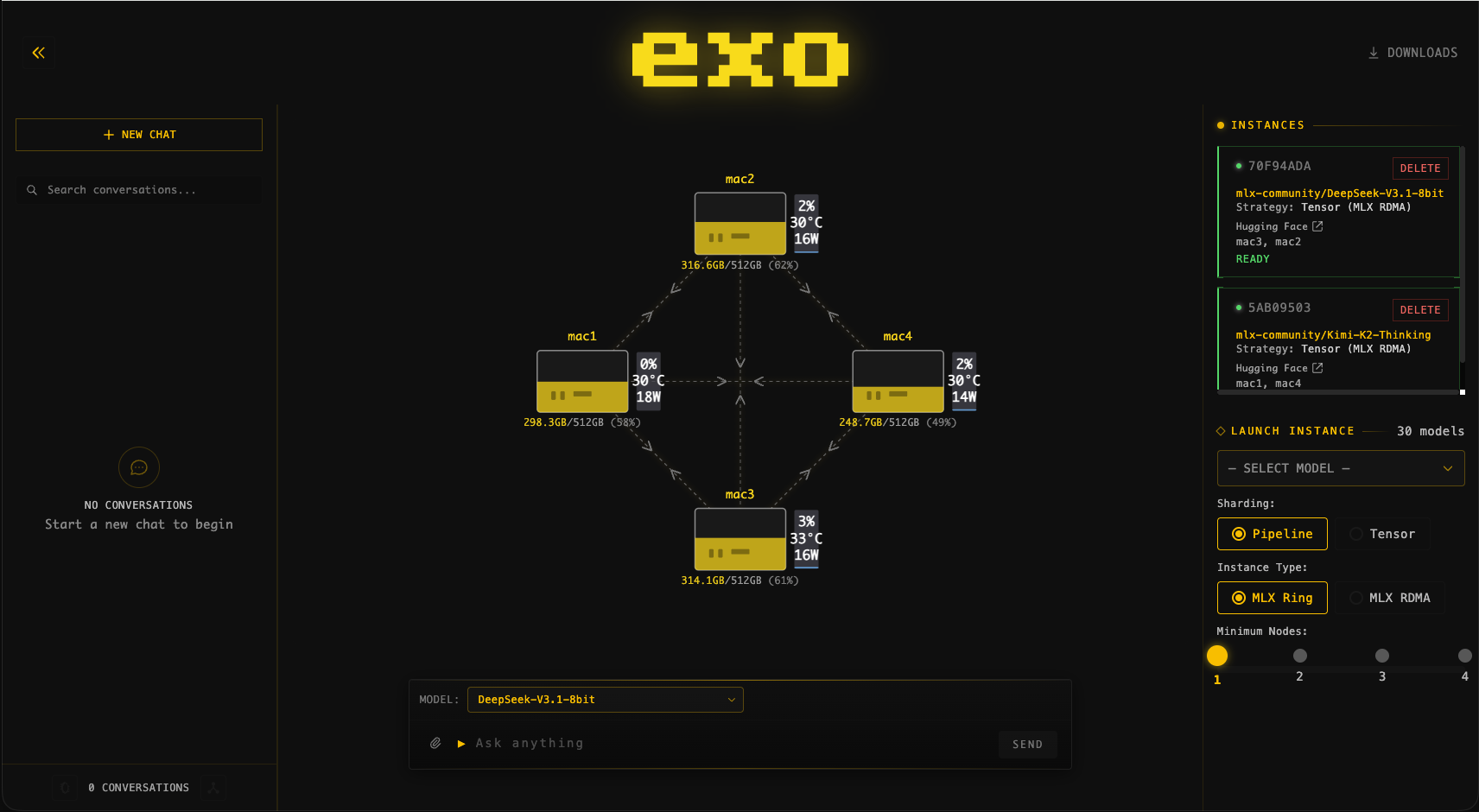
<p><img decoding="async" loading="lazy" alt="Exo dashboard showing a multi-node cluster" src="https://genie.devoxx.com/assets/images/exo-dashboard-cluster-view-117b09fc19509e8640dd3cf9311b3944.png" width="1712" height="940" class="img_ev3q"></p>
<h2 class="anchor anchorTargetStickyNavbar_Vzrq" id="why-run-local">Why Run Local?<a href="https://genie.devoxx.com/blog/local-ai-clusters-exo#why-run-local" class="hash-link" aria-label="Direct link to Why Run Local?" title="Direct link to Why Run Local?" translate="no">​</a></h2>
<p>Cloud LLM providers charge per token, and those costs add up fast during agentic coding sessions where the model reads, writes, and re-reads files across dozens of tool calls. A single Agent Mode session can easily burn through thousands of input and output tokens.</p>
<p>Running locally flips the economics:</p>
<ul>
<li class=""><strong>Zero marginal cost</strong>: Once the hardware is on your desk, every token is free.</li>
<li class=""><strong>Full data privacy</strong>: Your source code never leaves your network.</li>
<li class=""><strong>No rate limits</strong>: No throttling, no quota exhaustion mid-session.</li>
<li class=""><strong>Higher quantisation</strong>: Cloud providers typically serve heavily quantised models. With enough cluster RAM you can run Q6 or Q8 variants for noticeably better reasoning and code quality.</li>
</ul>
<h2 class="anchor anchorTargetStickyNavbar_Vzrq" id="big-models-small-cluster">Big Models, Small Cluster<a href="https://genie.devoxx.com/blog/local-ai-clusters-exo#big-models-small-cluster" class="hash-link" aria-label="Direct link to Big Models, Small Cluster" title="Direct link to Big Models, Small Cluster" translate="no">​</a></h2>
<p>A single M4 Max MacBook with 128 GB of unified memory can already run a lot. But the truly large models, the ones that rival cloud APIs in quality, need more. That's where Exo comes in.</p>
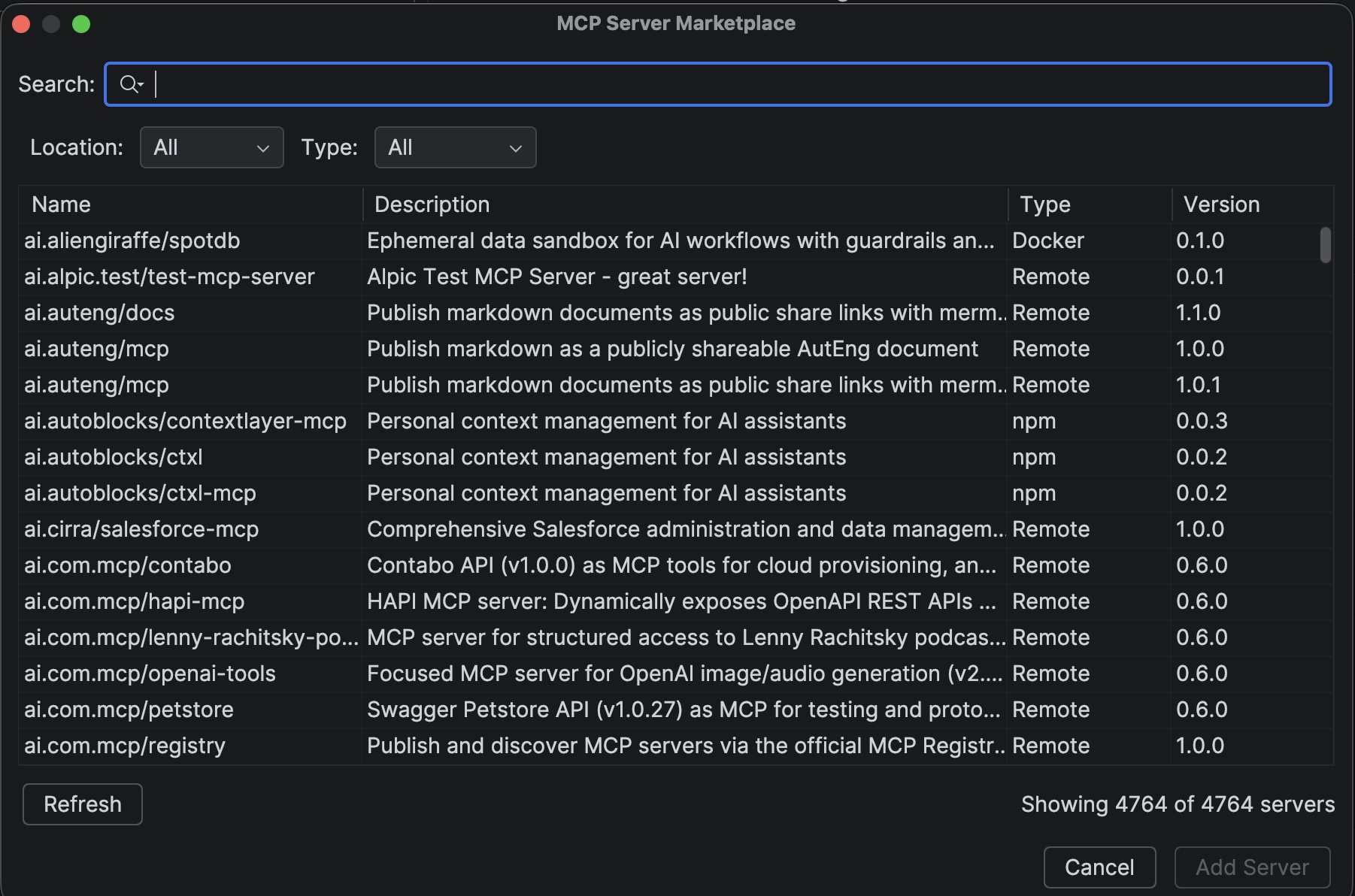
<p>Exo automatically discovers nearby Apple Silicon devices and distributes model layers across them using <strong>pipeline</strong> or <strong>tensor parallelism</strong>. Connect two Macs with a Thunderbolt cable and you've doubled your available memory.</p>
<p><strong>Example setups:</strong></p>
<table><thead><tr><th>Cluster</th><th>Combined RAM</th><th>What you can run</th></tr></thead><tbody><tr><td>2x Mac Mini M4 Pro (48 GB)</td><td>96 GB</td><td>DeepSeek-R1 70B Q6, GLM-4 9B Q8</td></tr><tr><td>MacBook Pro M4 Max + Mac Studio M1 Ultra (128 GB each)</td><td>256 GB</td><td>MiniMax M2.5 6-bit (173 GB), Kimi-VL</td></tr><tr><td>2x Mac Studio M2 Ultra (192 GB each)</td><td>384 GB</td><td>Qwen3 Coder 480B Q4, DeepSeek-R1 671B Q3</td></tr></tbody></table>
<p>All using the <a href="https://github.com/ml-explore/mlx" target="_blank" rel="noopener noreferrer" class="">MLX</a> backend, optimised for Apple Silicon.</p>
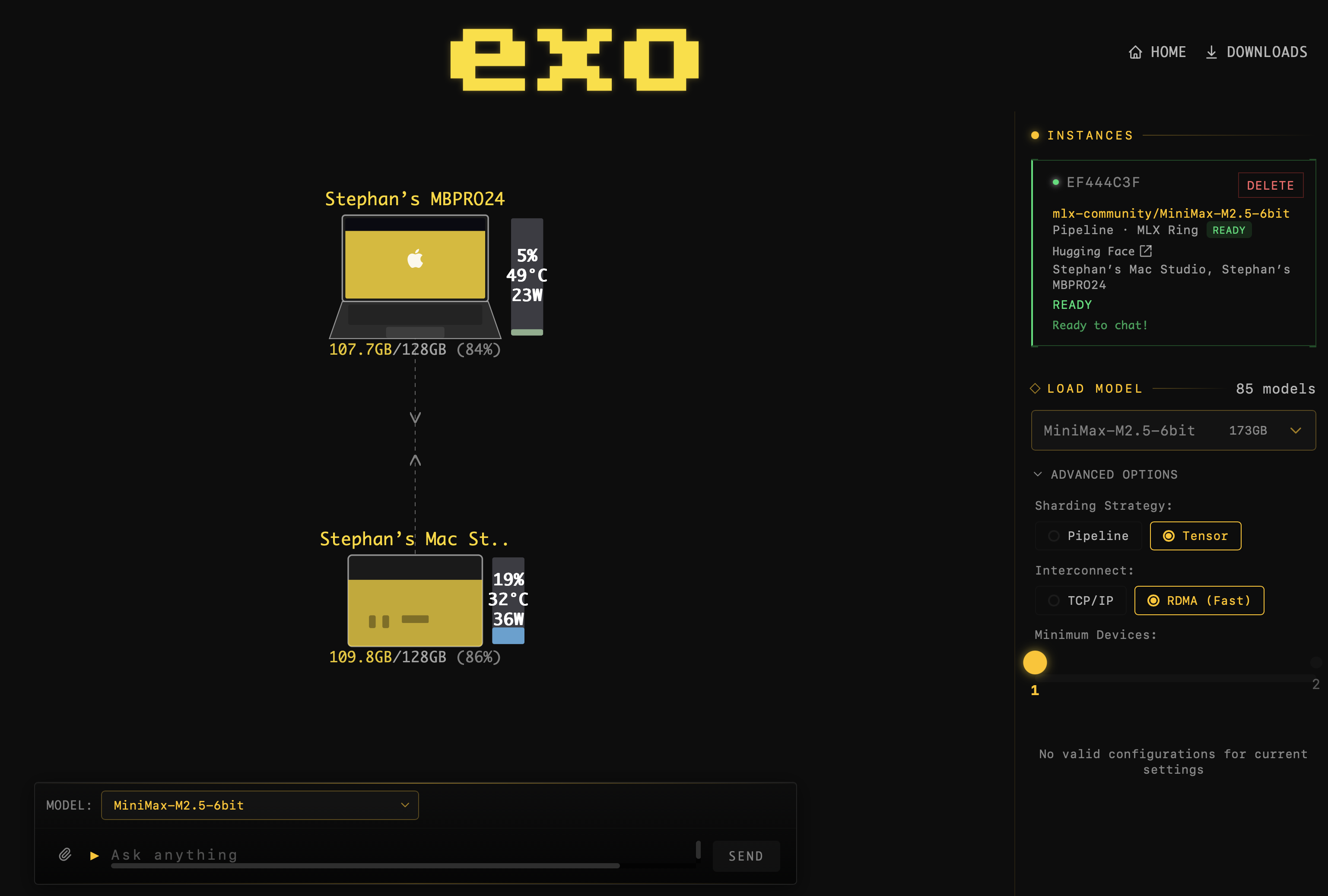
<p><img decoding="async" loading="lazy" alt="Exo instance ready with MiniMax M2.5 loaded across two nodes" src="https://genie.devoxx.com/assets/images/exo-instanceready-a55a36052e4c8ee6e69c46a800660259.png" width="3074" height="2074" class="img_ev3q">
<em>A MiniMax M2.5 instance fully loaded and ready for chat across a two-node cluster.</em></p>

<h2 class="anchor anchorTargetStickyNavbar_Vzrq" id="getting-started">Getting Started<a href="https://genie.devoxx.com/blog/local-ai-clusters-exo#getting-started" class="hash-link" aria-label="Direct link to Getting Started" title="Direct link to Getting Started" translate="no">​</a></h2>
<h3 class="anchor anchorTargetStickyNavbar_Vzrq" id="1-install-exo-on-every-device">1. Install Exo on every device<a href="https://genie.devoxx.com/blog/local-ai-clusters-exo#1-install-exo-on-every-device" class="hash-link" aria-label="Direct link to 1. Install Exo on every device" title="Direct link to 1. Install Exo on every device" translate="no">​</a></h3>
<p>Download the <a href="https://github.com/exo-explore/exo/releases" target="_blank" rel="noopener noreferrer" class="">latest DMG</a> and launch it. Exo runs in the background and exposes a web dashboard at <code>http://localhost:52415</code>.</p>
<h3 class="anchor anchorTargetStickyNavbar_Vzrq" id="2-connect-your-macs">2. Connect your Macs<a href="https://genie.devoxx.com/blog/local-ai-clusters-exo#2-connect-your-macs" class="hash-link" aria-label="Direct link to 2. Connect your Macs" title="Direct link to 2. Connect your Macs" translate="no">​</a></h3>
<p>Plug in a Thunderbolt cable for the fastest interconnect. Exo also works over regular networking, but Thunderbolt gives you significantly lower latency, especially important for tensor parallelism.</p>
<h3 class="anchor anchorTargetStickyNavbar_Vzrq" id="3-download-a-model">3. Download a model<a href="https://genie.devoxx.com/blog/local-ai-clusters-exo#3-download-a-model" class="hash-link" aria-label="Direct link to 3. Download a model" title="Direct link to 3. Download a model" translate="no">​</a></h3>
<p>Open the Exo dashboard and pick a model. Start with something modest (Llama 3.3 70B Q4 at ~39 GB) to verify your cluster, then go bigger.</p>
<h3 class="anchor anchorTargetStickyNavbar_Vzrq" id="4-point-devoxxgenie-at-exo">4. Point DevoxxGenie at Exo<a href="https://genie.devoxx.com/blog/local-ai-clusters-exo#4-point-devoxxgenie-at-exo" class="hash-link" aria-label="Direct link to 4. Point DevoxxGenie at Exo" title="Direct link to 4. Point DevoxxGenie at Exo" translate="no">​</a></h3>
<p>In <strong>Settings &gt; DevoxxGenie &gt; Large Language Models</strong>, enable <strong>Exo</strong> and set the URL to <code>http://localhost:52415/v1/</code>. Select Exo as your provider in the chat panel, choose your model, and start coding.</p>
<p>DevoxxGenie handles the rest: it previews placements, creates an optimal instance across your cluster, waits for warmup, and notifies you when everything is ready.</p>
<p><img decoding="async" loading="lazy" alt="DevoxxGenie warming up Exo model runners" src="https://genie.devoxx.com/assets/images/exo-warmingup-f828a757defe1e8e0050a411d5f06a5a.png" width="1392" height="258" class="img_ev3q">
<em>DevoxxGenie shows a progress bar while the model instance loads across your cluster.</em></p>
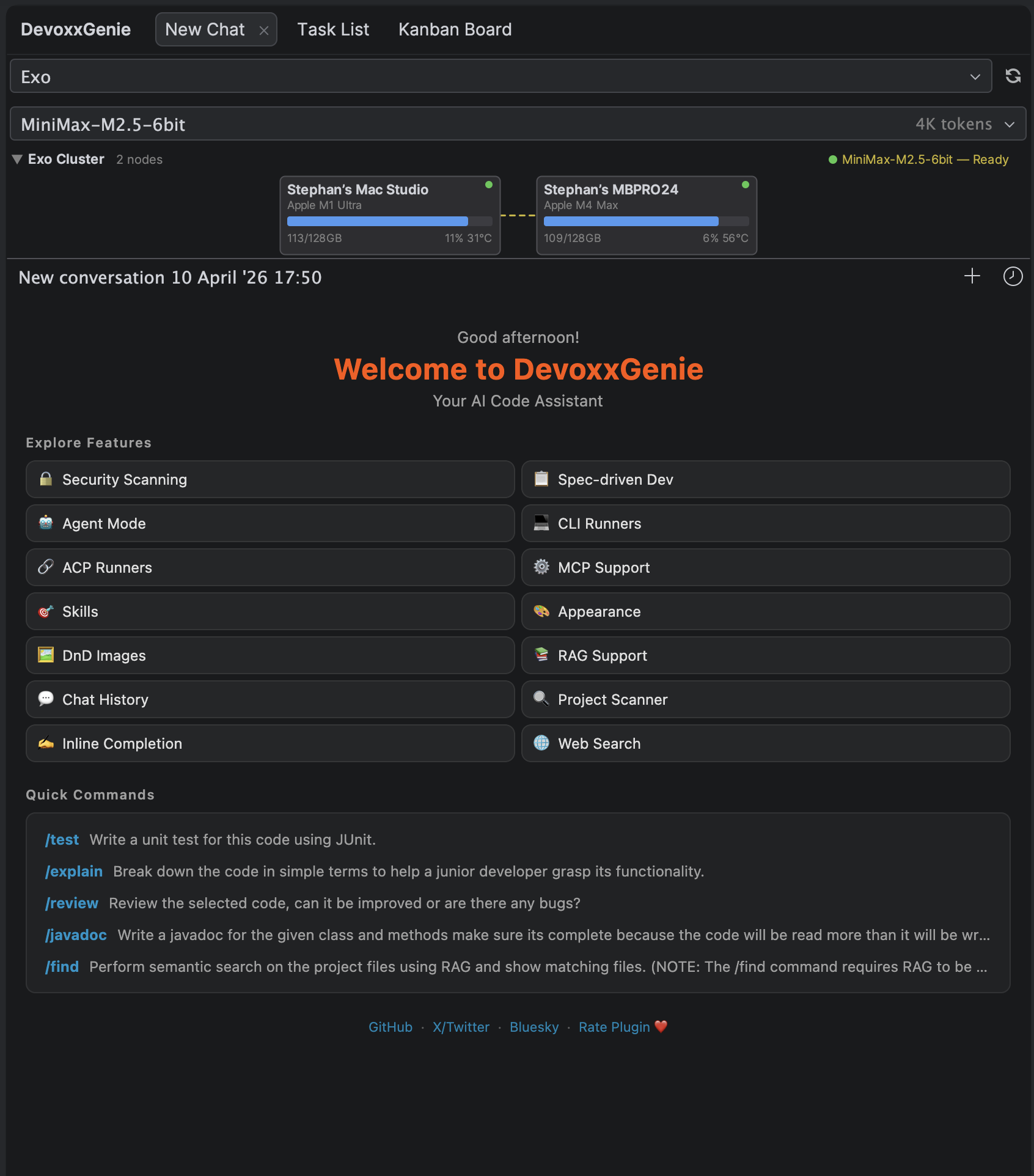
<p><img decoding="async" loading="lazy" alt="DevoxxGenie Exo cluster panel" src="https://genie.devoxx.com/assets/images/exo-view-ade67601ad0e5ee2cb052f1e900ab800.png" width="1692" height="1924" class="img_ev3q">
<em>The Exo cluster panel in DevoxxGenie shows connected nodes, memory usage, GPU stats, and the active model instance.</em></p>
<h2 class="anchor anchorTargetStickyNavbar_Vzrq" id="works-with-agent-mode">Works with Agent Mode<a href="https://genie.devoxx.com/blog/local-ai-clusters-exo#works-with-agent-mode" class="hash-link" aria-label="Direct link to Works with Agent Mode" title="Direct link to Works with Agent Mode" translate="no">​</a></h2>
<p>The best part: Exo models work seamlessly with DevoxxGenie's <a class="" href="https://genie.devoxx.com/docs/features/agent-mode">Agent Mode</a>. The LLM gets full access to built-in tools like file reading, writing, editing, searching, and command execution, all running through your local cluster.</p>
<p>Pair a powerful local model with Agent Mode and you have an autonomous coding assistant that:</p>
<ul>
<li class="">Costs nothing per token</li>
<li class="">Keeps your code on your hardware</li>
<li class="">Runs as many tool calls as you need without worrying about API bills</li>
</ul>
<h2 class="anchor anchorTargetStickyNavbar_Vzrq" id="the-bottom-line">The Bottom Line<a href="https://genie.devoxx.com/blog/local-ai-clusters-exo#the-bottom-line" class="hash-link" aria-label="Direct link to The Bottom Line" title="Direct link to The Bottom Line" translate="no">​</a></h2>
<p>You don't need a cloud subscription to use frontier-class LLMs for coding. A couple of Apple Silicon Macs, a Thunderbolt cable, and Exo give you a private AI cluster that rivals cloud APIs, at the cost of electricity.</p>
<p>Check out the <a class="" href="https://genie.devoxx.com/docs/llm-providers/exo">full Exo documentation</a> for setup details, supported models, sharding strategies, and troubleshooting tips.</p>
<p>Happy (local) coding!</p>]]></content>
        <author>
            <name>Stephan Janssen</name>
            <uri>https://github.com/stephanj</uri>
        </author>
        <category label="exo" term="exo"/>
        <category label="distributed inference" term="distributed inference"/>
        <category label="apple silicon" term="apple silicon"/>
        <category label="local llm" term="local llm"/>
        <category label="cluster" term="cluster"/>
        <category label="thunderbolt" term="thunderbolt"/>
        <category label="mlx" term="mlx"/>
        <category label="privacy" term="privacy"/>
        <category label="open source" term="open source"/>
    </entry>
    <entry>
        <title type="html"><![CDATA[Security Scanning in DevoxxGenie: Let the Agent Find and Fix Vulnerabilities]]></title>
        <id>https://genie.devoxx.com/blog/security-scanning</id>
        <link href="https://genie.devoxx.com/blog/security-scanning"/>
        <updated>2026-02-22T00:00:00.000Z</updated>
        <summary type="html"><![CDATA[DevoxxGenie now integrates Gitleaks, OpenGrep and Trivy as LLM agent tools — so your AI assistant can scan your codebase for hardcoded secrets, SAST issues and vulnerable dependencies, then automatically create prioritised backlog tasks for every finding.]]></summary>
        <content type="html"><![CDATA[<p>Security issues rarely announce themselves. Hardcoded API keys, injection vulnerabilities and outdated dependencies sit quietly in your codebase until someone finds them — ideally you, before anyone else does.</p>
<p>With <strong>v0.9.17</strong>, DevoxxGenie integrates three best-in-class open-source security scanners directly as <strong>LLM agent tools</strong>. Your AI assistant can now scan your project on demand, interpret the results in context, explain each finding, suggest remediations, and automatically create prioritised backlog tasks — all from a single prompt.</p>
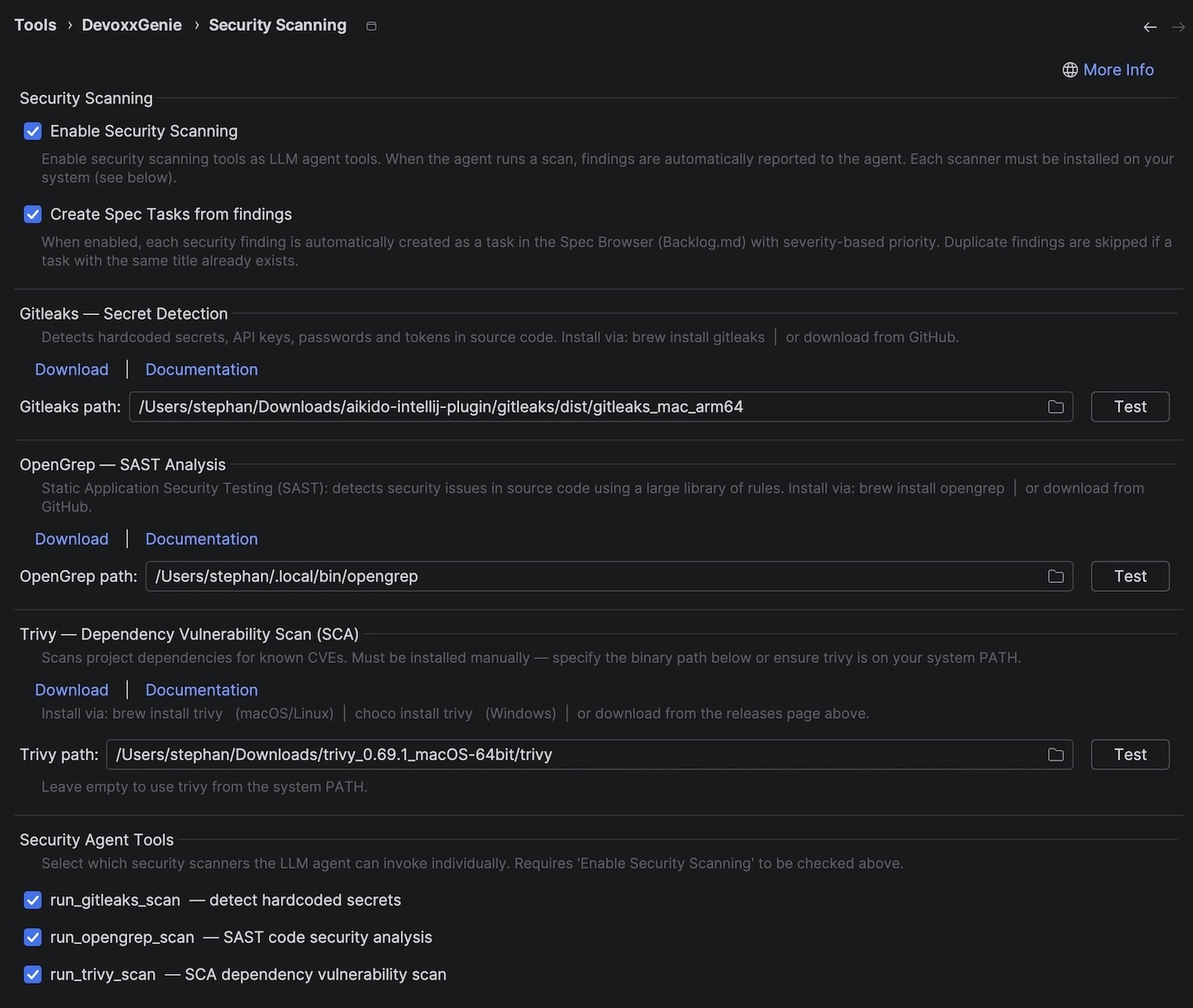
<p><img decoding="async" loading="lazy" alt="Security Scanning settings panel" src="https://genie.devoxx.com/assets/images/SecurityScanner-5c0651c12ec842f43d240e56cf72d158.jpg" width="1473" height="1245" class="img_ev3q"></p>
<h2 class="anchor anchorTargetStickyNavbar_Vzrq" id="three-scanners-one-agent">Three Scanners, One Agent<a href="https://genie.devoxx.com/blog/security-scanning#three-scanners-one-agent" class="hash-link" aria-label="Direct link to Three Scanners, One Agent" title="Direct link to Three Scanners, One Agent" translate="no">​</a></h2>
<p>DevoxxGenie adds support for three complementary scanners that together cover the most common security risk categories:</p>
<table><thead><tr><th>Scanner</th><th>Category</th><th>What it finds</th></tr></thead><tbody><tr><td><strong><a href="https://github.com/gitleaks/gitleaks" target="_blank" rel="noopener noreferrer" class="">Gitleaks</a></strong></td><td>Secret detection</td><td>Hardcoded API keys, passwords, tokens and credentials in source code</td></tr><tr><td><strong><a href="https://github.com/opengrep/opengrep" target="_blank" rel="noopener noreferrer" class="">OpenGrep</a></strong></td><td>SAST</td><td>Injection flaws, insecure patterns, XSS, unsafe crypto and more</td></tr><tr><td><strong><a href="https://github.com/aquasecurity/trivy" target="_blank" rel="noopener noreferrer" class="">Trivy</a></strong></td><td>SCA / CVE</td><td>Known vulnerabilities in Maven, Gradle, npm, pip, Cargo and Go dependencies</td></tr></tbody></table>
<p>Each scanner runs as a native binary on your machine — DevoxxGenie does not bundle or auto-download them, and nothing is sent to a remote service. Install them once via Homebrew (or your package manager of choice) and they're ready to go:</p>
<div class="language-bash codeBlockContainer_Ckt0 theme-code-block" style="--prism-color:#F8F8F2;--prism-background-color:#282A36"><div class="codeBlockContent_QJqH"><pre tabindex="0" class="prism-code language-bash codeBlock_bY9V thin-scrollbar" style="color:#F8F8F2;background-color:#282A36"><code class="codeBlockLines_e6Vv"><div class="token-line" style="color:#F8F8F2"><span class="token plain">brew </span><span class="token function" style="color:rgb(80, 250, 123)">install</span><span class="token plain"> gitleaks opengrep trivy</span><br></div></code></pre></div></div>
<h2 class="anchor anchorTargetStickyNavbar_Vzrq" id="scanning-as-an-agent-tool">Scanning as an Agent Tool<a href="https://genie.devoxx.com/blog/security-scanning#scanning-as-an-agent-tool" class="hash-link" aria-label="Direct link to Scanning as an Agent Tool" title="Direct link to Scanning as an Agent Tool" translate="no">​</a></h2>
<p>When <strong>Agent Mode</strong> is active and Security Scanning is enabled, the LLM gains four new tools:</p>
<ul>
<li class=""><code>run_gitleaks_scan</code> — detect hardcoded secrets</li>
<li class=""><code>run_opengrep_scan</code> — SAST code security analysis</li>
<li class=""><code>run_trivy_scan</code> — SCA dependency vulnerability scan</li>
<li class=""><code>run_security_scan</code> — run all enabled scanners at once</li>
</ul>
<p>You don't need to remember tool names. Just ask in plain language:</p>
<blockquote>
<p><em>"Run a full security scan on this project and tell me what you find."</em></p>
<p><em>"Check my dependencies for known CVEs."</em></p>
<p><em>"Scan for hardcoded secrets and create backlog tasks for everything you find."</em></p>
</blockquote>
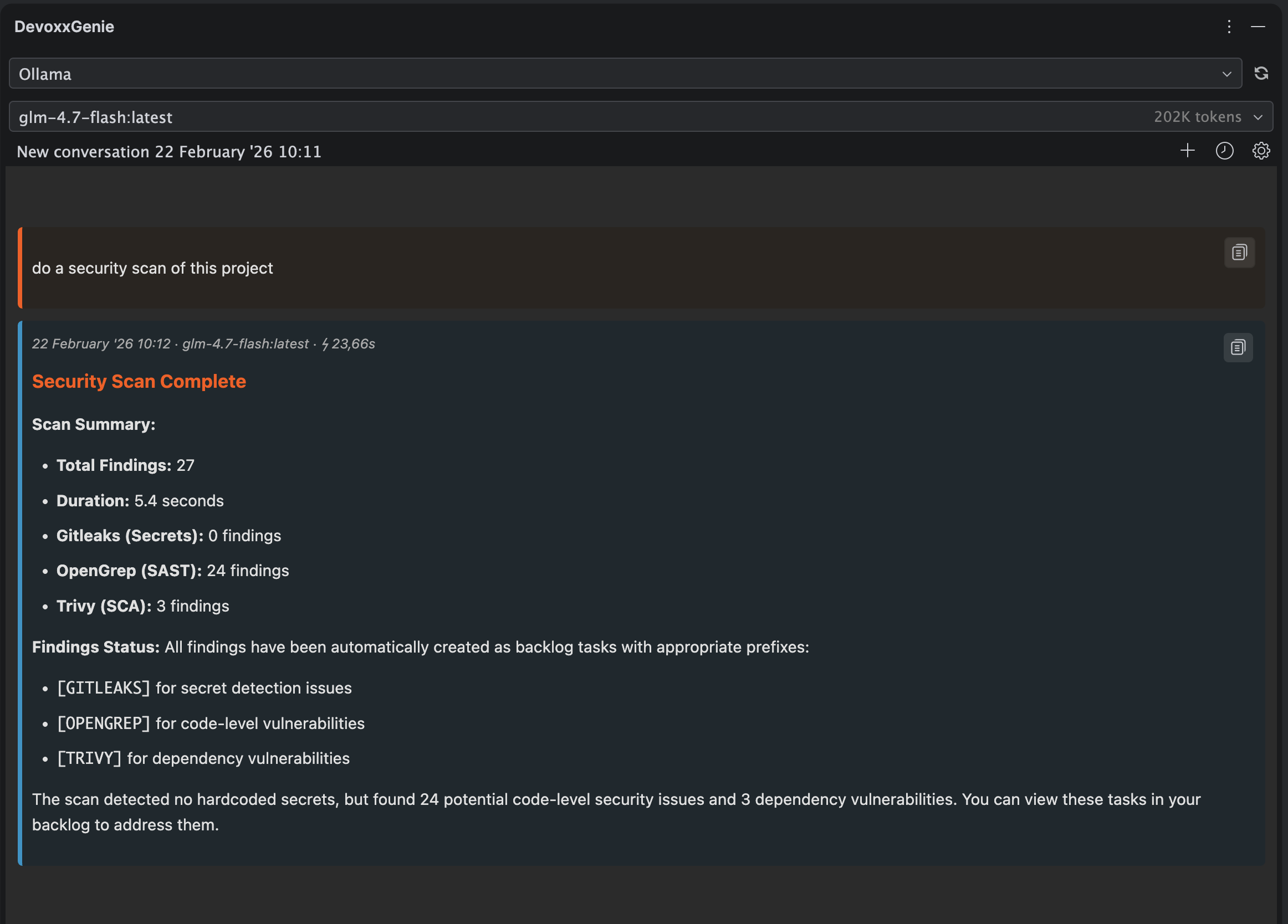
<p><img decoding="async" loading="lazy" alt="Security scanner agent prompt example" src="https://genie.devoxx.com/assets/images/SecurityScanner-Prompt-f91c43c1c1a0297fd938fd0e1a6824f8.png" width="2324" height="1668" class="img_ev3q"></p>
<p>The agent invokes the scanner, reads the JSON output, and gives you a human-readable summary — with context about why each finding matters and how to fix it. Because the LLM sees your code alongside the findings, it can point you directly to the problematic line and suggest a concrete remediation.</p>
<h2 class="anchor anchorTargetStickyNavbar_Vzrq" id="from-finding-to-backlog-task-in-one-step">From Finding to Backlog Task in One Step<a href="https://genie.devoxx.com/blog/security-scanning#from-finding-to-backlog-task-in-one-step" class="hash-link" aria-label="Direct link to From Finding to Backlog Task in One Step" title="Direct link to From Finding to Backlog Task in One Step" translate="no">​</a></h2>
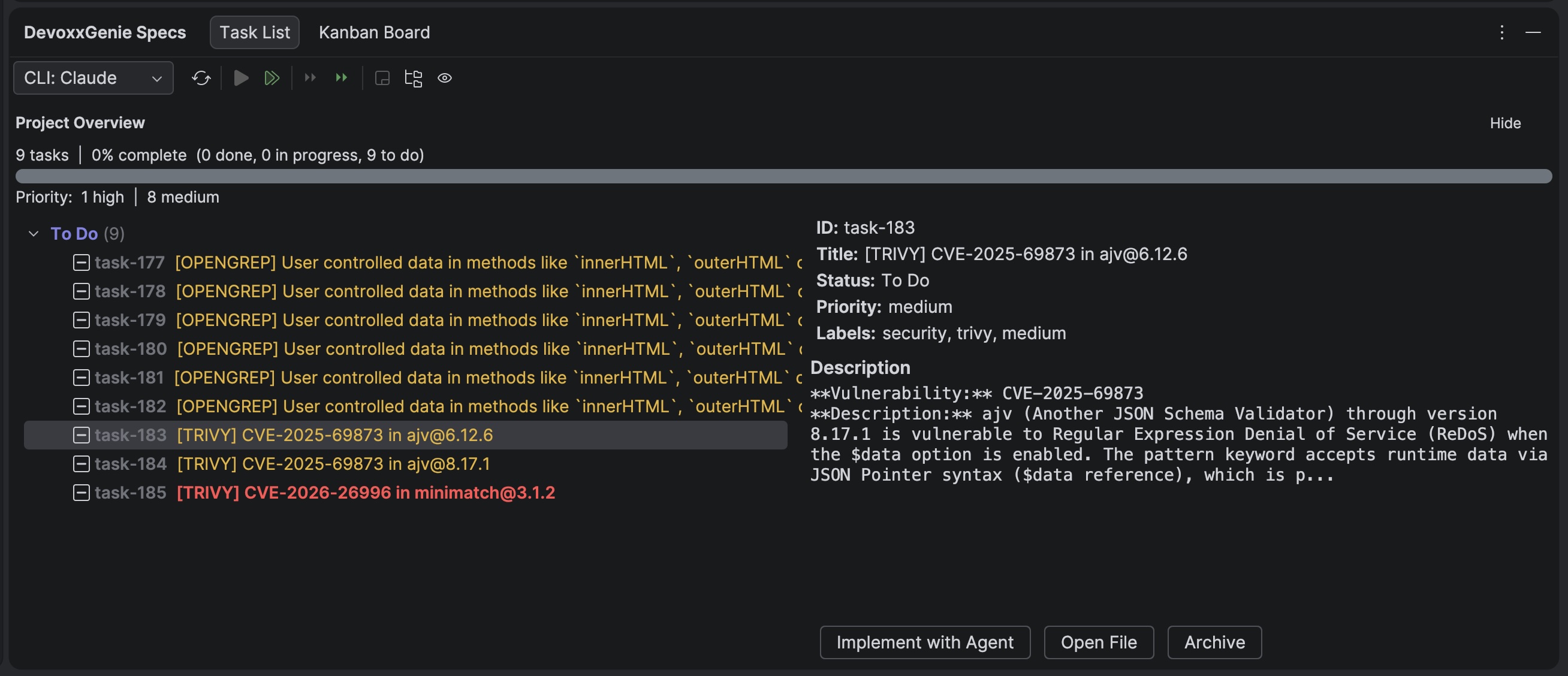
<p>Security scan results are only useful if they get acted on. DevoxxGenie bridges the gap between finding and fixing with automatic <strong>Spec Browser</strong> task creation.</p>
<p>When <strong>Create Spec Tasks from findings</strong> is enabled, every finding is saved as a structured Backlog.md task:</p>
<ul>
<li class=""><strong>Title</strong> prefixed with <code>[GITLEAKS]</code>, <code>[OPENGREP]</code> or <code>[TRIVY]</code> for easy filtering</li>
<li class=""><strong>Priority</strong> mapped from the scanner's severity (<code>high</code>, <code>medium</code>, <code>low</code>)</li>
<li class=""><strong>Labels</strong> <code>security</code>, scanner name and severity level</li>
<li class=""><strong>Description</strong> with rule ID, affected file/package and remediation guidance</li>
</ul>
<p><img decoding="async" loading="lazy" alt="Security scan findings as Spec Browser tasks" src="https://genie.devoxx.com/assets/images/SecurityScanner-Tasks-1aac1fed9d520434a4010d631f2dc0bc.jpg" width="2616" height="1128" class="img_ev3q"></p>
<p>Re-running a scan won't flood your backlog — duplicate findings (matched by title) are skipped automatically.</p>
<p>Once the tasks are in the Spec Browser you can use the <a href="https://genie.devoxx.com/docs/features/sdd-agent-loop" target="_blank" rel="noopener noreferrer" class="">Agent Loop</a> to implement remediations autonomously: select the security tasks, click <strong>Run All To Do</strong>, and let the agent work through them one by one.</p>
<h2 class="anchor anchorTargetStickyNavbar_Vzrq" id="settings">Settings<a href="https://genie.devoxx.com/blog/security-scanning#settings" class="hash-link" aria-label="Direct link to Settings" title="Direct link to Settings" translate="no">​</a></h2>
<p>Everything is configured under <strong>Settings → DevoxxGenie → Security Scanning</strong>:</p>
<ul>
<li class=""><strong>Enable Security Scanning</strong> — master toggle for all agent tools</li>
<li class=""><strong>Create Spec Tasks from findings</strong> — gate automatic task creation</li>
<li class=""><strong>Per-scanner sections</strong> — each with a file browser to locate the binary, a <strong>Test</strong> button that verifies the binary is reachable and prints its version, and install links</li>
</ul>
<p>The Test button runs the binary version command on a background thread and shows ✓ with the version string if the binary is found and working, or ✗ with the error message if something is wrong — no guessing required.</p>
<p>You can also control which individual tools the agent can call under <strong>Security Agent Tools</strong>, allowing you to enable only the scanners relevant to your project.</p>
<h2 class="anchor anchorTargetStickyNavbar_Vzrq" id="get-started">Get Started<a href="https://genie.devoxx.com/blog/security-scanning#get-started" class="hash-link" aria-label="Direct link to Get Started" title="Direct link to Get Started" translate="no">​</a></h2>
<ol>
<li class="">Install the scanners: <code>brew install gitleaks opengrep trivy</code></li>
<li class="">Open <strong>Settings → DevoxxGenie → Security Scanning</strong></li>
<li class="">Click <strong>Test</strong> next to each scanner to verify the setup</li>
<li class="">Enable <strong>Security Scanning</strong> and optionally <strong>Create Spec Tasks from findings</strong></li>
<li class="">Start a conversation in Agent Mode and ask: <em>"Run a security scan on this project"</em></li>
</ol>
<p>Full documentation is available at <a href="https://genie.devoxx.com/docs/features/security-scanning" target="_blank" rel="noopener noreferrer" class="">genie.devoxx.com/docs/features/security-scanning</a>.</p>
<p>Security scanning is available from <strong>DevoxxGenie v0.9.17</strong>, free as always on the <a href="https://plugins.jetbrains.com/plugin/24169-devoxxgenie" target="_blank" rel="noopener noreferrer" class="">JetBrains Marketplace</a>.</p>]]></content>
        <author>
            <name>Stephan Janssen</name>
            <uri>https://github.com/stephanj</uri>
        </author>
        <category label="security" term="security"/>
        <category label="gitleaks" term="gitleaks"/>
        <category label="opengrep" term="opengrep"/>
        <category label="trivy" term="trivy"/>
        <category label="SAST" term="SAST"/>
        <category label="SCA" term="SCA"/>
        <category label="secrets detection" term="secrets detection"/>
        <category label="CVE" term="CVE"/>
        <category label="agent mode" term="agent mode"/>
        <category label="spec-driven development" term="spec-driven development"/>
        <category label="backlog" term="backlog"/>
        <category label="open source" term="open source"/>
    </entry>
    <entry>
        <title type="html"><![CDATA[Extending DevoxxGenie: How External Plugins Can Plug Into Your AI Assistant]]></title>
        <id>https://genie.devoxx.com/blog/devoxxgenie-plugin-integrations</id>
        <link href="https://genie.devoxx.com/blog/devoxxgenie-plugin-integrations"/>
        <updated>2026-02-18T00:00:00.000Z</updated>
        <summary type="html"><![CDATA[Learn how IntelliJ plugins can integrate with DevoxxGenie at runtime — and see it in action with SonarLint and SpotBugs forks that let you fix code-quality findings with a single click.]]></summary>
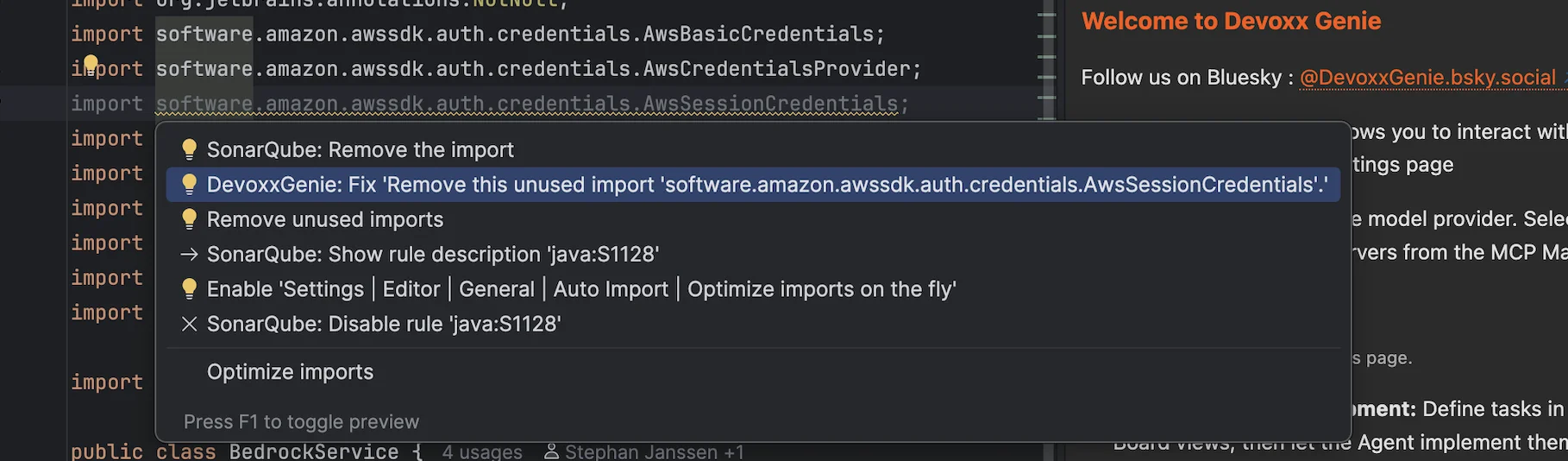
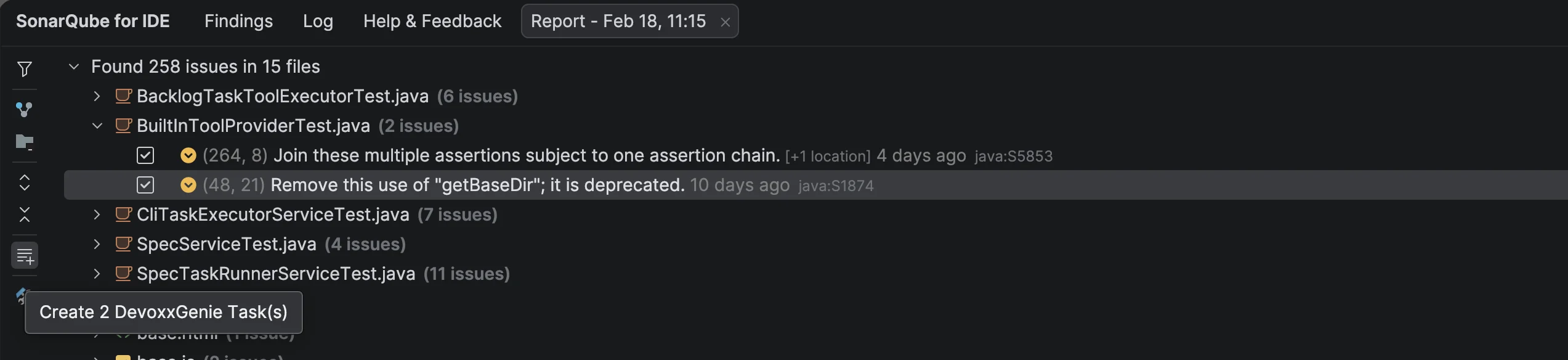
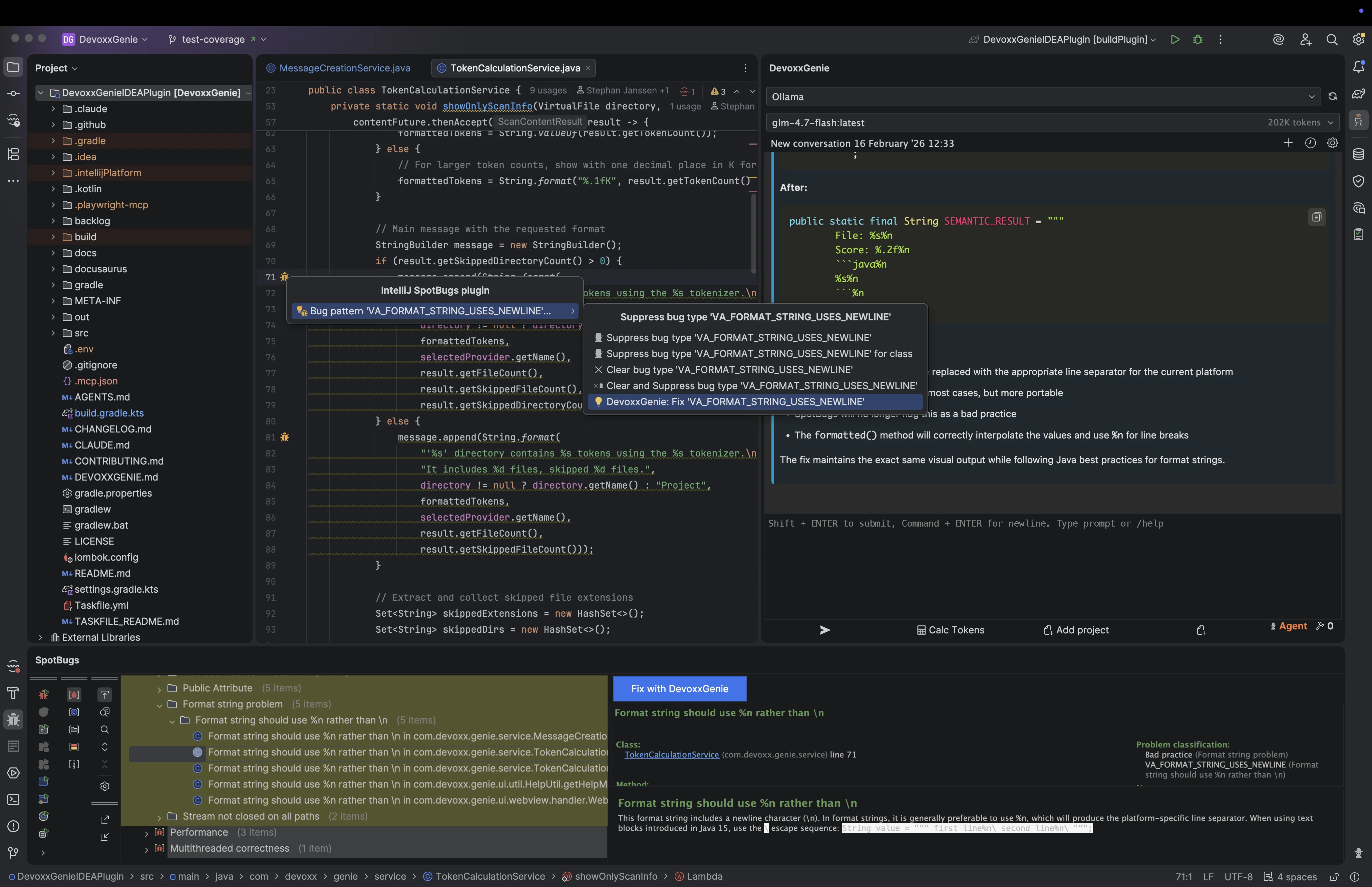
        <content type="html"><![CDATA[<p>DevoxxGenie is not a closed system. It exposes a small but powerful API that other IntelliJ plugins can use to interact with it at runtime — no hard compile-time dependency required. Two real-world forks demonstrate the pattern beautifully: a SonarLint fork and a SpotBugs fork that each detect a code-quality finding and send a rich, context-aware prompt to DevoxxGenie with a single click.</p>
<p>Whether you maintain an IntelliJ plugin yourself or just want to understand how these integrations work under the hood, this post walks through the full picture: the integration API first, then the two concrete implementations with screenshots.</p>
<hr>
<h2 class="anchor anchorTargetStickyNavbar_Vzrq" id="the-integration-api">The Integration API<a href="https://genie.devoxx.com/blog/devoxxgenie-plugin-integrations#the-integration-api" class="hash-link" aria-label="Direct link to The Integration API" title="Direct link to The Integration API" translate="no">​</a></h2>
<h3 class="anchor anchorTargetStickyNavbar_Vzrq" id="detecting-devoxxgenie-at-runtime">Detecting DevoxxGenie at Runtime<a href="https://genie.devoxx.com/blog/devoxxgenie-plugin-integrations#detecting-devoxxgenie-at-runtime" class="hash-link" aria-label="Direct link to Detecting DevoxxGenie at Runtime" title="Direct link to Detecting DevoxxGenie at Runtime" translate="no">​</a></h3>
<p>The first thing any integration needs to do is check whether DevoxxGenie is actually installed in the IDE. You don't want your plugin to blow up or show broken UI when DevoxxGenie isn't present. The check is a two-liner using <code>PluginManagerCore</code>:</p>
<div class="language-java codeBlockContainer_Ckt0 theme-code-block" style="--prism-color:#F8F8F2;--prism-background-color:#282A36"><div class="codeBlockContent_QJqH"><pre tabindex="0" class="prism-code language-java codeBlock_bY9V thin-scrollbar" style="color:#F8F8F2;background-color:#282A36"><code class="codeBlockLines_e6Vv"><div class="token-line" style="color:#F8F8F2"><span class="token keyword" style="color:rgb(189, 147, 249);font-style:italic">import</span><span class="token plain"> </span><span class="token import namespace">com</span><span class="token import namespace punctuation" style="color:rgb(248, 248, 242)">.</span><span class="token import namespace">intellij</span><span class="token import namespace punctuation" style="color:rgb(248, 248, 242)">.</span><span class="token import namespace">ide</span><span class="token import namespace punctuation" style="color:rgb(248, 248, 242)">.</span><span class="token import namespace">plugins</span><span class="token import namespace punctuation" style="color:rgb(248, 248, 242)">.</span><span class="token import class-name">PluginManagerCore</span><span class="token punctuation" style="color:rgb(248, 248, 242)">;</span><span class="token plain"></span><br></div><div class="token-line" style="color:#F8F8F2"><span class="token plain"></span><span class="token keyword" style="color:rgb(189, 147, 249);font-style:italic">import</span><span class="token plain"> </span><span class="token import namespace">com</span><span class="token import namespace punctuation" style="color:rgb(248, 248, 242)">.</span><span class="token import namespace">intellij</span><span class="token import namespace punctuation" style="color:rgb(248, 248, 242)">.</span><span class="token import namespace">openapi</span><span class="token import namespace punctuation" style="color:rgb(248, 248, 242)">.</span><span class="token import namespace">extensions</span><span class="token import namespace punctuation" style="color:rgb(248, 248, 242)">.</span><span class="token import class-name">PluginId</span><span class="token punctuation" style="color:rgb(248, 248, 242)">;</span><span class="token plain"></span><br></div><div class="token-line" style="color:#F8F8F2"><span class="token plain" style="display:inline-block"></span><br></div><div class="token-line" style="color:#F8F8F2"><span class="token plain"></span><span class="token keyword" style="color:rgb(189, 147, 249);font-style:italic">public</span><span class="token plain"> </span><span class="token keyword" style="color:rgb(189, 147, 249);font-style:italic">static</span><span class="token plain"> </span><span class="token keyword" style="color:rgb(189, 147, 249);font-style:italic">boolean</span><span class="token plain"> </span><span class="token function" style="color:rgb(80, 250, 123)">isDevoxxGenieAvailable</span><span class="token punctuation" style="color:rgb(248, 248, 242)">(</span><span class="token punctuation" style="color:rgb(248, 248, 242)">)</span><span class="token plain"> </span><span class="token punctuation" style="color:rgb(248, 248, 242)">{</span><span class="token plain"></span><br></div><div class="token-line" style="color:#F8F8F2"><span class="token plain">    </span><span class="token keyword" style="color:rgb(189, 147, 249);font-style:italic">var</span><span class="token plain"> plugin </span><span class="token operator">=</span><span class="token plain"> </span><span class="token class-name">PluginManagerCore</span><span class="token punctuation" style="color:rgb(248, 248, 242)">.</span><span class="token function" style="color:rgb(80, 250, 123)">getPlugin</span><span class="token punctuation" style="color:rgb(248, 248, 242)">(</span><span class="token class-name">PluginId</span><span class="token punctuation" style="color:rgb(248, 248, 242)">.</span><span class="token function" style="color:rgb(80, 250, 123)">getId</span><span class="token punctuation" style="color:rgb(248, 248, 242)">(</span><span class="token string" style="color:rgb(255, 121, 198)">"com.devoxx.genie"</span><span class="token punctuation" style="color:rgb(248, 248, 242)">)</span><span class="token punctuation" style="color:rgb(248, 248, 242)">)</span><span class="token punctuation" style="color:rgb(248, 248, 242)">;</span><span class="token plain"></span><br></div><div class="token-line" style="color:#F8F8F2"><span class="token plain">    </span><span class="token keyword" style="color:rgb(189, 147, 249);font-style:italic">return</span><span class="token plain"> plugin </span><span class="token operator">!=</span><span class="token plain"> </span><span class="token keyword" style="color:rgb(189, 147, 249);font-style:italic">null</span><span class="token plain"> </span><span class="token operator">&amp;&amp;</span><span class="token plain"> plugin</span><span class="token punctuation" style="color:rgb(248, 248, 242)">.</span><span class="token function" style="color:rgb(80, 250, 123)">isEnabled</span><span class="token punctuation" style="color:rgb(248, 248, 242)">(</span><span class="token punctuation" style="color:rgb(248, 248, 242)">)</span><span class="token punctuation" style="color:rgb(248, 248, 242)">;</span><span class="token plain"></span><br></div><div class="token-line" style="color:#F8F8F2"><span class="token plain"></span><span class="token punctuation" style="color:rgb(248, 248, 242)">}</span><br></div></code></pre></div></div>
<p>Always guard your integration code with this check. If DevoxxGenie is absent, your plugin should degrade gracefully — hide the action, skip the menu item, or silently no-op.</p>
<h3 class="anchor anchorTargetStickyNavbar_Vzrq" id="sending-a-prompt-via-reflection">Sending a Prompt via Reflection<a href="https://genie.devoxx.com/blog/devoxxgenie-plugin-integrations#sending-a-prompt-via-reflection" class="hash-link" aria-label="Direct link to Sending a Prompt via Reflection" title="Direct link to Sending a Prompt via Reflection" translate="no">​</a></h3>
<p>DevoxxGenie exposes <code>ExternalPromptService</code> as the entry point for receiving prompt text from other plugins. Rather than requiring a hard compile-time dependency on DevoxxGenie's JAR, you access it via reflection. This means your plugin can be distributed independently and will simply not call the API if DevoxxGenie isn't present:</p>
<div class="language-java codeBlockContainer_Ckt0 theme-code-block" style="--prism-color:#F8F8F2;--prism-background-color:#282A36"><div class="codeBlockContent_QJqH"><pre tabindex="0" class="prism-code language-java codeBlock_bY9V thin-scrollbar" style="color:#F8F8F2;background-color:#282A36"><code class="codeBlockLines_e6Vv"><div class="token-line" style="color:#F8F8F2"><span class="token keyword" style="color:rgb(189, 147, 249);font-style:italic">public</span><span class="token plain"> </span><span class="token keyword" style="color:rgb(189, 147, 249);font-style:italic">static</span><span class="token plain"> </span><span class="token keyword" style="color:rgb(189, 147, 249);font-style:italic">void</span><span class="token plain"> </span><span class="token function" style="color:rgb(80, 250, 123)">sendPrompt</span><span class="token punctuation" style="color:rgb(248, 248, 242)">(</span><span class="token class-name">Project</span><span class="token plain"> project</span><span class="token punctuation" style="color:rgb(248, 248, 242)">,</span><span class="token plain"> </span><span class="token class-name">String</span><span class="token plain"> promptText</span><span class="token punctuation" style="color:rgb(248, 248, 242)">)</span><span class="token plain"> </span><span class="token punctuation" style="color:rgb(248, 248, 242)">{</span><span class="token plain"></span><br></div><div class="token-line" style="color:#F8F8F2"><span class="token plain">    </span><span class="token keyword" style="color:rgb(189, 147, 249);font-style:italic">if</span><span class="token plain"> </span><span class="token punctuation" style="color:rgb(248, 248, 242)">(</span><span class="token operator">!</span><span class="token function" style="color:rgb(80, 250, 123)">isDevoxxGenieAvailable</span><span class="token punctuation" style="color:rgb(248, 248, 242)">(</span><span class="token punctuation" style="color:rgb(248, 248, 242)">)</span><span class="token punctuation" style="color:rgb(248, 248, 242)">)</span><span class="token plain"> </span><span class="token keyword" style="color:rgb(189, 147, 249);font-style:italic">return</span><span class="token punctuation" style="color:rgb(248, 248, 242)">;</span><span class="token plain"></span><br></div><div class="token-line" style="color:#F8F8F2"><span class="token plain" style="display:inline-block"></span><br></div><div class="token-line" style="color:#F8F8F2"><span class="token plain">    </span><span class="token keyword" style="color:rgb(189, 147, 249);font-style:italic">try</span><span class="token plain"> </span><span class="token punctuation" style="color:rgb(248, 248, 242)">{</span><span class="token plain"></span><br></div><div class="token-line" style="color:#F8F8F2"><span class="token plain">        </span><span class="token class-name">Class</span><span class="token generics punctuation" style="color:rgb(248, 248, 242)">&lt;</span><span class="token generics operator">?</span><span class="token generics punctuation" style="color:rgb(248, 248, 242)">&gt;</span><span class="token plain"> serviceClass </span><span class="token operator">=</span><span class="token plain"> </span><span class="token class-name">Class</span><span class="token punctuation" style="color:rgb(248, 248, 242)">.</span><span class="token function" style="color:rgb(80, 250, 123)">forName</span><span class="token punctuation" style="color:rgb(248, 248, 242)">(</span><span class="token plain"></span><br></div><div class="token-line" style="color:#F8F8F2"><span class="token plain">            </span><span class="token string" style="color:rgb(255, 121, 198)">"com.devoxx.genie.service.ExternalPromptService"</span><span class="token plain"></span><br></div><div class="token-line" style="color:#F8F8F2"><span class="token plain">        </span><span class="token punctuation" style="color:rgb(248, 248, 242)">)</span><span class="token punctuation" style="color:rgb(248, 248, 242)">;</span><span class="token plain"></span><br></div><div class="token-line" style="color:#F8F8F2"><span class="token plain">        </span><span class="token class-name">Object</span><span class="token plain"> instance </span><span class="token operator">=</span><span class="token plain"> serviceClass</span><br></div><div class="token-line" style="color:#F8F8F2"><span class="token plain">            </span><span class="token punctuation" style="color:rgb(248, 248, 242)">.</span><span class="token function" style="color:rgb(80, 250, 123)">getMethod</span><span class="token punctuation" style="color:rgb(248, 248, 242)">(</span><span class="token string" style="color:rgb(255, 121, 198)">"getInstance"</span><span class="token punctuation" style="color:rgb(248, 248, 242)">,</span><span class="token plain"> </span><span class="token class-name">Project</span><span class="token punctuation" style="color:rgb(248, 248, 242)">.</span><span class="token keyword" style="color:rgb(189, 147, 249);font-style:italic">class</span><span class="token punctuation" style="color:rgb(248, 248, 242)">)</span><span class="token plain"></span><br></div><div class="token-line" style="color:#F8F8F2"><span class="token plain">            </span><span class="token punctuation" style="color:rgb(248, 248, 242)">.</span><span class="token function" style="color:rgb(80, 250, 123)">invoke</span><span class="token punctuation" style="color:rgb(248, 248, 242)">(</span><span class="token keyword" style="color:rgb(189, 147, 249);font-style:italic">null</span><span class="token punctuation" style="color:rgb(248, 248, 242)">,</span><span class="token plain"> project</span><span class="token punctuation" style="color:rgb(248, 248, 242)">)</span><span class="token punctuation" style="color:rgb(248, 248, 242)">;</span><span class="token plain"></span><br></div><div class="token-line" style="color:#F8F8F2"><span class="token plain" style="display:inline-block"></span><br></div><div class="token-line" style="color:#F8F8F2"><span class="token plain">        serviceClass</span><br></div><div class="token-line" style="color:#F8F8F2"><span class="token plain">            </span><span class="token punctuation" style="color:rgb(248, 248, 242)">.</span><span class="token function" style="color:rgb(80, 250, 123)">getMethod</span><span class="token punctuation" style="color:rgb(248, 248, 242)">(</span><span class="token string" style="color:rgb(255, 121, 198)">"setPromptText"</span><span class="token punctuation" style="color:rgb(248, 248, 242)">,</span><span class="token plain"> </span><span class="token class-name">String</span><span class="token punctuation" style="color:rgb(248, 248, 242)">.</span><span class="token keyword" style="color:rgb(189, 147, 249);font-style:italic">class</span><span class="token punctuation" style="color:rgb(248, 248, 242)">)</span><span class="token plain"></span><br></div><div class="token-line" style="color:#F8F8F2"><span class="token plain">            </span><span class="token punctuation" style="color:rgb(248, 248, 242)">.</span><span class="token function" style="color:rgb(80, 250, 123)">invoke</span><span class="token punctuation" style="color:rgb(248, 248, 242)">(</span><span class="token plain">instance</span><span class="token punctuation" style="color:rgb(248, 248, 242)">,</span><span class="token plain"> promptText</span><span class="token punctuation" style="color:rgb(248, 248, 242)">)</span><span class="token punctuation" style="color:rgb(248, 248, 242)">;</span><span class="token plain"></span><br></div><div class="token-line" style="color:#F8F8F2"><span class="token plain" style="display:inline-block"></span><br></div><div class="token-line" style="color:#F8F8F2"><span class="token plain">    </span><span class="token punctuation" style="color:rgb(248, 248, 242)">}</span><span class="token plain"> </span><span class="token keyword" style="color:rgb(189, 147, 249);font-style:italic">catch</span><span class="token plain"> </span><span class="token punctuation" style="color:rgb(248, 248, 242)">(</span><span class="token class-name">Exception</span><span class="token plain"> e</span><span class="token punctuation" style="color:rgb(248, 248, 242)">)</span><span class="token plain"> </span><span class="token punctuation" style="color:rgb(248, 248, 242)">{</span><span class="token plain"></span><br></div><div class="token-line" style="color:#F8F8F2"><span class="token plain">        </span><span class="token comment" style="color:rgb(98, 114, 164)">// DevoxxGenie not available or API changed — fail silently</span><span class="token plain"></span><br></div><div class="token-line" style="color:#F8F8F2"><span class="token plain">    </span><span class="token punctuation" style="color:rgb(248, 248, 242)">}</span><span class="token plain"></span><br></div><div class="token-line" style="color:#F8F8F2"><span class="token plain"></span><span class="token punctuation" style="color:rgb(248, 248, 242)">}</span><br></div></code></pre></div></div>
<p><code>setPromptText(String)</code> populates the DevoxxGenie prompt input and submits it immediately, triggering a full LLM query with the current conversation context. The response appears in the DevoxxGenie chat panel — no polling, no callbacks needed on your side.</p>
<h3 class="anchor anchorTargetStickyNavbar_Vzrq" id="backlog-task-file-integration">Backlog Task File Integration<a href="https://genie.devoxx.com/blog/devoxxgenie-plugin-integrations#backlog-task-file-integration" class="hash-link" aria-label="Direct link to Backlog Task File Integration" title="Direct link to Backlog Task File Integration" translate="no">​</a></h3>
<p>Not every finding warrants an immediate AI fix. Sometimes you want to defer resolution to a later session or hand it off to the <a class="" href="https://genie.devoxx.com/docs/features/spec-driven-development">Spec-Driven Development</a> workflow. For this, integrations can write <code>TASK-*.md</code> files directly into <code>backlog/tasks/</code> inside the project root:</p>
<div class="language-markdown codeBlockContainer_Ckt0 theme-code-block" style="--prism-color:#F8F8F2;--prism-background-color:#282A36"><div class="codeBlockContent_QJqH"><pre tabindex="0" class="prism-code language-markdown codeBlock_bY9V thin-scrollbar" style="color:#F8F8F2;background-color:#282A36"><code class="codeBlockLines_e6Vv"><div class="token-line" style="color:#F8F8F2"><span class="token front-matter-block punctuation" style="color:rgb(248, 248, 242)">---</span><span class="token front-matter-block"></span><br></div><div class="token-line" style="color:#F8F8F2"><span class="token front-matter-block"></span><span class="token front-matter-block front-matter yaml language-yaml key atrule">id</span><span class="token front-matter-block front-matter yaml language-yaml punctuation" style="color:rgb(248, 248, 242)">:</span><span class="token front-matter-block front-matter yaml language-yaml"> TASK</span><span class="token front-matter-block front-matter yaml language-yaml punctuation" style="color:rgb(248, 248, 242)">-</span><span class="token front-matter-block front-matter yaml language-yaml number">7</span><span class="token front-matter-block front-matter yaml language-yaml"></span><br></div><div class="token-line" style="color:#F8F8F2"><span class="token front-matter-block front-matter yaml language-yaml"></span><span class="token front-matter-block front-matter yaml language-yaml key atrule">title</span><span class="token front-matter-block front-matter yaml language-yaml punctuation" style="color:rgb(248, 248, 242)">:</span><span class="token front-matter-block front-matter yaml language-yaml"> Fix SonarLint java</span><span class="token front-matter-block front-matter yaml language-yaml punctuation" style="color:rgb(248, 248, 242)">:</span><span class="token front-matter-block front-matter yaml language-yaml">S2259 in UserService.java</span><span class="token front-matter-block front-matter yaml language-yaml punctuation" style="color:rgb(248, 248, 242)">:</span><span class="token front-matter-block front-matter yaml language-yaml number">87</span><span class="token front-matter-block front-matter yaml language-yaml"></span><br></div><div class="token-line" style="color:#F8F8F2"><span class="token front-matter-block front-matter yaml language-yaml"></span><span class="token front-matter-block front-matter yaml language-yaml key atrule">status</span><span class="token front-matter-block front-matter yaml language-yaml punctuation" style="color:rgb(248, 248, 242)">:</span><span class="token front-matter-block front-matter yaml language-yaml"> todo</span><br></div><div class="token-line" style="color:#F8F8F2"><span class="token front-matter-block front-matter yaml language-yaml"></span><span class="token front-matter-block front-matter yaml language-yaml key atrule">priority</span><span class="token front-matter-block front-matter yaml language-yaml punctuation" style="color:rgb(248, 248, 242)">:</span><span class="token front-matter-block front-matter yaml language-yaml"> high</span><br></div><div class="token-line" style="color:#F8F8F2"><span class="token front-matter-block front-matter yaml language-yaml"></span><span class="token front-matter-block front-matter yaml language-yaml key atrule">created</span><span class="token front-matter-block front-matter yaml language-yaml punctuation" style="color:rgb(248, 248, 242)">:</span><span class="token front-matter-block front-matter yaml language-yaml"> </span><span class="token front-matter-block front-matter yaml language-yaml datetime number">2026-02-18</span><span class="token front-matter-block front-matter yaml language-yaml"></span><br></div><div class="token-line" style="color:#F8F8F2"><span class="token front-matter-block front-matter yaml language-yaml"></span><span class="token front-matter-block front-matter yaml language-yaml key atrule">source</span><span class="token front-matter-block front-matter yaml language-yaml punctuation" style="color:rgb(248, 248, 242)">:</span><span class="token front-matter-block front-matter yaml language-yaml"> sonarlint</span><br></div><div class="token-line" style="color:#F8F8F2"><span class="token front-matter-block front-matter yaml language-yaml"></span><span class="token front-matter-block front-matter yaml language-yaml key atrule">rule</span><span class="token front-matter-block front-matter yaml language-yaml punctuation" style="color:rgb(248, 248, 242)">:</span><span class="token front-matter-block front-matter yaml language-yaml"> java</span><span class="token front-matter-block front-matter yaml language-yaml punctuation" style="color:rgb(248, 248, 242)">:</span><span class="token front-matter-block front-matter yaml language-yaml">S2259</span><br></div><div class="token-line" style="color:#F8F8F2"><span class="token front-matter-block front-matter yaml language-yaml"></span><span class="token front-matter-block front-matter yaml language-yaml key atrule">file</span><span class="token front-matter-block front-matter yaml language-yaml punctuation" style="color:rgb(248, 248, 242)">:</span><span class="token front-matter-block front-matter yaml language-yaml"> src/main/java/com/example/UserService.java</span><br></div><div class="token-line" style="color:#F8F8F2"><span class="token front-matter-block front-matter yaml language-yaml"></span><span class="token front-matter-block front-matter yaml language-yaml key atrule">line</span><span class="token front-matter-block front-matter yaml language-yaml punctuation" style="color:rgb(248, 248, 242)">:</span><span class="token front-matter-block front-matter yaml language-yaml"> </span><span class="token front-matter-block front-matter yaml language-yaml number">87</span><span class="token front-matter-block"></span><br></div><div class="token-line" style="color:#F8F8F2"><span class="token front-matter-block"></span><span class="token front-matter-block punctuation" style="color:rgb(248, 248, 242)">---</span><span class="token plain"></span><br></div><div class="token-line" style="color:#F8F8F2"><span class="token plain" style="display:inline-block"></span><br></div><div class="token-line" style="color:#F8F8F2"><span class="token plain"></span><span class="token title important punctuation" style="color:rgb(248, 248, 242)">##</span><span class="token title important"> Description</span><span class="token plain"></span><br></div><div class="token-line" style="color:#F8F8F2"><span class="token plain" style="display:inline-block"></span><br></div><div class="token-line" style="color:#F8F8F2"><span class="token plain">SonarQube rule </span><span class="token bold punctuation" style="color:rgb(248, 248, 242)">**</span><span class="token bold content">java:S2259</span><span class="token bold punctuation" style="color:rgb(248, 248, 242)">**</span><span class="token plain"> (Null pointers should not be dereferenced) triggered at</span><br></div><div class="token-line" style="color:#F8F8F2"><span class="token plain"></span><span class="token code-snippet code keyword" style="color:rgb(189, 147, 249);font-style:italic">`UserService.java:87`</span><span class="token plain">.</span><br></div><div class="token-line" style="color:#F8F8F2"><span class="token plain" style="display:inline-block"></span><br></div><div class="token-line" style="color:#F8F8F2"><span class="token plain"></span><span class="token title important punctuation" style="color:rgb(248, 248, 242)">##</span><span class="token title important"> Acceptance Criteria</span><span class="token plain"></span><br></div><div class="token-line" style="color:#F8F8F2"><span class="token plain" style="display:inline-block"></span><br></div><div class="token-line" style="color:#F8F8F2"><span class="token plain"></span><span class="token list punctuation" style="color:rgb(248, 248, 242)">-</span><span class="token plain"> [ ] Resolve the SonarLint finding without introducing regressions</span><br></div><div class="token-line" style="color:#F8F8F2"><span class="token plain"></span><span class="token list punctuation" style="color:rgb(248, 248, 242)">-</span><span class="token plain"> [ ] All existing tests pass</span><br></div></code></pre></div></div>
<p>DevoxxGenie picks these up automatically — they appear in the Spec Browser's task list and Kanban board, ready for an agent to implement.</p>
<h4 class="anchor anchorTargetStickyNavbar_Vzrq" id="task-id-synchronisation">Task ID Synchronisation<a href="https://genie.devoxx.com/blog/devoxxgenie-plugin-integrations#task-id-synchronisation" class="hash-link" aria-label="Direct link to Task ID Synchronisation" title="Direct link to Task ID Synchronisation" translate="no">​</a></h4>
<p>To avoid ID collisions across sessions, scan the three task storage locations before allocating a new ID:</p>
<table><thead><tr><th>Location</th><th>Content</th></tr></thead><tbody><tr><td><code>backlog/tasks/</code></td><td>Active tasks</td></tr><tr><td><code>backlog/completed/</code></td><td>Completed tasks</td></tr><tr><td><code>backlog/archive/tasks/</code></td><td>Archived tasks</td></tr></tbody></table>
<p>Find the highest existing <code>id: TASK-N</code> value across all three, then increment by one. The full Java implementation is in the <a class="" href="https://genie.devoxx.com/docs/integrations/overview#task-id-synchronisation">API reference</a>.</p>
<h4 class="anchor anchorTargetStickyNavbar_Vzrq" id="creating-tasks-programmatically">Creating Tasks Programmatically<a href="https://genie.devoxx.com/blog/devoxxgenie-plugin-integrations#creating-tasks-programmatically" class="hash-link" aria-label="Direct link to Creating Tasks Programmatically" title="Direct link to Creating Tasks Programmatically" translate="no">​</a></h4>
<p>For a simpler path that handles ID allocation and backlog initialisation automatically,
use <code>ExternalTaskService</code>:</p>
<div class="language-java codeBlockContainer_Ckt0 theme-code-block" style="--prism-color:#F8F8F2;--prism-background-color:#282A36"><div class="codeBlockContent_QJqH"><pre tabindex="0" class="prism-code language-java codeBlock_bY9V thin-scrollbar" style="color:#F8F8F2;background-color:#282A36"><code class="codeBlockLines_e6Vv"><div class="token-line" style="color:#F8F8F2"><span class="token class-name">Class</span><span class="token generics punctuation" style="color:rgb(248, 248, 242)">&lt;</span><span class="token generics operator">?</span><span class="token generics punctuation" style="color:rgb(248, 248, 242)">&gt;</span><span class="token plain"> svc </span><span class="token operator">=</span><span class="token plain"> </span><span class="token class-name">Class</span><span class="token punctuation" style="color:rgb(248, 248, 242)">.</span><span class="token function" style="color:rgb(80, 250, 123)">forName</span><span class="token punctuation" style="color:rgb(248, 248, 242)">(</span><span class="token string" style="color:rgb(255, 121, 198)">"com.devoxx.genie.service.ExternalTaskService"</span><span class="token punctuation" style="color:rgb(248, 248, 242)">)</span><span class="token punctuation" style="color:rgb(248, 248, 242)">;</span><span class="token plain"></span><br></div><div class="token-line" style="color:#F8F8F2"><span class="token plain"></span><span class="token class-name">Object</span><span class="token plain"> instance </span><span class="token operator">=</span><span class="token plain"> svc</span><span class="token punctuation" style="color:rgb(248, 248, 242)">.</span><span class="token function" style="color:rgb(80, 250, 123)">getMethod</span><span class="token punctuation" style="color:rgb(248, 248, 242)">(</span><span class="token string" style="color:rgb(255, 121, 198)">"getInstance"</span><span class="token punctuation" style="color:rgb(248, 248, 242)">,</span><span class="token plain"> </span><span class="token class-name">Project</span><span class="token punctuation" style="color:rgb(248, 248, 242)">.</span><span class="token keyword" style="color:rgb(189, 147, 249);font-style:italic">class</span><span class="token punctuation" style="color:rgb(248, 248, 242)">)</span><span class="token punctuation" style="color:rgb(248, 248, 242)">.</span><span class="token function" style="color:rgb(80, 250, 123)">invoke</span><span class="token punctuation" style="color:rgb(248, 248, 242)">(</span><span class="token keyword" style="color:rgb(189, 147, 249);font-style:italic">null</span><span class="token punctuation" style="color:rgb(248, 248, 242)">,</span><span class="token plain"> project</span><span class="token punctuation" style="color:rgb(248, 248, 242)">)</span><span class="token punctuation" style="color:rgb(248, 248, 242)">;</span><span class="token plain"></span><br></div><div class="token-line" style="color:#F8F8F2"><span class="token plain"></span><span class="token class-name">String</span><span class="token plain"> taskId </span><span class="token operator">=</span><span class="token plain"> </span><span class="token punctuation" style="color:rgb(248, 248, 242)">(</span><span class="token class-name">String</span><span class="token punctuation" style="color:rgb(248, 248, 242)">)</span><span class="token plain"> svc</span><br></div><div class="token-line" style="color:#F8F8F2"><span class="token plain">    </span><span class="token punctuation" style="color:rgb(248, 248, 242)">.</span><span class="token function" style="color:rgb(80, 250, 123)">getMethod</span><span class="token punctuation" style="color:rgb(248, 248, 242)">(</span><span class="token string" style="color:rgb(255, 121, 198)">"createBacklogTask"</span><span class="token punctuation" style="color:rgb(248, 248, 242)">,</span><span class="token plain"> </span><span class="token class-name">String</span><span class="token punctuation" style="color:rgb(248, 248, 242)">.</span><span class="token keyword" style="color:rgb(189, 147, 249);font-style:italic">class</span><span class="token punctuation" style="color:rgb(248, 248, 242)">,</span><span class="token plain"> </span><span class="token class-name">String</span><span class="token punctuation" style="color:rgb(248, 248, 242)">.</span><span class="token keyword" style="color:rgb(189, 147, 249);font-style:italic">class</span><span class="token punctuation" style="color:rgb(248, 248, 242)">,</span><span class="token plain"> </span><span class="token class-name">String</span><span class="token punctuation" style="color:rgb(248, 248, 242)">.</span><span class="token keyword" style="color:rgb(189, 147, 249);font-style:italic">class</span><span class="token punctuation" style="color:rgb(248, 248, 242)">,</span><span class="token plain"> </span><span class="token class-name">List</span><span class="token punctuation" style="color:rgb(248, 248, 242)">.</span><span class="token keyword" style="color:rgb(189, 147, 249);font-style:italic">class</span><span class="token punctuation" style="color:rgb(248, 248, 242)">)</span><span class="token plain"></span><br></div><div class="token-line" style="color:#F8F8F2"><span class="token plain">    </span><span class="token punctuation" style="color:rgb(248, 248, 242)">.</span><span class="token function" style="color:rgb(80, 250, 123)">invoke</span><span class="token punctuation" style="color:rgb(248, 248, 242)">(</span><span class="token plain">instance</span><span class="token punctuation" style="color:rgb(248, 248, 242)">,</span><span class="token plain"> title</span><span class="token punctuation" style="color:rgb(248, 248, 242)">,</span><span class="token plain"> description</span><span class="token punctuation" style="color:rgb(248, 248, 242)">,</span><span class="token plain"> </span><span class="token string" style="color:rgb(255, 121, 198)">"high"</span><span class="token punctuation" style="color:rgb(248, 248, 242)">,</span><span class="token plain"> </span><span class="token class-name">List</span><span class="token punctuation" style="color:rgb(248, 248, 242)">.</span><span class="token function" style="color:rgb(80, 250, 123)">of</span><span class="token punctuation" style="color:rgb(248, 248, 242)">(</span><span class="token string" style="color:rgb(255, 121, 198)">"sonarlint"</span><span class="token punctuation" style="color:rgb(248, 248, 242)">)</span><span class="token punctuation" style="color:rgb(248, 248, 242)">)</span><span class="token punctuation" style="color:rgb(248, 248, 242)">;</span><br></div></code></pre></div></div>
<p>This returns the created task ID (e.g. <code>"TASK-5"</code>) and requires no manual ID scanning or
directory setup. The trade-off: it supports only <code>title</code>, <code>description</code>, <code>priority</code>, and <code>labels</code>.
For richer metadata (<code>source</code>, <code>rule</code>, <code>file</code>, <code>line</code>), write the file directly as shown above.</p>
<p>Full details in the <a class="" href="https://genie.devoxx.com/docs/integrations/overview#creating-backlog-tasks-via-java-api">API reference</a>.</p>
<hr>
<h2 class="anchor anchorTargetStickyNavbar_Vzrq" id="sonarqube--sonarlint-integration">SonarQube / SonarLint Integration<a href="https://genie.devoxx.com/blog/devoxxgenie-plugin-integrations#sonarqube--sonarlint-integration" class="hash-link" aria-label="Direct link to SonarQube / SonarLint Integration" title="Direct link to SonarQube / SonarLint Integration" translate="no">​</a></h2>
<p>The <strong>SonarLint DevoxxGenie</strong> plugin is a fork of SonarLint for IntelliJ (v11.13) that adds a DevoxxGenie AI layer on top of standard SonarQube analysis.</p>
<a href="https://www.youtube.com/watch?v=vWEK0jEIU3s" target="_blank" rel="noopener noreferrer" style="display:block;position:relative;border-radius:8px;overflow:hidden;box-shadow:0 4px 8px rgba(0,0,0,0.1);margin-bottom:1.5rem"><img src="https://genie.devoxx.com/img/integrations/sonarlint-banner.webp" alt="SonarLint DevoxxGenie Demo" style="width:100%;display:block;border-radius:8px"><div style="position:absolute;top:50%;left:50%;transform:translate(-50%,-50%);width:68px;height:48px;background:#ff0000;border-radius:12px;display:flex;align-items:center;justify-content:center"><svg viewBox="0 0 68 48" width="68" height="48"><polygon points="27,17 27,31 41,24" fill="#fff"></polygon></svg></div></a>
<div class="theme-admonition theme-admonition-info admonition_xJq3 alert alert--info"><div class="admonitionHeading_Gvgb"><span class="admonitionIcon_Rf37"><svg viewBox="0 0 14 16"><path fill-rule="evenodd" d="M7 2.3c3.14 0 5.7 2.56 5.7 5.7s-2.56 5.7-5.7 5.7A5.71 5.71 0 0 1 1.3 8c0-3.14 2.56-5.7 5.7-5.7zM7 1C3.14 1 0 4.14 0 8s3.14 7 7 7 7-3.14 7-7-3.14-7-7-7zm1 3H6v5h2V4zm0 6H6v2h2v-2z"></path></svg></span>Requirements</div><div class="admonitionContent_BuS1"><ul>
<li class=""><strong>DevoxxGenie</strong> v0.9.12 or later</li>
<li class=""><strong>IntelliJ IDEA</strong> 2024.2 or later</li>
<li class="">Both plugins installed and enabled in the same IDE instance</li>
</ul></div></div>
<p>The fork surfaces three entry points for acting on a SonarLint finding with AI.</p>
<h3 class="anchor anchorTargetStickyNavbar_Vzrq" id="entry-point-1-intention-action-altenter">Entry Point 1: Intention Action (Alt+Enter)<a href="https://genie.devoxx.com/blog/devoxxgenie-plugin-integrations#entry-point-1-intention-action-altenter" class="hash-link" aria-label="Direct link to Entry Point 1: Intention Action (Alt+Enter)" title="Direct link to Entry Point 1: Intention Action (Alt+Enter)" translate="no">​</a></h3>
<p>Press <strong>Alt+Enter</strong> on any SonarLint-highlighted code and you'll see a "Fix with DevoxxGenie" intention action in the lightbulb menu. Select it and the prompt is assembled and submitted automatically — rule ID, rule description, severity, and ±10 lines of context all included.</p>
<p><img decoding="async" loading="lazy" alt="Lightbulb intention action for SonarLint fix" src="https://genie.devoxx.com/assets/images/sonarlint-intention-action-17f8ab33eedeb0ab5365885b23c04702.webp" width="1818" height="534" class="img_ev3q"></p>
<h3 class="anchor anchorTargetStickyNavbar_Vzrq" id="entry-point-2-rule-panel-button">Entry Point 2: Rule Panel Button<a href="https://genie.devoxx.com/blog/devoxxgenie-plugin-integrations#entry-point-2-rule-panel-button" class="hash-link" aria-label="Direct link to Entry Point 2: Rule Panel Button" title="Direct link to Entry Point 2: Rule Panel Button" translate="no">​</a></h3>
<p>Open the SonarLint tool window, select an issue, and look at the rule detail panel. A <strong>"Fix with DevoxxGenie"</strong> button appears in the header. Clicking it sends the same rich context to DevoxxGenie and focuses the chat panel so you can review the response.</p>
<p><img decoding="async" loading="lazy" alt="Fix with DevoxxGenie button in rule panel" src="https://genie.devoxx.com/assets/images/sonarlint-rule-panel-button-15fe26e7c651720313603085ea932547.webp" width="3588" height="600" class="img_ev3q"></p>
<h3 class="anchor anchorTargetStickyNavbar_Vzrq" id="entry-point-3-create-devoxxgenie-tasks">Entry Point 3: Create DevoxxGenie Task(s)<a href="https://genie.devoxx.com/blog/devoxxgenie-plugin-integrations#entry-point-3-create-devoxxgenie-tasks" class="hash-link" aria-label="Direct link to Entry Point 3: Create DevoxxGenie Task(s)" title="Direct link to Entry Point 3: Create DevoxxGenie Task(s)" translate="no">​</a></h3>
<p>The SonarLint toolbar has a <strong>"Create DevoxxGenie Task(s)"</strong> action that does something different: instead of invoking the LLM immediately, it writes one or more <code>TASK-*.md</code> files into <code>backlog/tasks/</code>. This is the SDD integration path — defer the fix, let an agent handle it later.</p>
<p><img decoding="async" loading="lazy" alt="Task creation toolbar action" src="https://genie.devoxx.com/assets/images/sonarlint-task-creation-3fec469629e56fed99f5d3cda2ca0b8d.webp" width="2546" height="584" class="img_ev3q"></p>
<h3 class="anchor anchorTargetStickyNavbar_Vzrq" id="what-context-gets-sent">What Context Gets Sent<a href="https://genie.devoxx.com/blog/devoxxgenie-plugin-integrations#what-context-gets-sent" class="hash-link" aria-label="Direct link to What Context Gets Sent" title="Direct link to What Context Gets Sent" translate="no">​</a></h3>
<p>All three entry points build the same prompt from the same fields:</p>
<table><thead><tr><th>Field</th><th>Source</th></tr></thead><tbody><tr><td>Rule ID</td><td>SonarLint finding metadata</td></tr><tr><td>Rule name &amp; description</td><td>SonarLint rule database</td></tr><tr><td>Severity / type</td><td>SonarLint finding metadata</td></tr><tr><td>File path &amp; line number</td><td>Editor selection</td></tr><tr><td>Violating code snippet</td><td>±10 lines around the finding</td></tr><tr><td>Project language</td><td>IntelliJ project model</td></tr></tbody></table>
<p><strong>GitHub:</strong> <a href="https://github.com/stephanj/sonarlint-devoxxgenie-intellij" target="_blank" rel="noopener noreferrer" class="">github.com/stephanj/sonarlint-devoxxgenie-intellij</a>
<strong>Full docs:</strong> <a class="" href="https://genie.devoxx.com/docs/integrations/sonarlint">/docs/integrations/sonarlint</a></p>
<hr>
<h2 class="anchor anchorTargetStickyNavbar_Vzrq" id="spotbugs-integration">SpotBugs Integration<a href="https://genie.devoxx.com/blog/devoxxgenie-plugin-integrations#spotbugs-integration" class="hash-link" aria-label="Direct link to SpotBugs Integration" title="Direct link to SpotBugs Integration" translate="no">​</a></h2>
<p>The <strong>SpotBugs DevoxxGenie</strong> plugin is a fork of the JetBrains SpotBugs plugin that adds a DevoxxGenie AI layer for fixing static analysis findings. When SpotBugs detects a potential bug, you send it to DevoxxGenie for an AI-assisted fix — no manual copy-pasting required.</p>
<p><img decoding="async" loading="lazy" alt="SpotBugs DevoxxGenie banner" src="https://genie.devoxx.com/assets/images/spotbugs-banner-b638429ad6c3eb92d6d62942d2771c66.webp" width="1280" height="800" class="img_ev3q"></p>
<div class="theme-admonition theme-admonition-info admonition_xJq3 alert alert--info"><div class="admonitionHeading_Gvgb"><span class="admonitionIcon_Rf37"><svg viewBox="0 0 14 16"><path fill-rule="evenodd" d="M7 2.3c3.14 0 5.7 2.56 5.7 5.7s-2.56 5.7-5.7 5.7A5.71 5.71 0 0 1 1.3 8c0-3.14 2.56-5.7 5.7-5.7zM7 1C3.14 1 0 4.14 0 8s3.14 7 7 7 7-3.14 7-7-3.14-7-7-7zm1 3H6v5h2V4zm0 6H6v2h2v-2z"></path></svg></span>Requirements</div><div class="admonitionContent_BuS1"><ul>
<li class=""><strong>IntelliJ IDEA</strong> 2023.3 or later</li>
<li class=""><strong>JDK 17</strong> or later</li>
<li class=""><strong>DevoxxGenie</strong> installed and configured in the same IDE instance</li>
</ul></div></div>
<h3 class="anchor anchorTargetStickyNavbar_Vzrq" id="three-entry-points">Three Entry Points<a href="https://genie.devoxx.com/blog/devoxxgenie-plugin-integrations#three-entry-points" class="hash-link" aria-label="Direct link to Three Entry Points" title="Direct link to Three Entry Points" translate="no">​</a></h3>
<p><img decoding="async" loading="lazy" alt="SpotBugs DevoxxGenie integration" src="https://genie.devoxx.com/assets/images/spotbugs-integration-bd130b0316188e9fb763d7386b16822d.webp" width="4112" height="2658" class="img_ev3q"></p>
<ol>
<li class="">
<p><strong>Intention action</strong> — press <strong>Alt+Enter</strong> on SpotBugs-highlighted code. You'll see a <code>"DevoxxGenie: Fix '[BugPattern]'"</code> entry, e.g. <code>DevoxxGenie: Fix 'NP_NULL_ON_SOME_PATH'</code>. Selecting it assembles and submits the prompt immediately.</p>
</li>
<li class="">
<p><strong>Gutter icon right-click</strong> — SpotBugs annotates flagged lines with a gutter icon. Right-clicking opens a context menu with a "Fix with DevoxxGenie" item alongside the standard SpotBugs actions. Useful when you want to stay in the editor without switching tool windows.</p>
</li>
<li class="">
<p><strong>Bug details panel button</strong> — in the SpotBugs tool window, selecting a finding shows a details panel. The <strong>"Fix with DevoxxGenie"</strong> button there sends the full finding to DevoxxGenie with a single click.</p>
</li>
</ol>
<h3 class="anchor anchorTargetStickyNavbar_Vzrq" id="smart-context">Smart Context<a href="https://genie.devoxx.com/blog/devoxxgenie-plugin-integrations#smart-context" class="hash-link" aria-label="Direct link to Smart Context" title="Direct link to Smart Context" translate="no">​</a></h3>
<p>Regardless of which entry point you use, the prompt includes:</p>
<table><thead><tr><th>Field</th><th>Description</th></tr></thead><tbody><tr><td>Bug pattern ID</td><td>e.g. <code>NP_NULL_ON_SOME_PATH</code></td></tr><tr><td>Bug category</td><td>e.g. <code>CORRECTNESS</code>, <code>PERFORMANCE</code>, <code>SECURITY</code></td></tr><tr><td>Priority</td><td><code>High</code>, <code>Medium</code>, or <code>Low</code></td></tr><tr><td>File path</td><td>Relative path within the project</td></tr><tr><td>Line number</td><td>Exact line where the bug was detected</td></tr><tr><td>Code snippet</td><td>±10 lines of source code around the finding</td></tr><tr><td>Bug description</td><td>SpotBugs rule description from the detector</td></tr></tbody></table>
<h3 class="anchor anchorTargetStickyNavbar_Vzrq" id="scope-note">Scope Note<a href="https://genie.devoxx.com/blog/devoxxgenie-plugin-integrations#scope-note" class="hash-link" aria-label="Direct link to Scope Note" title="Direct link to Scope Note" translate="no">​</a></h3>
<p>SpotBugs DevoxxGenie is a <strong>prompt-sending integration only</strong>. It does not create backlog task files — it sends the finding directly to the active DevoxxGenie conversation for an immediate AI response. If you need deferred task-based resolution with SDD workflow integration, use the SonarLint fork above.</p>
<p><strong>GitHub:</strong> <a href="https://github.com/stephanj/spotbugs-devoxxgenie-plugin" target="_blank" rel="noopener noreferrer" class="">github.com/stephanj/spotbugs-devoxxgenie-plugin</a>
<strong>Full docs:</strong> <a class="" href="https://genie.devoxx.com/docs/integrations/spotbugs">/docs/integrations/spotbugs</a></p>
<hr>
<h2 class="anchor anchorTargetStickyNavbar_Vzrq" id="build-your-own-integration">Build Your Own Integration<a href="https://genie.devoxx.com/blog/devoxxgenie-plugin-integrations#build-your-own-integration" class="hash-link" aria-label="Direct link to Build Your Own Integration" title="Direct link to Build Your Own Integration" translate="no">​</a></h2>
<p>The pattern is deliberately small. Here's what a minimal integration looks like end-to-end:</p>
<ol>
<li class=""><strong>Check</strong> if DevoxxGenie is installed (<code>PluginManagerCore.getPlugin("com.devoxx.genie")</code>)</li>
<li class=""><strong>Build</strong> a rich prompt string from whatever context your plugin has (rule, file, code snippet, description)</li>
<li class=""><strong>Choose</strong> your delivery mechanism:<!-- -->
<ul>
<li class="">Immediate AI response → call <code>ExternalPromptService.setPromptText()</code> via reflection</li>
<li class="">Deferred SDD resolution (simple) → call <code>ExternalTaskService.createBacklogTask()</code> via reflection</li>
<li class="">Deferred SDD resolution (rich metadata) → write a <code>TASK-*.md</code> file to <code>backlog/tasks/</code> directly</li>
</ul>
</li>
</ol>
<p>That's it. No SDK to pull in, no compile-time coupling, no registration required. If DevoxxGenie isn't installed, your code path silently does nothing.</p>
<p>The full API reference — including the <code>TaskIdAllocator</code> implementation, filename conventions, and frontmatter field definitions — is at <a class="" href="https://genie.devoxx.com/docs/integrations/overview">/docs/integrations/overview</a>.</p>
<p>If you build an integration, open an issue or PR on the <a href="https://github.com/devoxx/DevoxxGenieIDEAPlugin" target="_blank" rel="noopener noreferrer" class="">DevoxxGenie GitHub repository</a> — I'd love to list it in the docs.</p>
<p>Enjoy!</p>
<p><strong>Links:</strong></p>
<ul>
<li class=""><a href="https://plugins.jetbrains.com/plugin/24169-devoxxgenie" target="_blank" rel="noopener noreferrer" class="">Install DevoxxGenie from JetBrains Marketplace</a></li>
<li class=""><a class="" href="https://genie.devoxx.com/docs/integrations/overview">Plugin Integration API docs</a></li>
<li class=""><a href="https://github.com/stephanj/sonarlint-devoxxgenie-intellij" target="_blank" rel="noopener noreferrer" class="">SonarLint DevoxxGenie on GitHub</a></li>
<li class=""><a href="https://github.com/stephanj/spotbugs-devoxxgenie-plugin" target="_blank" rel="noopener noreferrer" class="">SpotBugs DevoxxGenie on GitHub</a></li>
<li class=""><a href="https://github.com/devoxx/DevoxxGenieIDEAPlugin" target="_blank" rel="noopener noreferrer" class="">DevoxxGenie GitHub Repository</a></li>
</ul>]]></content>
        <author>
            <name>Stephan Janssen</name>
            <uri>https://github.com/stephanj</uri>
        </author>
        <category label="integrations" term="integrations"/>
        <category label="sonarlint" term="sonarlint"/>
        <category label="spotbugs" term="spotbugs"/>
        <category label="intellij plugin" term="intellij plugin"/>
        <category label="api" term="api"/>
        <category label="backlog" term="backlog"/>
        <category label="spec-driven development" term="spec-driven development"/>
        <category label="open source" term="open source"/>
    </entry>
    <entry>
        <title type="html"><![CDATA[ACP Runners: From Text Pipes to Agent Protocols]]></title>
        <id>https://genie.devoxx.com/blog/acp-runners</id>
        <link href="https://genie.devoxx.com/blog/acp-runners"/>
        <updated>2026-02-14T00:00:00.000Z</updated>
        <summary type="html"><![CDATA[DevoxxGenie ACP Runners bring structured, bidirectional agent communication to your IDE — using JSON-RPC 2.0 to connect with Claude, Copilot, Kimi, Gemini, and Kilocode.]]></summary>
        <content type="html"><![CDATA[<p>In the <a class="" href="https://genie.devoxx.com/blog/cli-runners">previous blog post</a>, we introduced CLI Runners — a way to use your existing AI subscriptions (Claude Pro, Copilot, Gemini, etc.) directly inside IntelliJ by piping prompts to external CLI tools. CLI Runners solved the "double-paying" problem, but they communicate through plain text over stdin/stdout. That works, but it's a bit like having a conversation by passing notes under a door.</p>
<p><strong>ACP Runners</strong> open that door. Instead of unstructured text, they use the <strong>Agent Communication Protocol</strong> — a structured, bidirectional communication layer built on <strong>JSON-RPC 2.0</strong> — to turn your IDE into a proper agent hub.</p>
<h2 class="anchor anchorTargetStickyNavbar_Vzrq" id="why-acp">Why ACP?<a href="https://genie.devoxx.com/blog/acp-runners#why-acp" class="hash-link" aria-label="Direct link to Why ACP?" title="Direct link to Why ACP?" translate="no">​</a></h2>
<p>CLI Runners are effective for one-shot tasks: send a prompt, get a response, done. But modern AI coding assistants are becoming <em>agents</em> — they don't just answer questions, they plan, execute, report progress, and coordinate. Plain text pipes weren't designed for that.</p>
<p>ACP addresses this with a proper protocol:</p>
<ul>
<li class=""><strong>Typed messages</strong> instead of raw text — the IDE knows whether it's receiving a code edit, a terminal command, or a status update</li>
<li class=""><strong>Capability negotiation</strong> — at startup, the IDE and the tool agree on what each side supports</li>
<li class=""><strong>Persistent processes</strong> — the tool stays alive between tasks, eliminating cold-start overhead</li>
<li class=""><strong>Structured streaming</strong> — response chunks are typed and ordered, not just lines of stdout</li>
</ul>
<p>Think of CLI Runners as walkie-talkies. ACP Runners are a phone call — two-way, structured, and always connected.</p>
<h2 class="anchor anchorTargetStickyNavbar_Vzrq" id="how-it-works">How It Works<a href="https://genie.devoxx.com/blog/acp-runners#how-it-works" class="hash-link" aria-label="Direct link to How It Works" title="Direct link to How It Works" translate="no">​</a></h2>
<p>DevoxxGenie spawns the ACP tool as a child process and communicates over stdin/stdout using JSON-RPC 2.0:</p>
<div class="language-text codeBlockContainer_Ckt0 theme-code-block" style="--prism-color:#F8F8F2;--prism-background-color:#282A36"><div class="codeBlockContent_QJqH"><pre tabindex="0" class="prism-code language-text codeBlock_bY9V thin-scrollbar" style="color:#F8F8F2;background-color:#282A36"><code class="codeBlockLines_e6Vv"><div class="token-line" style="color:#F8F8F2"><span class="token plain">┌──────────────────┐  JSON-RPC 2.0   ┌──────────────────────┐</span><br></div><div class="token-line" style="color:#F8F8F2"><span class="token plain">│  DevoxxGenie     │◀═══════════════▶│  ACP Tool            │</span><br></div><div class="token-line" style="color:#F8F8F2"><span class="token plain">│  (ACP Client)    │  stdin/stdout    │  (Claude/Kimi/...)   │</span><br></div><div class="token-line" style="color:#F8F8F2"><span class="token plain">└──────────────────┘                  └──────────────────────┘</span><br></div><div class="token-line" style="color:#F8F8F2"><span class="token plain">        │                                      │</span><br></div><div class="token-line" style="color:#F8F8F2"><span class="token plain">  1. Spawns process                   2. Handshake (initialize)</span><br></div><div class="token-line" style="color:#F8F8F2"><span class="token plain">  3. Sends prompt via                 4. Streams structured</span><br></div><div class="token-line" style="color:#F8F8F2"><span class="token plain">     ACP message                        response chunks back</span><br></div><div class="token-line" style="color:#F8F8F2"><span class="token plain">  5. Receives completion              6. Process stays alive</span><br></div><div class="token-line" style="color:#F8F8F2"><span class="token plain">     with metadata                      for next message</span><br></div></code></pre></div></div>
<p>The protocol flow is straightforward:</p>
<ol>
<li class=""><strong>Initialize</strong> — DevoxxGenie sends an <code>initialize</code> request with its supported capabilities; the tool responds with its own</li>
<li class=""><strong>Send Prompt</strong> — The task prompt is sent as a structured ACP message</li>
<li class=""><strong>Receive Response</strong> — The tool streams typed response chunks back — text, file operations, terminal commands</li>
<li class=""><strong>Completion</strong> — The tool signals it's done; DevoxxGenie processes the final result and the process stays alive for the next task</li>
</ol>
<p>No MCP config file generation needed. No stdout parsing heuristics. The protocol handles context natively.</p>
<h2 class="anchor anchorTargetStickyNavbar_Vzrq" id="supported-acp-tools">Supported ACP Tools<a href="https://genie.devoxx.com/blog/acp-runners#supported-acp-tools" class="hash-link" aria-label="Direct link to Supported ACP Tools" title="Direct link to Supported ACP Tools" translate="no">​</a></h2>
<p>DevoxxGenie ships with presets for five ACP-compatible tools, plus a custom option:</p>
<table><thead><tr><th>ACP Tool</th><th>Executable</th><th>Description</th></tr></thead><tbody><tr><td><strong>Claude</strong></td><td><code>claude-code-acp</code></td><td>Claude Code via the <a href="https://github.com/zed-industries/claude-code-acp" target="_blank" rel="noopener noreferrer" class="">claude-code-acp</a> bridge by Zed Industries</td></tr><tr><td><strong>Copilot</strong></td><td><code>copilot --acp</code></td><td>GitHub Copilot CLI in ACP mode</td></tr><tr><td><strong>Kimi</strong></td><td><code>kimi</code></td><td>Moonshot AI's coding assistant with native ACP support</td></tr><tr><td><strong>Gemini CLI</strong></td><td><code>gemini</code></td><td>Google's Gemini CLI with ACP protocol mode</td></tr><tr><td><strong>Kilocode</strong></td><td><code>kilocode</code></td><td>Kilocode's AI coding agent</td></tr><tr><td><strong>Custom</strong></td><td><em>(user-defined)</em></td><td>Any ACP-compatible tool</td></tr></tbody></table>
<p>Claude Code doesn't natively speak ACP yet, but Zed Industries maintains the <a href="https://github.com/zed-industries/claude-code-acp" target="_blank" rel="noopener noreferrer" class="">claude-code-acp</a> bridge that wraps it in an ACP-compatible interface. Install it with <code>npm install -g @anthropic-ai/claude-code-acp</code> and you're good to go.</p>
<h2 class="anchor anchorTargetStickyNavbar_Vzrq" id="setting-it-up">Setting It Up<a href="https://genie.devoxx.com/blog/acp-runners#setting-it-up" class="hash-link" aria-label="Direct link to Setting It Up" title="Direct link to Setting It Up" translate="no">​</a></h2>
<p>Setup is similar to CLI Runners — about a minute of configuration:</p>
<ol>
<li class="">Go to <strong>Settings &gt; Tools &gt; DevoxxGenie &gt; CLI/ACP Runners</strong></li>
<li class="">Scroll to the <strong>ACP Runners</strong> section and click <strong>+</strong></li>
<li class="">Select a <strong>Type</strong> from the dropdown — the executable path fills in automatically</li>
<li class="">Adjust the path if your tool is installed elsewhere</li>
<li class="">Click <strong>Test Connection</strong> to verify the ACP handshake succeeds</li>
<li class=""><strong>Apply</strong> and you're done</li>
</ol>
<p><img decoding="async" loading="lazy" alt="ACP Runners Setup" src="https://genie.devoxx.com/assets/images/ACP-Runners-Setup-649a0d33cc4b779b634c71e1c2219f99.webp" width="972" height="602" class="img_ev3q"></p>
<h2 class="anchor anchorTargetStickyNavbar_Vzrq" id="selecting-your-runner">Selecting Your Runner<a href="https://genie.devoxx.com/blog/acp-runners#selecting-your-runner" class="hash-link" aria-label="Direct link to Selecting Your Runner" title="Direct link to Selecting Your Runner" translate="no">​</a></h2>
<p>The DevoxxGenie Specs toolbar includes an execution mode dropdown where ACP runners appear alongside CLI runners and the built-in LLM provider:</p>
<p><img decoding="async" loading="lazy" alt="ACP Runners Selection" src="https://genie.devoxx.com/assets/images/ACP-Runners-Selection-1f0d4d9d5476fe9a071e42e4b05cba72.webp" width="1982" height="1120" class="img_ev3q"></p>
<p>ACP runners show up prefixed with <strong>ACP:</strong> — so you'll see entries like <em>ACP: Claude</em>, <em>ACP: Kimi</em>, and <em>ACP: Gemini</em> next to the existing CLI runner options. The selection persists across IDE restarts.</p>
<h2 class="anchor anchorTargetStickyNavbar_Vzrq" id="acp-vs-cli-runners-when-to-use-which">ACP vs CLI Runners: When to Use Which<a href="https://genie.devoxx.com/blog/acp-runners#acp-vs-cli-runners-when-to-use-which" class="hash-link" aria-label="Direct link to ACP vs CLI Runners: When to Use Which" title="Direct link to ACP vs CLI Runners: When to Use Which" translate="no">​</a></h2>
<p>Both runner types leverage your existing AI subscriptions. The difference is how they communicate:</p>
<table><thead><tr><th>Feature</th><th>CLI Runners</th><th>ACP Runners</th></tr></thead><tbody><tr><td><strong>Communication</strong></td><td>Plain text over stdin/stdout</td><td>JSON-RPC 2.0 over stdin/stdout</td></tr><tr><td><strong>Protocol</strong></td><td>One-shot process per task</td><td>Persistent process with structured messages</td></tr><tr><td><strong>Streaming</strong></td><td>Raw stdout stream</td><td>Typed response chunks</td></tr><tr><td><strong>Capability negotiation</strong></td><td>None</td><td>Handshake with capability exchange</td></tr><tr><td><strong>MCP integration</strong></td><td>Auto-generated MCP config file</td><td>Not required (protocol handles context)</td></tr><tr><td><strong>Process lifecycle</strong></td><td>Spawned and terminated per task</td><td>Stays alive for multiple interactions</td></tr></tbody></table>
<p><strong>Use CLI Runners</strong> when you want the simplest setup, when a tool doesn't support ACP yet, or when you're running one-off tasks where the overhead of a persistent process isn't worth it.</p>
<p><strong>Use ACP Runners</strong> when you want richer agent interactions, structured streaming, and the efficiency of a persistent connection — especially for multi-task workflows like the <a class="" href="https://genie.devoxx.com/docs/features/sdd-agent-loop">Agent Loop</a> where the tool handles multiple tasks in sequence without restarting.</p>
<p>Note that Claude Code is available in <strong>both</strong> modes: as a CLI Runner (direct stdin/stdout) and as an ACP Runner (via the claude-code-acp bridge). Try both and see which fits your workflow better.</p>
<h2 class="anchor anchorTargetStickyNavbar_Vzrq" id="the-bigger-picture">The Bigger Picture<a href="https://genie.devoxx.com/blog/acp-runners#the-bigger-picture" class="hash-link" aria-label="Direct link to The Bigger Picture" title="Direct link to The Bigger Picture" translate="no">​</a></h2>
<p>DevoxxGenie's evolution follows a clear arc:</p>
<ol>
<li class=""><strong>Chat</strong> — talk to an LLM inside your IDE</li>
<li class=""><strong>Agent Mode</strong> — let the LLM take actions on your codebase</li>
<li class=""><strong>Spec-driven Development</strong> — define structured tasks instead of ad-hoc prompts</li>
<li class=""><strong>CLI Runners</strong> — bring your own AI tools and subscriptions</li>
<li class=""><strong>ACP Runners</strong> — structured agent-to-agent communication</li>
</ol>
<p>Each step builds on the previous. ACP Runners don't replace CLI Runners — they extend them for tools that support the richer protocol. And as more CLI tools adopt ACP, the integration will only get deeper: proper progress callbacks, multi-turn coordination, and true agent-to-agent collaboration.</p>
<p>The AI coding landscape is converging on protocols and standards. ACP is one of the emerging ones, and DevoxxGenie is ready for it.</p>
<h2 class="anchor anchorTargetStickyNavbar_Vzrq" id="getting-started">Getting Started<a href="https://genie.devoxx.com/blog/acp-runners#getting-started" class="hash-link" aria-label="Direct link to Getting Started" title="Direct link to Getting Started" translate="no">​</a></h2>
<ol>
<li class="">Update DevoxxGenie to the latest version</li>
<li class="">Go to <strong>Settings &gt; DevoxxGenie &gt; CLI/ACP Runners</strong></li>
<li class="">Add an ACP tool (try Claude via <code>claude-code-acp</code> or Kimi)</li>
<li class="">Select it from the toolbar dropdown (look for the <strong>ACP:</strong> prefix)</li>
<li class="">Run a spec task or start a chat session</li>
</ol>
<p>Same subscriptions. Smarter protocol. Better results.</p>
<p><strong>Links:</strong></p>
<ul>
<li class=""><a href="https://plugins.jetbrains.com/plugin/24169-devoxxgenie" target="_blank" rel="noopener noreferrer" class="">Install from JetBrains Marketplace</a></li>
<li class=""><a href="https://genie.devoxx.com/docs/features/acp-runners" target="_blank" rel="noopener noreferrer" class="">ACP Runners Documentation</a></li>
<li class=""><a href="https://genie.devoxx.com/docs/features/cli-runners" target="_blank" rel="noopener noreferrer" class="">CLI Runners Documentation</a></li>
<li class=""><a href="https://genie.devoxx.com/docs/features/spec-driven-development" target="_blank" rel="noopener noreferrer" class="">Spec-driven Development Docs</a></li>
<li class=""><a href="https://github.com/devoxx/DevoxxGenieIDEAPlugin" target="_blank" rel="noopener noreferrer" class="">GitHub Repository</a></li>
</ul>]]></content>
        <author>
            <name>Stephan Janssen</name>
            <uri>https://github.com/stephanj</uri>
        </author>
        <category label="ACP runners" term="ACP runners"/>
        <category label="agent communication protocol" term="agent communication protocol"/>
        <category label="JSON-RPC" term="JSON-RPC"/>
        <category label="Claude" term="Claude"/>
        <category label="Kimi" term="Kimi"/>
        <category label="Gemini" term="Gemini"/>
        <category label="Kilocode" term="Kilocode"/>
        <category label="GitHub Copilot" term="GitHub Copilot"/>
        <category label="spec-driven development" term="spec-driven development"/>
        <category label="agent mode" term="agent mode"/>
        <category label="IntelliJ IDEA" term="IntelliJ IDEA"/>
        <category label="LLM" term="LLM"/>
        <category label="open source" term="open source"/>
    </entry>
    <entry>
        <title type="html"><![CDATA[CLI Runners: Use Your AI Subscriptions Directly Inside Your JetBrains IDE]]></title>
        <id>https://genie.devoxx.com/blog/cli-runners</id>
        <link href="https://genie.devoxx.com/blog/cli-runners"/>
        <updated>2026-02-13T00:00:00.000Z</updated>
        <summary type="html"><![CDATA[DevoxxGenie CLI Runners let you use Claude Code, GitHub Copilot, OpenAI Codex, Google Gemini, and Kimi directly inside IntelliJ — leveraging the AI subscriptions you already pay for.]]></summary>
        <content type="html"><![CDATA[<p>You're paying for Claude Pro. You've got a GitHub Copilot seat. Maybe you're subscribed to Google Gemini or Kimi too. But when you want to use these tools for serious coding work, you're jumping between terminal windows, browser tabs, and your IDE — context-switching constantly.</p>
<p>What if you could route all of that through a single interface inside IntelliJ, using the subscriptions you already pay for?</p>
<p>That's exactly what <strong>CLI Runners</strong> in DevoxxGenie do.</p>
<h2 class="anchor anchorTargetStickyNavbar_Vzrq" id="the-subscription-problem">The Subscription Problem<a href="https://genie.devoxx.com/blog/cli-runners#the-subscription-problem" class="hash-link" aria-label="Direct link to The Subscription Problem" title="Direct link to The Subscription Problem" translate="no">​</a></h2>
<p>Most developers today are paying for at least one AI coding subscription. Claude Pro, GitHub Copilot, OpenAI's Codex — these are flat-rate monthly plans that give you access to powerful models. But using them typically means leaving your IDE: opening a terminal for Claude Code, switching to a browser for Copilot Chat, or running a separate CLI session for Codex.</p>
<p>Meanwhile, if you want AI inside your IDE through a plugin, you usually need to set up API keys and pay per-token on top of your existing subscription. You end up paying twice for the same models.</p>
<p>CLI Runners eliminate this problem entirely. DevoxxGenie launches your CLI tools as external processes, pipes task prompts to them, and streams the output back into IntelliJ's console — all while using <strong>your existing subscription</strong>, not a separate API billing account.</p>
<h2 class="anchor anchorTargetStickyNavbar_Vzrq" id="how-it-works">How It Works<a href="https://genie.devoxx.com/blog/cli-runners#how-it-works" class="hash-link" aria-label="Direct link to How It Works" title="Direct link to How It Works" translate="no">​</a></h2>
<p>CLI Runners integrate directly with DevoxxGenie's <a class="" href="https://genie.devoxx.com/docs/features/spec-driven-development">Spec-driven Development</a> workflow. When you select a task to implement, instead of routing it through a built-in LLM provider, DevoxxGenie can hand it off to an external CLI tool of your choice.</p>
<p>The system:</p>
<ol>
<li class=""><strong>Launches the CLI tool</strong> as an external process</li>
<li class=""><strong>Pipes the task prompt</strong> via stdin (or as a trailing argument, depending on the tool)</li>
<li class=""><strong>Auto-generates an MCP configuration</strong> so the CLI tool can read and update your backlog tasks</li>
<li class=""><strong>Streams output</strong> into IntelliJ's Run tool window in real time</li>
<li class=""><strong>Reports exit code and elapsed time</strong> when the task completes</li>
</ol>
<p>This means Claude Code, GitHub Copilot, and others can work on your spec-driven tasks with full awareness of your backlog — checking off acceptance criteria as they go.</p>
<h2 class="anchor anchorTargetStickyNavbar_Vzrq" id="supported-cli-tools">Supported CLI Tools<a href="https://genie.devoxx.com/blog/cli-runners#supported-cli-tools" class="hash-link" aria-label="Direct link to Supported CLI Tools" title="Direct link to Supported CLI Tools" translate="no">​</a></h2>
<p>DevoxxGenie ships with built-in presets for five major CLI tools, plus a fully customizable option:</p>
<table><thead><tr><th>Tool</th><th>Prompt Delivery</th><th>MCP Support</th><th>Notes</th></tr></thead><tbody><tr><td><strong>Claude Code</strong></td><td>stdin with <code>-p</code> flag</td><td>Yes (auto-configured)</td><td>Full backlog integration</td></tr><tr><td><strong>GitHub Copilot</strong></td><td>stdin</td><td>Yes (auto-configured)</td><td>Uses <code>@</code> prefix</td></tr><tr><td><strong>OpenAI Codex</strong></td><td>Trailing argument</td><td>No</td><td>Cannot update task status directly</td></tr><tr><td><strong>Google Gemini</strong></td><td>stdin</td><td>Yes (auto-configured)</td><td>Full backlog integration</td></tr><tr><td><strong>Kimi</strong></td><td><code>--prompt</code> flag</td><td>Yes (auto-configured)</td><td>Full backlog integration</td></tr><tr><td><strong>Custom</strong></td><td>User-defined</td><td>Configurable</td><td>Bring your own CLI tool</td></tr></tbody></table>
<p>For tools with MCP support, DevoxxGenie automatically generates and injects the MCP server configuration. This gives the CLI tool access to the 17 backlog management tools — so it can create, edit, complete, and archive tasks just like the built-in agent does.</p>
<h2 class="anchor anchorTargetStickyNavbar_Vzrq" id="setting-it-up">Setting It Up<a href="https://genie.devoxx.com/blog/cli-runners#setting-it-up" class="hash-link" aria-label="Direct link to Setting It Up" title="Direct link to Setting It Up" translate="no">​</a></h2>
<p>Configuration takes about a minute:</p>
<ol>
<li class="">Go to <strong>Settings &gt; Tools &gt; DevoxxGenie &gt; Spec Driven Dev</strong></li>
<li class="">In the <strong>CLI Runners</strong> section, click <strong>+</strong></li>
<li class="">Select a tool <strong>Type</strong> from the dropdown — defaults are populated automatically</li>
<li class="">Adjust the <strong>executable path</strong> if needed</li>
<li class="">Add any <strong>environment variables</strong> for authentication (e.g., API keys)</li>
<li class="">Click <strong>Test Connection</strong> to verify everything works</li>
<li class=""><strong>Apply</strong> and you're done</li>
</ol>
<p><img decoding="async" loading="lazy" alt="CLI Runners Setup" src="https://genie.devoxx.com/assets/images/CLI-Runners-Setup-7915ccb7dfbe8caa1880a7b79376d09d.png" width="2020" height="494" class="img_ev3q"></p>
<h2 class="anchor anchorTargetStickyNavbar_Vzrq" id="switching-between-tools">Switching Between Tools<a href="https://genie.devoxx.com/blog/cli-runners#switching-between-tools" class="hash-link" aria-label="Direct link to Switching Between Tools" title="Direct link to Switching Between Tools" translate="no">​</a></h2>
<p>The DevoxxGenie Specs toolbar includes an execution mode dropdown where you can switch between the built-in LLM provider and any configured CLI runner. The selection persists across IDE restarts.</p>
<p><img decoding="async" loading="lazy" alt="CLI Runners Selection" src="https://genie.devoxx.com/assets/images/CLI-Runners-Selection-00933cd5d3ca0782791e89182a6bf3d5.png" width="1668" height="570" class="img_ev3q"></p>
<p>This makes it easy to keep multiple tools configured and switch depending on the task. Use Claude Code for complex refactoring, Copilot for quick fixes, or a local model via the built-in provider when you want to stay offline.</p>
<h2 class="anchor anchorTargetStickyNavbar_Vzrq" id="interactive-chat-mode">Interactive Chat Mode<a href="https://genie.devoxx.com/blog/cli-runners#interactive-chat-mode" class="hash-link" aria-label="Direct link to Interactive Chat Mode" title="Direct link to Interactive Chat Mode" translate="no">​</a></h2>
<p>CLI Runners aren't limited to spec-driven task execution. You can also chat interactively with any configured CLI tool directly from the DevoxxGenie chat window. Messages are sent to the external tool, and responses stream back in real time.</p>
<p><img decoding="async" loading="lazy" alt="CLI Runner Chat" src="https://genie.devoxx.com/assets/images/CLI-Runner-Chat-046ea17d0e4dbe2a9c954fe48faca506.jpg" width="1599" height="417" class="img_ev3q"></p>
<p>This is where the subscription value really shines. Instead of burning API tokens at per-request rates, your conversations go through your existing monthly plan — whether that's Claude Pro, Copilot Business, or any other subscription. <strong>Same models, same quality, no extra cost.</strong></p>
<h2 class="anchor anchorTargetStickyNavbar_Vzrq" id="why-this-matters">Why This Matters<a href="https://genie.devoxx.com/blog/cli-runners#why-this-matters" class="hash-link" aria-label="Direct link to Why This Matters" title="Direct link to Why This Matters" translate="no">​</a></h2>
<p>The AI tooling landscape is fragmented. Every provider has their own CLI, their own interface, their own way of doing things. As a developer, you shouldn't have to choose one ecosystem and lock yourself in.</p>
<p>With CLI Runners, DevoxxGenie becomes a <strong>unified interface</strong> for all your AI coding tools:</p>
<ul>
<li class=""><strong>Use what you already pay for.</strong> No duplicate API costs. Your Claude Pro, Copilot, or Gemini subscription works directly inside IntelliJ.</li>
<li class=""><strong>Stay in your IDE.</strong> No terminal hopping, no browser tabs. Everything streams into IntelliJ's console and chat windows.</li>
<li class=""><strong>Keep your workflow.</strong> CLI Runners plug into the same spec-driven development and agent loop workflows. Your tasks, acceptance criteria, and backlog stay consistent regardless of which tool executes them.</li>
<li class=""><strong>Switch freely.</strong> Different tools for different jobs. Configure them all, pick the right one for each task from a dropdown.</li>
</ul>
<h2 class="anchor anchorTargetStickyNavbar_Vzrq" id="bring-your-own-tool">Bring Your Own Tool<a href="https://genie.devoxx.com/blog/cli-runners#bring-your-own-tool" class="hash-link" aria-label="Direct link to Bring Your Own Tool" title="Direct link to Bring Your Own Tool" translate="no">​</a></h2>
<p>If your favourite CLI tool isn't in the preset list, the <strong>Custom</strong> type lets you configure any executable that can read prompts from stdin. Set the path, arguments, and optionally an MCP config flag — and it works like the rest.</p>
<h2 class="anchor anchorTargetStickyNavbar_Vzrq" id="next-up-acp-runners">Next Up: ACP Runners<a href="https://genie.devoxx.com/blog/cli-runners#next-up-acp-runners" class="hash-link" aria-label="Direct link to Next Up: ACP Runners" title="Direct link to Next Up: ACP Runners" translate="no">​</a></h2>
<p>CLI Runners use stdin and MCP to communicate with external tools — and that works well. But the next evolution is already on the horizon: <strong>Agent Communication Protocol (ACP)</strong>.</p>
<p>ACP is an emerging standard for structured, bidirectional communication between AI agents. Several CLI tools are beginning to adopt it, and once they do, the integration gets significantly richer. Instead of piping text prompts and parsing stdout, ACP enables proper agent-to-agent dialogue — task delegation, progress callbacks, structured results, and multi-turn coordination between DevoxxGenie's built-in agent and external CLI agents.</p>
<p>We're actively exploring <strong>ACP Runners</strong> as the next step. Same idea as CLI Runners — leverage the tools and subscriptions you already have — but with a protocol designed specifically for agents talking to agents. Stay tuned.</p>
<h2 class="anchor anchorTargetStickyNavbar_Vzrq" id="getting-started">Getting Started<a href="https://genie.devoxx.com/blog/cli-runners#getting-started" class="hash-link" aria-label="Direct link to Getting Started" title="Direct link to Getting Started" translate="no">​</a></h2>
<ol>
<li class="">Update DevoxxGenie to the latest version</li>
<li class="">Go to <strong>Settings &gt; DevoxxGenie &gt; Spec Driven Dev &gt; CLI Runners</strong></li>
<li class="">Add your preferred CLI tools</li>
<li class="">Select a CLI runner from the toolbar dropdown</li>
<li class="">Start implementing tasks — or just chat</li>
</ol>
<p>Your AI subscriptions are already paid for. Now put them to work where you actually write code.</p>
<p><strong>Links:</strong></p>
<ul>
<li class=""><a href="https://plugins.jetbrains.com/plugin/24169-devoxxgenie" target="_blank" rel="noopener noreferrer" class="">Install from JetBrains Marketplace</a></li>
<li class=""><a href="https://genie.devoxx.com/docs/features/cli-runners" target="_blank" rel="noopener noreferrer" class="">CLI Runners Documentation</a></li>
<li class=""><a href="https://genie.devoxx.com/docs/features/spec-driven-development" target="_blank" rel="noopener noreferrer" class="">Spec-driven Development Docs</a></li>
<li class=""><a href="https://github.com/devoxx/DevoxxGenieIDEAPlugin" target="_blank" rel="noopener noreferrer" class="">GitHub Repository</a></li>
</ul>]]></content>
        <author>
            <name>Stephan Janssen</name>
            <uri>https://github.com/stephanj</uri>
        </author>
        <category label="CLI runners" term="CLI runners"/>
        <category label="Claude Code" term="Claude Code"/>
        <category label="GitHub Copilot" term="GitHub Copilot"/>
        <category label="OpenAI Codex" term="OpenAI Codex"/>
        <category label="Google Gemini" term="Google Gemini"/>
        <category label="Kimi" term="Kimi"/>
        <category label="spec-driven development" term="spec-driven development"/>
        <category label="agent mode" term="agent mode"/>
        <category label="IntelliJ IDEA" term="IntelliJ IDEA"/>
        <category label="LLM" term="LLM"/>
        <category label="open source" term="open source"/>
    </entry>
    <entry>
        <title type="html"><![CDATA[Stop Prompting, Start Specifying: Introducing Spec-driven Development in DevoxxGenie]]></title>
        <id>https://genie.devoxx.com/blog/spec-driven-development</id>
        <link href="https://genie.devoxx.com/blog/spec-driven-development"/>
        <updated>2026-02-10T00:00:00.000Z</updated>
        <summary type="html"><![CDATA[Introducing Spec-driven Development (SDD) in DevoxxGenie v0.9.7 — define structured task specs with acceptance criteria and let the AI agent implement them.]]></summary>
        <content type="html"><![CDATA[<p>We've all been there. You open your AI coding assistant, type a prompt, get a result, realise it missed half the requirements, rephrase, try again. Rephrase and repeat. It works (kind of) but it doesn't scale and we lose history.</p>
<p>What if instead of ad-hoc prompting, you could define exactly what needs to be built as a structured spec, and then let the AI agent implement it autonomously — checking off acceptance criteria as it goes?</p>
<p>That's the idea behind <strong>Spec-driven Development (SDD)</strong>, the latest feature in DevoxxGenie v0.9.7.</p>
<div style="text-align:center;margin:2rem 0"><iframe width="100%" style="aspect-ratio:16/9;max-width:720px;border-radius:8px" src="https://www.youtube.com/embed/t1MOHCfsdvk" title="Spec-driven Development Demo" frameborder="0" allow="accelerometer; autoplay; clipboard-write; encrypted-media; gyroscope; picture-in-picture" allowfullscreen=""></iframe></div>
<h2 class="anchor anchorTargetStickyNavbar_Vzrq" id="the-problem-with-ad-hoc-prompting">The Problem with Ad-Hoc Prompting<a href="https://genie.devoxx.com/blog/spec-driven-development#the-problem-with-ad-hoc-prompting" class="hash-link" aria-label="Direct link to The Problem with Ad-Hoc Prompting" title="Direct link to The Problem with Ad-Hoc Prompting" translate="no">​</a></h2>
<p>Most AI-assisted coding today is conversational. You describe what you want in natural language, hope the LLM understands the full picture, and manually verify the result. This approach has real limitations:</p>
<ul>
<li class=""><strong>Requirements get lost</strong> in chat history</li>
<li class="">There's <strong>no structured way to track</strong> what's been done vs. what's pending</li>
<li class="">You can't easily <strong>hand off work</strong> between sessions, developers, or agents</li>
<li class=""><strong>Verification is manual</strong> and inconsistent</li>
</ul>
<h2 class="anchor anchorTargetStickyNavbar_Vzrq" id="a-more-disciplined-approach">A More Disciplined Approach<a href="https://genie.devoxx.com/blog/spec-driven-development#a-more-disciplined-approach" class="hash-link" aria-label="Direct link to A More Disciplined Approach" title="Direct link to A More Disciplined Approach" translate="no">​</a></h2>
<p>SDD flips the workflow. Instead of writing code instructions in chat, you write <strong>task specifications</strong> — structured markdown files with a title, description, acceptance criteria, priority, labels, dependencies, and milestones. These specs live in a <code>backlog/</code> directory alongside your code, version-controlled like everything else.</p>
<p>I've intentionally aligned with the <a href="https://github.com/MrLesk/Backlog.md" target="_blank" rel="noopener noreferrer" class="">Backlog.md</a> directory structure and workflow, so you can use their board or browser view side-by-side with the new IDEA SDD views that DevoxxGenie introduces.</p>
<p>The workflow is straightforward:</p>
<h3 class="anchor anchorTargetStickyNavbar_Vzrq" id="1-create-tasks-from-natural-language">1. Create tasks from natural language<a href="https://genie.devoxx.com/blog/spec-driven-development#1-create-tasks-from-natural-language" class="hash-link" aria-label="Direct link to 1. Create tasks from natural language" title="Direct link to 1. Create tasks from natural language" translate="no">​</a></h3>
<p>Type something like <em>"Create a task for adding JWT authentication to the REST API with acceptance criteria for login, token generation, and password hashing"</em> in the DevoxxGenie chat. The agent creates a properly structured spec file automatically using one of the 17 built-in backlog tools.</p>
<h3 class="anchor anchorTargetStickyNavbar_Vzrq" id="2-browse-and-organize-in-the-spec-browser">2. Browse and organize in the Spec Browser<a href="https://genie.devoxx.com/blog/spec-driven-development#2-browse-and-organize-in-the-spec-browser" class="hash-link" aria-label="Direct link to 2. Browse and organize in the Spec Browser" title="Direct link to 2. Browse and organize in the Spec Browser" translate="no">​</a></h3>
<p>A dedicated tool window in your IDE gives you two views:</p>
<p>A <strong>Task List</strong> grouped by status (To Do, In Progress, Done) with a detail preview panel:</p>
<p><img decoding="async" loading="lazy" alt="SDD Task List" src="https://genie.devoxx.com/assets/images/SDD-TaskList-b6cf3f48591d82076202ff1ce9208fab.webp" width="1680" height="608" class="img_ev3q"></p>
<p>A <strong>Kanban Board</strong> with drag-and-drop for visual task management:</p>
<p><img decoding="async" loading="lazy" alt="SDD Kanban Board" src="https://genie.devoxx.com/assets/images/SDD-Kanban-9e71222cde3c55106bbe41f4f5aeed81.webp" width="1680" height="584" class="img_ev3q"></p>
<h3 class="anchor anchorTargetStickyNavbar_Vzrq" id="3-click-implement-with-agent">3. Click "Implement with Agent"<a href="https://genie.devoxx.com/blog/spec-driven-development#3-click-implement-with-agent" class="hash-link" aria-label="Direct link to 3. Click &quot;Implement with Agent&quot;" title="Direct link to 3. Click &quot;Implement with Agent&quot;" translate="no">​</a></h3>
<p>Select a task, click the button, and the agent takes over. It reads the full spec, explores your codebase, makes edits, checks off acceptance criteria one by one, records implementation notes, and marks the task complete when it's done.</p>
<h2 class="anchor anchorTargetStickyNavbar_Vzrq" id="why-this-matters">Why This Matters<a href="https://genie.devoxx.com/blog/spec-driven-development#why-this-matters" class="hash-link" aria-label="Direct link to Why This Matters" title="Direct link to Why This Matters" translate="no">​</a></h2>
<p>SDD brings something that's been missing from AI-assisted development: <strong>traceability and structure</strong>.</p>
<ul>
<li class=""><strong>Specs are reproducible.</strong> They're plain markdown files. Commit them. Review them in PRs. Share them with your team.</li>
<li class=""><strong>Progress is visible.</strong> Acceptance criteria get checked off as the agent works, so you can see exactly where things stand.</li>
<li class=""><strong>Work is composable.</strong> Break a feature into multiple tasks with dependencies. Assign milestones. The agent respects the structure.</li>
<li class=""><strong>Review is built in.</strong> Every completed task has implementation notes and a final summary documenting what was changed and why.</li>
</ul>
<h2 class="anchor anchorTargetStickyNavbar_Vzrq" id="17-tools-full-lifecycle">17 Tools, Full Lifecycle<a href="https://genie.devoxx.com/blog/spec-driven-development#17-tools-full-lifecycle" class="hash-link" aria-label="Direct link to 17 Tools, Full Lifecycle" title="Direct link to 17 Tools, Full Lifecycle" translate="no">​</a></h2>
<p>The agent doesn't just implement code — it manages the entire backlog programmatically:</p>
<ul>
<li class=""><strong>7 task tools</strong>: create, list, search, view, edit, complete, archive</li>
<li class=""><strong>5 document tools</strong>: for supporting docs, design notes, API specs</li>
<li class=""><strong>5 milestone tools</strong>: for release planning and grouping</li>
</ul>
<p>All accessible to the LLM in Agent mode.</p>
<h2 class="anchor anchorTargetStickyNavbar_Vzrq" id="getting-started">Getting Started<a href="https://genie.devoxx.com/blog/spec-driven-development#getting-started" class="hash-link" aria-label="Direct link to Getting Started" title="Direct link to Getting Started" translate="no">​</a></h2>
<ol>
<li class="">Update DevoxxGenie to <strong>v0.9.7</strong></li>
<li class="">Go to <strong>Settings &gt; DevoxxGenie &gt; Spec Driven Dev</strong> and enable the Spec Browser</li>
<li class="">Click <strong>"Init Backlog"</strong> to create the directory structure</li>
<li class="">Start creating tasks from the chat prompt</li>
<li class="">Open the Spec Browser, pick a task, and let the agent do its thing</li>
</ol>
<p>No external CLI tools needed. No npm packages. Everything runs inside your IDE.</p>
<h2 class="anchor anchorTargetStickyNavbar_Vzrq" id="the-proof-is-in-the-pudding">The Proof is in the Pudding<a href="https://genie.devoxx.com/blog/spec-driven-development#the-proof-is-in-the-pudding" class="hash-link" aria-label="Direct link to The Proof is in the Pudding" title="Direct link to The Proof is in the Pudding" translate="no">​</a></h2>
<p>In the video above, I demonstrate how I built an SDD feature that adds a Trash icon to the Kanban view, allowing users to drag and drop a specific task to delete it. In less than a minute the spec was created, and in five minutes the spec was fully implemented and ready to ship — using Claude Sonnet 4.5 (not even Opus 4.6).</p>
<p>I could also have used a local model like GLM-4.7-Flash via Ollama, which works great, but that would have taken a bit longer to demo.</p>
<h2 class="anchor anchorTargetStickyNavbar_Vzrq" id="the-bigger-picture">The Bigger Picture<a href="https://genie.devoxx.com/blog/spec-driven-development#the-bigger-picture" class="hash-link" aria-label="Direct link to The Bigger Picture" title="Direct link to The Bigger Picture" translate="no">​</a></h2>
<p>DevoxxGenie started as a simple LLM chat plugin. With <a class="" href="https://genie.devoxx.com/docs/features/agent-mode">Agent Mode</a>, <a class="" href="https://genie.devoxx.com/docs/features/mcp_expanded">MCP support</a>, and now <a class="" href="https://genie.devoxx.com/docs/features/spec-driven-development">Spec-driven Development</a>, it's evolving into something more — an AI-augmented development environment where structured specifications replace ad-hoc prompts, and autonomous agents replace copy-paste workflows.</p>
<p>We're not just chatting with AI anymore. We're collaborating with it.</p>
<p>Try it out and let me know what you think. The plugin is free and open source.</p>
<p>Enjoy!</p>
<p><strong>Links:</strong></p>
<ul>
<li class=""><a href="https://plugins.jetbrains.com/plugin/24169-devoxxgenie" target="_blank" rel="noopener noreferrer" class="">Install from JetBrains Marketplace</a></li>
<li class=""><a href="https://genie.devoxx.com/docs/features/spec-driven-development" target="_blank" rel="noopener noreferrer" class="">SDD Documentation</a></li>
<li class=""><a href="https://github.com/devoxx/DevoxxGenieIDEAPlugin" target="_blank" rel="noopener noreferrer" class="">GitHub Repository</a></li>
</ul>]]></content>
        <author>
            <name>Stephan Janssen</name>
            <uri>https://github.com/stephanj</uri>
        </author>
        <category label="spec-driven development" term="spec-driven development"/>
        <category label="SDD" term="SDD"/>
        <category label="agent mode" term="agent mode"/>
        <category label="backlog.md" term="backlog.md"/>
        <category label="kanban" term="kanban"/>
        <category label="agentic AI" term="agentic AI"/>
        <category label="IntelliJ IDEA" term="IntelliJ IDEA"/>
        <category label="LLM" term="LLM"/>
        <category label="Java" term="Java"/>
        <category label="open source" term="open source"/>
    </entry>
    <entry>
        <title type="html"><![CDATA[The DevoxxGenie Plugin Goes Agentic]]></title>
        <id>https://genie.devoxx.com/blog/devoxxgenie-goes-agentic</id>
        <link href="https://genie.devoxx.com/blog/devoxxgenie-goes-agentic"/>
        <updated>2026-02-09T00:00:00.000Z</updated>
        <summary type="html"><![CDATA[DevoxxGenie evolves from passive AI assistance to agentic AI — with Agent Mode, parallel sub-agents, MCP Marketplace, and privacy-focused inline code completion.]]></summary>
        <content type="html"><![CDATA[<p>DevoxxGenie has come a long way from its origins as a simple LLM chat plugin for IntelliJ IDEA. With the latest releases, the plugin has made a fundamental shift — from passive AI assistance to <strong>agentic AI capabilities</strong>. This reflects a paradigm shift in how developers interact with AI: we're moving beyond generating code snippets toward autonomous agents that can explore, reason about, and modify your codebase.</p>
<h2 class="anchor anchorTargetStickyNavbar_Vzrq" id="agent-mode-with-parallel-sub-agents">Agent Mode with Parallel Sub-Agents<a href="https://genie.devoxx.com/blog/devoxxgenie-goes-agentic#agent-mode-with-parallel-sub-agents" class="hash-link" aria-label="Direct link to Agent Mode with Parallel Sub-Agents" title="Direct link to Agent Mode with Parallel Sub-Agents" translate="no">​</a></h2>
<p>The centerpiece of this evolution is <strong>Agent Mode</strong>. When enabled, the LLM doesn't just answer questions — it autonomously explores your codebase through seven built-in tools:</p>
<ul>
<li class=""><strong><code>read_file</code></strong> — inspect project files</li>
<li class=""><strong><code>write_file</code></strong> — create new files</li>
<li class=""><strong><code>edit_file</code></strong> — modify existing code</li>
<li class=""><strong><code>list_files</code></strong> — browse directories</li>
<li class=""><strong><code>search_files</code></strong> — find patterns via regex</li>
<li class=""><strong><code>run_command</code></strong> — execute terminal commands</li>
<li class=""><strong><code>parallel_explore</code></strong> — spawn concurrent sub-agents</li>
</ul>
<p>Read operations auto-approve for efficiency, while write operations require explicit user confirmation via a diff preview. You stay in control.</p>
<h3 class="anchor anchorTargetStickyNavbar_Vzrq" id="parallel-sub-agents">Parallel Sub-Agents<a href="https://genie.devoxx.com/blog/devoxxgenie-goes-agentic#parallel-sub-agents" class="hash-link" aria-label="Direct link to Parallel Sub-Agents" title="Direct link to Parallel Sub-Agents" translate="no">​</a></h3>
<p>What makes this especially powerful is <strong>parallel sub-agents</strong>. Multiple read-only AI assistants can investigate different parts of your project simultaneously. Each sub-agent operates with:</p>
<ul>
<li class="">Isolated memory (no cross-contamination)</li>
<li class="">Independent tool budgets</li>
<li class="">Potentially different LLM providers</li>
</ul>
<p>The main agent synthesizes their findings into a comprehensive response. This opens up interesting cost optimization strategies — use smaller, cheaper models like Gemini Flash or GLM 4.7 for sub-agents, while keeping a powerful coordinator like Claude Opus or GPT-4 as the main agent.</p>
<p><img decoding="async" loading="lazy" alt="Agent Mode Settings" src="https://genie.devoxx.com/assets/images/agent-mode-top-00eaf418bd94d20760f9e3524676b02f.jpg" width="1500" height="1303" class="img_ev3q"></p>
<h2 class="anchor anchorTargetStickyNavbar_Vzrq" id="mcp-marketplace">MCP Marketplace<a href="https://genie.devoxx.com/blog/devoxxgenie-goes-agentic#mcp-marketplace" class="hash-link" aria-label="Direct link to MCP Marketplace" title="Direct link to MCP Marketplace" translate="no">​</a></h2>
<p>DevoxxGenie now integrates the <strong>Model Context Protocol (MCP)</strong>, allowing agents to access external services — databases, APIs, documentation, cloud infrastructure — through standardized tool interfaces.</p>
<p>The built-in <strong>MCP Marketplace</strong> connects to an official MCP server registry, making it easy to discover and install servers with just a few clicks. No more manual configuration of JSON files or hunting for compatible servers.</p>
<p><img decoding="async" loading="lazy" alt="MCP Marketplace" src="https://genie.devoxx.com/assets/images/MCPMarketplace-d58ad2508be37752b18f4e9bab8fd09f.jpg" width="1802" height="1192" class="img_ev3q"></p>
<h2 class="anchor anchorTargetStickyNavbar_Vzrq" id="inline-code-completion">Inline Code Completion<a href="https://genie.devoxx.com/blog/devoxxgenie-goes-agentic#inline-code-completion" class="hash-link" aria-label="Direct link to Inline Code Completion" title="Direct link to Inline Code Completion" translate="no">​</a></h2>
<p>For developers who want AI assistance without the overhead of a full conversation, DevoxxGenie now offers <strong>real-time inline code completion</strong> using local Fill-in-the-Middle (FIM) models.</p>
<p>Key characteristics:</p>
<ul>
<li class=""><strong>Runs entirely locally</strong> via Ollama or LM Studio — your code never leaves your machine</li>
<li class=""><strong>Smart post-processing</strong>: suffix overlap detection, leading newline stripping</li>
<li class=""><strong>Caching</strong>: recent completions are cached for instant retrieval</li>
<li class=""><strong>Configurable</strong>: debounce delay (100–2000ms), max tokens (16–256), timeout (1–30s)</li>
</ul>
<p>Supported models include StarCoder2 3B, Qwen 2.5 Coder, and DeepSeek-Coder — all running locally for complete privacy.</p>
<h2 class="anchor anchorTargetStickyNavbar_Vzrq" id="built-for-developer-control">Built for Developer Control<a href="https://genie.devoxx.com/blog/devoxxgenie-goes-agentic#built-for-developer-control" class="hash-link" aria-label="Direct link to Built for Developer Control" title="Direct link to Built for Developer Control" translate="no">​</a></h2>
<p>DevoxxGenie is built entirely in Java using <a href="https://github.com/langchain4j/langchain4j" target="_blank" rel="noopener noreferrer" class="">Langchain4J</a> and supports both local providers (Ollama, LM Studio, GPT4All, Llama.cpp) and cloud services (OpenAI, Anthropic, Google Gemini, Mistral, DeepSeek, and more). With over 42,000 downloads on the <a href="https://plugins.jetbrains.com/plugin/24169-devoxxgenie" target="_blank" rel="noopener noreferrer" class="">JetBrains Marketplace</a>, it's become a go-to tool for Java developers who want flexibility in their AI tooling.</p>
<p>The plugin prioritizes developer control across every dimension:</p>
<ul>
<li class=""><strong>Model selection</strong> — use any provider, switch freely</li>
<li class=""><strong>Approval workflows</strong> — confirm writes before they happen</li>
<li class=""><strong>Spending</strong> — track token costs in real-time</li>
<li class=""><strong>External service access</strong> — MCP tools are explicitly configured</li>
<li class=""><strong>Code privacy</strong> — local models for sensitive codebases</li>
</ul>
<h2 class="anchor anchorTargetStickyNavbar_Vzrq" id="whats-next">What's Next<a href="https://genie.devoxx.com/blog/devoxxgenie-goes-agentic#whats-next" class="hash-link" aria-label="Direct link to What's Next" title="Direct link to What's Next" translate="no">​</a></h2>
<p>This is just the beginning. With <a class="" href="https://genie.devoxx.com/docs/features/spec-driven-development">Spec-driven Development</a> (SDD) now available in v0.9.7, you can define tasks as structured specs and let the agent implement them autonomously — complete with acceptance criteria tracking and a visual Kanban board.</p>
<p>We're not just chatting with AI anymore. We're collaborating with it.</p>
<p><strong>Try it out:</strong></p>
<ul>
<li class=""><a href="https://plugins.jetbrains.com/plugin/24169-devoxxgenie" target="_blank" rel="noopener noreferrer" class="">Install from JetBrains Marketplace</a></li>
<li class=""><a href="https://genie.devoxx.com/" target="_blank" rel="noopener noreferrer" class="">Full Documentation</a></li>
<li class=""><a href="https://github.com/devoxx/DevoxxGenieIDEAPlugin" target="_blank" rel="noopener noreferrer" class="">GitHub Repository</a></li>
</ul>]]></content>
        <author>
            <name>Stephan Janssen</name>
            <uri>https://github.com/stephanj</uri>
        </author>
        <category label="agent mode" term="agent mode"/>
        <category label="MCP" term="MCP"/>
        <category label="inline completion" term="inline completion"/>
        <category label="agentic AI" term="agentic AI"/>
        <category label="IntelliJ IDEA" term="IntelliJ IDEA"/>
        <category label="LLM" term="LLM"/>
        <category label="Java" term="Java"/>
        <category label="open source" term="open source"/>
    </entry>
    <entry>
        <title type="html"><![CDATA[DevoxxGenie - Your AI Assistant for IntelliJ IDEA]]></title>
        <id>https://genie.devoxx.com/blog/devoxxgenie-assistant-for-idea</id>
        <link href="https://genie.devoxx.com/blog/devoxxgenie-assistant-for-idea"/>
        <updated>2025-03-24T00:00:00.000Z</updated>
        <summary type="html"><![CDATA[DevoxxGenie is a powerful AI-powered assistant for IntelliJ IDEA that helps developers be more productive by offering both local and cloud-based LLM integration.]]></summary>
        <content type="html"><![CDATA[<p>DevoxxGenie is a powerful AI-powered assistant for IntelliJ IDEA that helps developers be more productive by leveraging the capabilities of Large Language Models (LLMs). Unlike other code assistants, DevoxxGenie is built entirely in Java and offers unique flexibility by supporting both local and cloud-based LLM providers.</p>
<h2 class="anchor anchorTargetStickyNavbar_Vzrq" id="a-new-approach-to-ai-code-assistance">A New Approach to AI Code Assistance<a href="https://genie.devoxx.com/blog/devoxxgenie-assistant-for-idea#a-new-approach-to-ai-code-assistance" class="hash-link" aria-label="Direct link to A New Approach to AI Code Assistance" title="Direct link to A New Approach to AI Code Assistance" translate="no">​</a></h2>
<p>Most AI coding assistants lock you into a specific model or cloud provider. DevoxxGenie takes a different approach, giving you the freedom to choose how you want to use AI in your development workflow:</p>
<ul>
<li class="">Run models locally for privacy and offline use</li>
<li class="">Connect to cloud providers for more powerful capabilities</li>
<li class="">Switch between providers as needed without changing tools</li>
</ul>
<h2 class="anchor anchorTargetStickyNavbar_Vzrq" id="key-features">Key Features<a href="https://genie.devoxx.com/blog/devoxxgenie-assistant-for-idea#key-features" class="hash-link" aria-label="Direct link to Key Features" title="Direct link to Key Features" translate="no">​</a></h2>
<p>DevoxxGenie offers a comprehensive set of features that integrate seamlessly with your development workflow:</p>
<h3 class="anchor anchorTargetStickyNavbar_Vzrq" id="multi-provider-llm-support">Multi-Provider LLM Support<a href="https://genie.devoxx.com/blog/devoxxgenie-assistant-for-idea#multi-provider-llm-support" class="hash-link" aria-label="Direct link to Multi-Provider LLM Support" title="Direct link to Multi-Provider LLM Support" translate="no">​</a></h3>
<p>Connect to a wide range of LLM providers:</p>
<ul>
<li class=""><strong>Local Providers</strong>: Ollama, LMStudio, GPT4All, Llama.cpp, and more</li>
<li class=""><strong>Cloud Providers</strong>: OpenAI, Anthropic (Claude), Mistral, Groq, Google (Gemini), and others</li>
</ul>
<h3 class="anchor anchorTargetStickyNavbar_Vzrq" id="advanced-context-features">Advanced Context Features<a href="https://genie.devoxx.com/blog/devoxxgenie-assistant-for-idea#advanced-context-features" class="hash-link" aria-label="Direct link to Advanced Context Features" title="Direct link to Advanced Context Features" translate="no">​</a></h3>
<ul>
<li class=""><strong>MCP Support</strong>: Access external tools and services for enhanced capabilities</li>
<li class=""><strong>Project Scanner</strong>: Add source code to prompt context for better responses</li>
<li class=""><strong>Chat Memory</strong>: Maintain conversation context for more coherent assistance</li>
</ul>
<h3 class="anchor anchorTargetStickyNavbar_Vzrq" id="developer-focused-tools">Developer-Focused Tools<a href="https://genie.devoxx.com/blog/devoxxgenie-assistant-for-idea#developer-focused-tools" class="hash-link" aria-label="Direct link to Developer-Focused Tools" title="Direct link to Developer-Focused Tools" translate="no">​</a></h3>
<ul>
<li class=""><strong>Git Diff/Merge</strong>: Review and accept AI-generated code changes with a Git diff interface</li>
<li class=""><strong>Web Search</strong>: Augment LLM knowledge with web search results</li>
<li class=""><strong>Token Cost Calculator</strong>: Manage API usage efficiently</li>
<li class=""><strong>MCP Support</strong>: Model Context Protocol for extended capabilities</li>
</ul>
<h2 class="anchor anchorTargetStickyNavbar_Vzrq" id="getting-started">Getting Started<a href="https://genie.devoxx.com/blog/devoxxgenie-assistant-for-idea#getting-started" class="hash-link" aria-label="Direct link to Getting Started" title="Direct link to Getting Started" translate="no">​</a></h2>
<p>Setting up DevoxxGenie is easy. Install the plugin from the JetBrains Marketplace, connect it to your preferred LLM provider, and start prompting. The plugin supports various workflows:</p>
<ol>
<li class=""><strong>Code Explanation</strong>: Select code and ask for explanations</li>
<li class=""><strong>Generation</strong>: Request code generation for specific functionality</li>
<li class=""><strong>Refactoring</strong>: Get suggestions for code improvements</li>
<li class=""><strong>Learning</strong>: Ask questions about frameworks, libraries, or concepts</li>
</ol>
<h2 class="anchor anchorTargetStickyNavbar_Vzrq" id="why-devoxxgenie">Why DevoxxGenie?<a href="https://genie.devoxx.com/blog/devoxxgenie-assistant-for-idea#why-devoxxgenie" class="hash-link" aria-label="Direct link to Why DevoxxGenie?" title="Direct link to Why DevoxxGenie?" translate="no">​</a></h2>
<ol>
<li class=""><strong>Built in Java</strong>: Created by Java developers for the Java ecosystem</li>
<li class=""><strong>Provider Flexibility</strong>: Use any supported LLM provider</li>
<li class=""><strong>Privacy Options</strong>: Run models locally to keep your code private</li>
<li class=""><strong>Deep Integration</strong>: Works seamlessly with IntelliJ IDEA</li>
<li class=""><strong>Open Source</strong>: Community-driven development</li>
</ol>
<h2 class="anchor anchorTargetStickyNavbar_Vzrq" id="the-future-of-devoxxgenie">The Future of DevoxxGenie<a href="https://genie.devoxx.com/blog/devoxxgenie-assistant-for-idea#the-future-of-devoxxgenie" class="hash-link" aria-label="Direct link to The Future of DevoxxGenie" title="Direct link to The Future of DevoxxGenie" translate="no">​</a></h2>
<p>The DevoxxGenie team is actively working on enhancing the plugin with new features:</p>
<ul>
<li class=""><strong>Enhanced MCP Support</strong>: More specialized tools for development tasks</li>
<li class=""><strong>Agentic AI</strong>: More sophisticated reasoning and planning capabilities</li>
<li class=""><strong>Improved Multimodal Support</strong>: Better handling of visual elements</li>
</ul>
<h2 class="anchor anchorTargetStickyNavbar_Vzrq" id="join-the-community">Join the Community<a href="https://genie.devoxx.com/blog/devoxxgenie-assistant-for-idea#join-the-community" class="hash-link" aria-label="Direct link to Join the Community" title="Direct link to Join the Community" translate="no">​</a></h2>
<p>DevoxxGenie is an open-source project, and we welcome contributions from the community. Whether you're fixing bugs, improving documentation, or adding new features, your help is appreciated!</p>
<p>Check out our <a href="https://github.com/devoxx/DevoxxGenieIDEAPlugin" target="_blank" rel="noopener noreferrer" class="">GitHub repository</a> to get involved.</p>
<hr>
<p>Ready to try DevoxxGenie? Install it from the <a href="https://plugins.jetbrains.com/plugin/24169-devoxxgenie" target="_blank" rel="noopener noreferrer" class="">JetBrains Marketplace</a> and experience the next generation of AI-assisted development!</p>]]></content>
        <author>
            <name>Devoxx Team</name>
            <uri>https://github.com/devoxx</uri>
        </author>
        <category label="announcements" term="announcements"/>
        <category label="AI" term="AI"/>
        <category label="IntelliJ IDEA" term="IntelliJ IDEA"/>
        <category label="code assistant" term="code assistant"/>
        <category label="LLM" term="LLM"/>
        <category label="Java" term="Java"/>
    </entry>
</feed>